Hi everyone!
Hope you are all doing well.
A new WME version has been released:
Closed nodes icon are under the red highlighted closed segment - FIXED
Allow snapshot mode for all ranks - ENABLED
Changing setting has not effect till browser refresh - FIXED
Calendar not closing if going through the elements with Tab key - FIXED
Remove closure description validation - FIXED
Show closure history details - FIXED
Closures - Delete key in description input field delete also the segment , not only the text.- FIXED
Alert geometry editing blocked for segments with beacons - FIXED
Fix overflowing text in toolbar items (Latvian) - FIXED
*Restricted Driving areas are now in production! More information and instructions here
Thanks,
Maia
jm6087
August 5, 2020, 12:19pm
2
Tested in my L1 test account and I don’t see snapshot mode.
Ditto. I also commented when it was released to beta.
GigaaG
August 5, 2020, 2:17pm
4
I’m trying to delete Lane Guidance by setting the number of lanes to 0, but that doens’t work anymore. Is this a bug?
jm6087
August 5, 2020, 3:19pm
5
Confirmed in script free environment. When I set the number of lanes to 0, it leaves the number of lanes previously set with no lanes in it. I saved the change and re-selected segment to see if it would clear the lanes and it doesn’t
Machete808:
Ditto for mine.
Staff replied that they found the issue and it will be fixed in the next release.
1 Like
G_W1Z
August 5, 2020, 7:09pm
8
When adding a new road closure, None used to stick for the dropdown option under Event. Now I have to select it for each closure.
It’s always been that way for the native Map Editor, the drop-down auto setting itself to None is a script feature.
jm6087
August 5, 2020, 8:37pm
10
IIRC, after discussing with another editor with the same issue, it could also be a browser issue. Apparently some browsers will auto select (I believe it was Safari or Edge). But it is still not a bug or WME issue.
Layout issues in Safari 13.1.2 for the closure panel. Look at the time fields.
jm6087
August 5, 2020, 10:39pm
12
I don’t believe this is a Safari issue, there have been reports of this on multiple browsers.
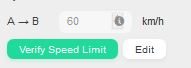
I noticed that there is an automatic speed limit set by default. Is it new in this version?
No, this has been around since speed limits were introduced (is this a Primary Street or higher segment :?: ). This speed limit is only suggested and you need to verify it, the big green button, before it should show in the client.
Wazeopedia
I have never seen that in Israel before. The type of the road is PS.atrophicshiner , thanks for the info.
shmupi
August 6, 2020, 1:15pm
16
Several scripts have been broken again
Not sure why the team keeps changing RTC feature. keep moving the buttons from one place to another and keep breaking the scripts
Cannot copy a RTC closure , cannot add a closure without manually selecting “none” as the event.
in addition it broke
WME Junction Node Fixer (in Toolbox) has failed to load due to API check: W.map.DefaultPanInPixel
Shmupi
When adding an overnight closure, and forgetting to shift the end date 1 day forward, I am not seeing an error message, which we used to get, something like “end date cannot be in the past”. Instead the closure just does nothing.
It is possible the error message is hidden off the bottom of my screen now the closure UI is so big and useless.
PFMLB
August 7, 2020, 7:48am
18
Hi,
just to keep this issue in mind from previous version “Re: New Editor Version v2.58-8”
Here my UR created yesterday (05th August 2020) so now with version 2.60-4
As mentioned before tried with different OS (Linux, M$ W7, W10, S2012, S2016) and browsers (Vivaldi, Firefox, Chrome, IE, Edge) with and without scripts.
subs5
August 7, 2020, 1:25pm
19
The time for a real time closure to start or finish is basically hidden and hard to select if you have 67% or larger screen size
Can the size of the date be shrunken significantly or have the time listed on the next line?
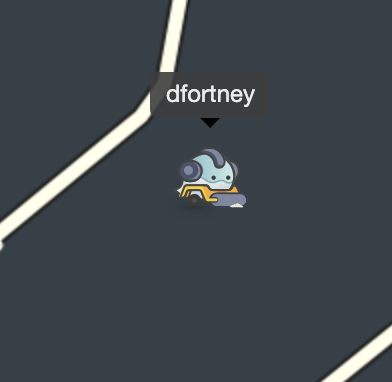
Avatars for Level 5 editors appear to be incorrect. dfortney is a Level 5 editor, but appears on WME with a Level 4 avatar.