Introducing: New Traffic Event Category: Unplanned Disruption 
Hey Community!
We are introducing a new WME Traffic Event category: Unplanned Disruption.
This informs drivers of significant, unexpected traffic incidents that cause major delays, allowing them to avoid affected areas or delay travel, improving their experience and traffic flow.
What is an ‘Unplanned Disruption’?
An ‘Unplanned Disruption’ is a severe, unexpected, live traffic event causing prolonged, significant delays. More severe than a typical alert on a segment and less severe than a crisis.
Key characteristics of an ‘Unplanned Disruption’:
- Live and Unexpected: It’s an out-of-the-ordinary, unplanned traffic disruption happening now
- Large-Scale Impact: It affects a significant number of drivers (guideline: 100,000+ drivers on impacted or nearby roads).
- Prolonged Duration: The resulting traffic impact is expected to last for more than 3 hours.
Examples of ‘Unplanned Disruptions’:
- A bridge collapsed on a major highway.
- A large sinkhole opening up on a key arterial road.
- An overturned truck or a chemical spill that closes multiple lanes on a highway for several hours.
What is NOT an ‘Unplanned Disruption’?
It’s crucial to distinguish ‘Unplanned Disruptions’ from other types of reports to maintain the integrity of our alerts. The following should NOT be reported as an ‘Unplanned Disruption’:
- Minor or common crashes that are expected to clear within 1-2 hours (unless they are blocking a major artery and meet the impact and duration criteria).
- General weather-related driving conditions like fog or heavy rain. These should be reported using standard hazard alerts.
- Routine road work or planned maintenance. These should be reported as Constructions Traffic Events.
It’s important to note that ‘Unplanned disruptions’ don’t replace hazard or accident reports; they complement them by alerting drivers both near and far from the immediate incident about an unusual situation.
‘Unplanned Disruptions’ vs. ‘Crisis Events’
If the event involves dangerous or potentially life-threatening conditions affecting a large area and is expected to last for more than 24H, it should be submitted as a crisis event.
Examples of ‘Crisis Events’:
- Natural disasters such as earthquakes, hurricanes, or major flooding.
- Incidents that require large-scale evacuations or sheltering.
How to Add an ‘Unplanned Disruption’ Event in WME
Creating an ‘Unplanned Disruption’ event is similar to creating other Major Traffic Events.
- Select the Category: In the WME, choose the new MTE category named ‘Unplanned Disruption’.
- Set the Timing:
- Start Time: Set the start time to the current time you are creating the event, even if the incident began earlier.
- End Time: You must set an anticipated end time for when the impact on traffic is expected to clear (The traffic impact is expected to last for more than 3 hours)
3.in case you dont know the estimated end time, you can extend or shorten it later on as needed
- Define the Impacted Area: Include a polygon covering the affected area and/or the relevant road closure(s). This is crucial for accurate driver alerts.
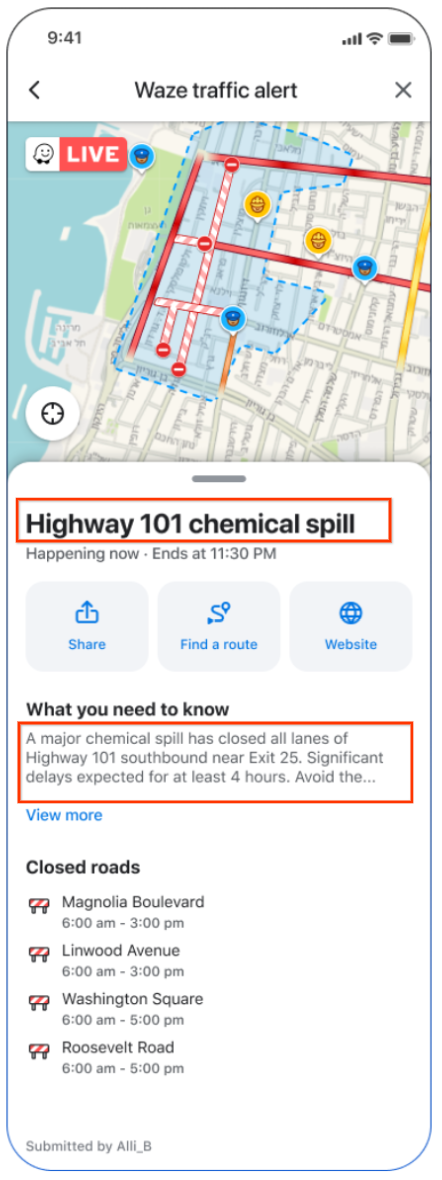
- Event Name: The event title should immediately tell the user where and what the event is ( in less than 25 characters).
Make it clear where and what: Fill out the title using the format [Location] [Type of Event]. This helps people instantly see if it’s relevant to them and what’s going on.
- Do: “Highway 17 chemical spill”
- Don’t: “Urgent incident on Highway 101” (Too vague)
- Description: The description backs up the title and will be displayed to app users who seek more information. It tells people what happened, where exactly, how it affects traffic, and what they should do. Follow this structure:
- What happened + specific location
- Immediate impact
If you don’t include a description, drivers will see our default: “Expect increased traffic and delays. Use Waze for real-time updates on closures and alternate routes.”
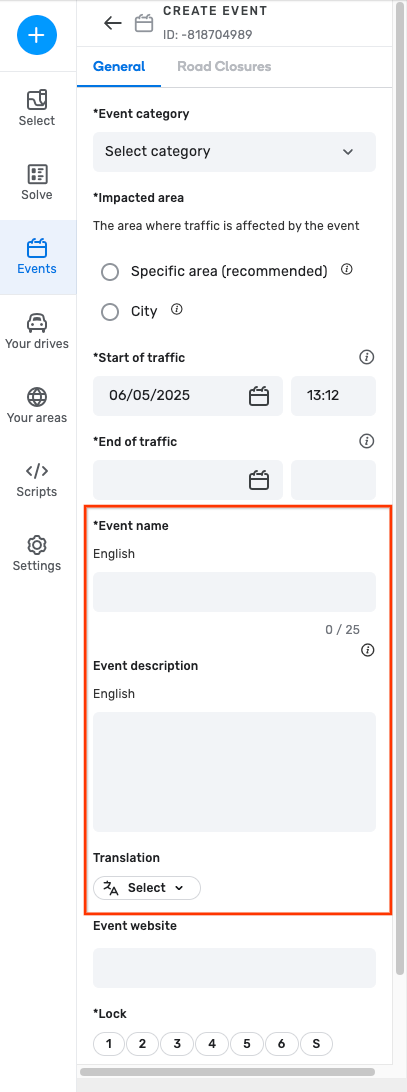
Guidelines for Naming and Describing Events
The information you provide directly impacts drivers. Please adhere to the following guidelines:
- Be Clear and Concise: Drivers need to understand the situation quickly.
- Use Neutral and Unbiased Language: Stick to the facts. Avoid any personal opinions, political views, or offensive language.
- Be Helpful: Provide information that helps drivers make informed decisions.
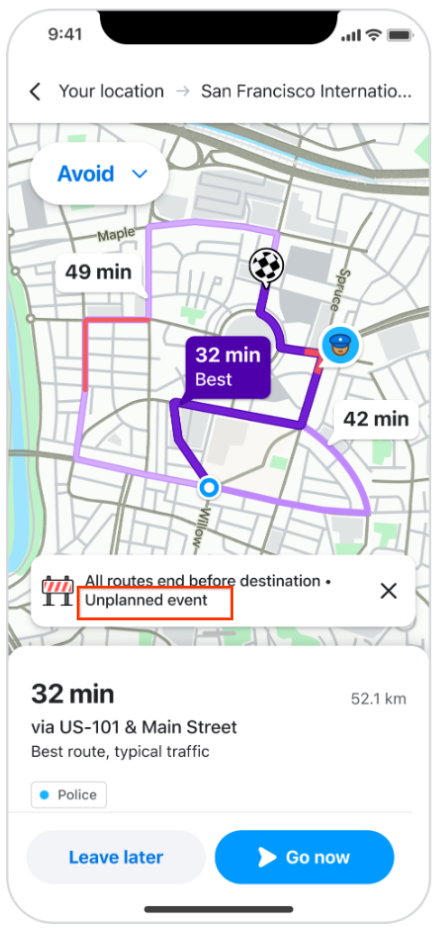
How does Waze plan to communicate it to drivers?
Trip Overview:
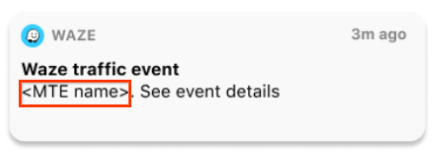
Important Reminders
- Unplanned Disruptions’ don’t replace other reports: Create both ‘Unplanned Disruption’ and standard hazard/crash reports or road closures when applicable.
- Stay updated: If the estimated disruption duration changes, update the event’s end time in WME.
By following these guidelines, you will play a vital role in providing Waze drivers with accurate and timely information during significant, unplanned traffic events.
Thank you for your contribution to Waze!