Hi @cukkini, regarding the U-shaped segments, can you please record the video with the error? And please create a separate issue here so we can process it properly.
Hi @linguasaltitante, it’s because of the view box. When you pan your map and change a zoom level - our backend returns correspondent segments, and the one you worked before not in the list anymore. In order to proceed with your editing - you need to return back to the place with the initial node or segment. You can create a separate issue here so we can think about solution for this. But it’s not a version specific issue I believe.
so how do Update my old Waze software?
To update your old Waze software, simply open your phone’s app store (like Google Play Store on Android or App Store on iOS), search for “Waze”, and if an update is available, tap “Update” to download and install the latest version of the app on your device; if no update is available, your Waze is already up-to-date
For Waze Map Editor or WME, go to the Waze website and log in to access the map editor. It will be presented with latest WME
Hello Daria.
Thank you for the clarification. I mentioned this because this behavior is different from the one I remember from the beginning of the RS’s feature.
Back then, when I started to add RS’s mainly in highways - where, in certain nodes, we frequently have references to another (distant) highways - I usually add them by making zoom out and zoom in as shown in both GIF’s, and then I would simply add the RS I wanted. Now, as you can see in both GIF’s, when I try to add the RS, both fields and buttons have a behavior that I would say is not what I was used to🤷♂️, reason way i considered it a bug.
Again, thank you for your feedback 
Maybe house number is on that street in another spot - you are trying to add duplicate number? Before WME was providing such info (house number already exists) but now we just got error “invalid house number” …
Hi, Daria,
It seems there is a new check in place for the Number field in public places. Until now this address was not used in searches, has this changed?
The problem is that this number can’t be a duplicate of an existing HN or a number of another public place (POI ?). However, this is bad, because we can have at least two public places on the same street number, and this shouldn’t raise an error. Examples include the main place and its parking lot, stores in a mall, companies in an office building etc.
Please revert this, thank you!
Thank you for your bug report - we have multiple places (in same shopping center/plaza) sharing same address…
Can you please share an example? I tried and was able to save 2 POIs with the same address (and same HN).
Correct address should be: 101 Crawfords Corner Rd, Holmdel, NJ
As you can see other POI using same address already - if you try to move them (just to ba able to see save button) you will get “unable to save - wrong house number” error
“Original” place:
https://waze.com/editor?env=row&lat=42.68775&lon=23.33558&zoomLevel=18&venues=15270315.152965293.360294
Additional places:
https://waze.com/editor?env=row&lat=42.68775&lon=23.33558&zoomLevel=18&venues=15270315.152899757.1080729
https://waze.com/editor?env=row&lat=42.68775&lon=23.33558&zoomLevel=18&venues=15270315.152965293.1080760
https://waze.com/editor?env=row&lat=42.68775&lon=23.33558&zoomLevel=18&venues=15270315.152965293.1080747
The numbers on these I had to change because it wasn’t accepted.
I had to remove the number 76 on this one:
https://waze.com/editor?env=row&lat=42.68844&lon=23.33445&zoomLevel=19&venues=15270315.152899757.2787930
because it was duplicate with the HN next to it.
P.S. I just deleted HN 38 on top of the stadium entrance, which I saw later. This didn’t help and the parking lots return the same error because of the number on the stadium.
Thank you. Now I see the issue, will create an internal ticket to investigate it. Can you please in the meanwhile open the separate thread for this under Production bugs?
Nope. I (and the others I talked to) triple checked the HN doesn’t already exist elsewhere.
OK - how far from the segment you are placing this HN?
for some reason, when editing a place I get an error for invalid house number. example below, I have since had to remove the number so I can save the place? it seems (-) is causing the issue?
@krzycholub Varies - it happens for all kinds of setups and not only a single segment/street or house number. Staff has opened an internal bug, it looks like.
@temp2123454333 Yup, same issue I reported earlier in the thread. Can’t save any POIs where the HN contains a “-”.
Did you intend sharing the PL of a place?
I believe “-” is not valid in the HN of a place.
yes, to show that the number was already there but with the saving error, I had to remove it. it does not make sense for a place not to have the option for a (-) as it could be an actual address? i.e like the above example.
There are some minor issues, that could be fixed.
It is not possible to approve new details for a Place due to “Invalid service name”.
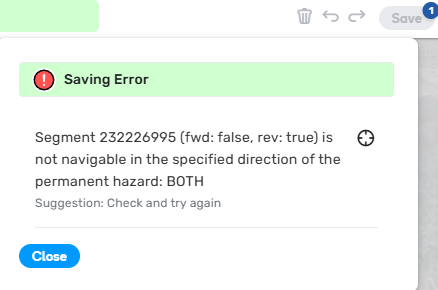
Also, it is not possible to save one way segment suggestion change due to available two way Hazard on the segment.
https://waze.com/editor?env=row&lat=42.49040&lon=26.01151&zoomLevel=19&segments=232226995