Hello Everyone 
We hope you’re all doing great.
We’ve just released a new version of WME v2.302 
Below you can find a summary of the release.
New features/enhancements:
1. Suggest an Edit on House numbers: “Suggest an Edit” feature is expanding, with House Numbers (HN) suggestions now available in WME across all environments!. This enhancement is part of our ongoing effort to enrich the Waze Map with more local knowledge and support our community’s growth. We look forward to hearing your feedback here.
2. Improved login flow for NA: The login screen is now the default view for unlogged users, replacing the previous landing screen. Language settings and practice mode button have been moved to the top right.
3. House Numbers (HN) Revamp: We’ve added several valuable improvements to make editing house numbers smoother and more efficient.
- We have updated the flow and you can now split and/or merge segments and also add/edit a house number in the same action (same save stack).
EDIT:
4. On Segment suggestions and Suggest an edit: We will update the flow for handling Apply/Reject actions; this will be part of a future version.
5. SDK improvements: please refer to the change log to check the SDK additions.
Bug fixes:
We released 14 bug fixes:
1. Map Events Filtering / Duplicating:
- The Map View feature doesn’t display the original polygon, and the zoom in/out behavior is incorrect after duplicating or opening a duplicated event - fixed.
- Past events were returned in the events list when adding closures - fixed.
- Resolved an issue that the ‘unplanned Disruption’ category event can be edited by regular editors.
- Addressed an issue where switching any event category to ‘Local Driving Advisory’ couldn’t be undone.
2. School Zones & Scheduler: If “no end date” option checked the error “Failed to generate schedule” appears.
3. Segments: Crash caused by duplicate points — fixed.
This fix addresses the issue where dragging one node onto another could create duplicate coordinates, leading to a crash.
4. We’ve resolved the issue where creating segments would fail while panning the map. However, some edge cases still occur in random locations. We’re investigating each of these separately as local issues.
5. Suggest an Edit: We’ve introduced an automated mechanism to remove suggestions linked to deleted segments. Specifically, if a segment’s ID changes after a suggestion is made, the suggestion will now be automatically removed. Previously, these suggestions couldn’t be applied or rejected, as all actions were greyed out. We also performed a retroactive cleanup of such suggestions.
6. House numbers (HN) revamp:
-
Fixed an issue where added invalid house numbers were not highlighted, and the error notification did not explain the cause clearly.
-
Resolved an issue when using “Forced Save” incorrectly marked valid house numbers as forced. Now, only invalid house numbers are highlighted in red (forced).
-
Fixed an issue where only the ‘Too far from segment’ error was shown when multiple forcible errors were present.
7. On Segment suggestions and Suggest an edit:
- Toggling a change before saving results in a suggestion for the opposite action.
- We resolved the issues that when suggesting the change for the city of a named segment, the resulting suggestion may incorrectly display “A segment without a street name” instead of showing the updated address.
8. Shelters: Venue incorrectly displays as active after WME refresh - resolved.
Known issues:
- Turn popup appears over the instruction popup and turn closures pop-up when opening the street view
- Suggested closure is not highlighted on the map after hovering it
- Creating a segment from node to node fails with a client-side error when the editor doesn’t have permission to interact with segments. In this case, a notification about insufficient permissions is expected to be displayed.
- The issue where it’s not possible to select any object beneath the Permanent Hazards polygon still remains.
- Online editors: no online editors are visible in practice mode.
You can read more here
We look forward to hearing your feedback! 
Thank you,
Olesya
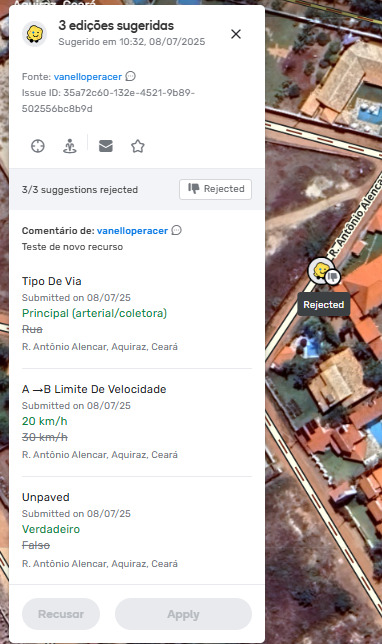

 The post has now been updated. I have rechecked, and this will be part of a future version.
 but we can write to each other about other map problems