Introduction
Non-routable paths are a group of non-drivable road types in the WME found under the Roads menu. Waze will not use any of these road types for routing. As Waze is designed as a commuter driving aid, it has no plans to support walking or cycling in the App. These road types are available because there are limited situations in which, when mapped correctly, non-drivable segments can improve the user experience.
Editors should only map Non-routable paths that benefit Wazers driving motor vehicles. If it doesn’t have a proper name, it is unlikely to be beneficial. Any road that only encourages or benefits non-driving users should not be mapped. Mapping footpaths may encourage Waze users, such as walkers and cyclists, to use Waze; this could lead to pollution of speed data, create false congestion reports, and negatively influence routing.
 |
Be aware of the WME language setting! This article uses localised names, found in the English (UK) language. |
Non-routable paths
End point path - When a destination can only be reached along a mapped path, the route will end at the virtual node at the junction with the drivable segment. The App should snap Wazers to the alignment of an End point path when displaying their location.
Adjacent path - The routing server will not consider adjacent paths when calculating routes, even if the segment is closest to the destination. Instead, it will route to the closest drivable segment. The App will not snap Wazers to this road type.
Stairway - Do not use this road type as it does not benefit mapping in the UK.
Characteristics

Virtual node
Any Non-routable path road types can be connected to a drivable segment. A ’ virtual ’ node is created instead of creating a standard junction node. This does not split the drivable segment and will not allow routing onto the non-drivable segment. Turn arrows will not appear.
It is not possible to convert any of the Non-routable path road types to any of the other road types available in the WME, nor vice versa. Should a drivable road be permanently closed and require converting to a Non-routable path, it is necessary to delete the original segment and draw a new Non-routable path segment along the same alignment. This is also true for the reverse scenario.
House numbers can be added to any of the Non-routable path types. Routing to mapped house numbers works according to the routing behaviour described above. If the house number is on an End point path, Waze will only ever route the Wazer to the virtual node junction with the drivable segment. For an adjacent path, Waze will route to the closest location to the house number navigation point.
When to map Non-routable paths
End point paths
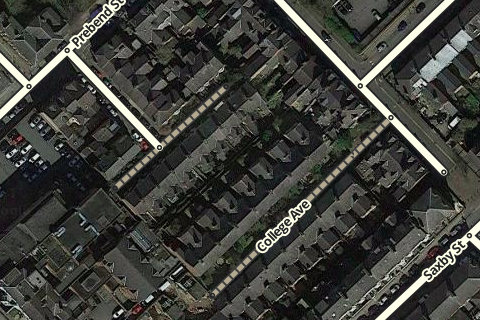
Useful End point path mapping
In heavily built-up areas, some destinations, such as a row of terraced houses, may be accessible only on foot. When mapped using the End point path road type, Wazers will be routed to an access point regardless of where the destination is along the End point path.
It is worth noting that when a End point path is connected at both ends to drivable segments, the routing server will choose whichever end it believes to give the best route to the destination. This is due to the End point path having fixed speed data of 2 m/s. This can be used to map a location with access from 2 drivable segments, such as a railway station with no car park or main entrance.
Occasionally, a major Google Maps location, such as an airport, is returned in the App results and can not easily be linked to the Waze location. Mapping a ‘false’ End point path from the pin location to a sensible point in the WME can solve routing errors.
 |
Due to the App snapping wazers to this type of Walking Trail, avoid mapping Footpaths close in parallel to drivable segments. |
Adjacent paths
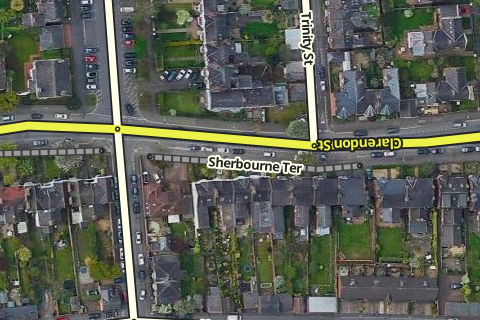
Useful Pedestrianised Area mapping
When a short group of houses have a separate name from the road they are located on, you can use an alt name on the drivable segment. When you add a house number to the segment, it will only associate the house number with the primary name. By mapping an adjacent path parallel to the drivable segment, you can add the correct name and house numbers. The App will then route to the closest point on the drivable segment to the navigation point of the house number on the adjacent path.
Some pedestrian-only routes are so well-known they can serve as landmarks themselves; having them appear in the App can help Wazers as navigation references. Using adjacent path means there is no risk of the App snapping the Wazer onto the mapped segment and creating routing errors.
Consideration may be made to using an adjacent path segment to map a non-drivable route that is inaccessible in the GPS traces. This may be due to Wazers forgetting to close their App or deliberately misusing the route. Mapping with an adjacent path would prevent pollution of the speed data of nearby drivable segments.
Stairways
Do not use in the UK.
What not to map
- Footpaths along roads - these should never be mapped; the road segment is enough for Waze to create routing choices, and the proximity of the segments means one will hide the other when viewed in the App.
- Canal tow paths - unless the towpath is the only means to reach a destination, mapping the canal itself is a better visual navigation reference than the towpath.
- Parks & tourist attractions - similar to mapping parking roads, Waze is not intended to navigate around a country park or theme park. Once the Wazer has reached the leading destination, we want Waze to ‘go quiet’ so the Wazer can concentrate on their final task, whether parking up or following local signage. Mapping every pathway in a local park only adds clutter to the map.