Introduction
 |
Restrictions should not be used to manage closures. If you do not have the editing rights to add real-time closures, request on the UK Editor Request forum or UK Discord. |
|---|
Using the correct Road type and naming segments is a key part of mapping in Waze—road type influences route planning, particularly on long journeys where Waze prioritises the major Road types. The naming of segments gives users a consistent experience and can also influence routing and detour mechanisms.
Road types
 |
Be aware of the WME language setting! This article uses localised names in the English (UK) language. |
|---|
The following convention should be followed where possible, although it is acknowledged that you may need to deviate from it in some circumstances.
| Waze Road Type | UK Road Types |
|---|---|
| Motorway | All Motorway & Motorway class A roads (locked to L5) M60 A1(M) |
| Major Highway | A-class roads that are classified as Primary Routes (locked to L4) A4600 |
| Minor Highway | Non-primary A-class roads A614 |
| Primary Street | B-class and unclassified roads that carry heavier traffic, often seen on Ordnance Survey maps in yellow or orange.1 B547 |
| Street | Urban Streets, low-traffic rural roads |
| Narrow Street | DO NOT USE - This Road type is currently not deemed useful for mapping in the UK (See UK forum discussion) NB: UK Champs may use this in limited situations for testing purposes. |
| Private Road | Road with no access for the general public, public roads with legal prohibition on through routing in both directions (private road sign, no motor vehicles except for access sign, or a closable gate). |
| Parking Road | Roads within a car park or other places where we don’t want Waze to monitor speed and potentially generate a traffic jam report, particularly petrol station forecourts. Read more on car park mapping on the UK Car Parks page. |
| Off-road / Not maintained | Unsurfaced roads are often impassable for normal cars and only suitable for 4x4 vehicles. |
Unpaved checkbox - This attribute can be selected for all Road types, but should only be applied to Street Road type and below. This checkbox can be used to segment those that cover unsurfaced roads or of poor construction, but are still passable by a normal car. Users can avoid roads marked with this attribute by applying it within the App settings. Segments that ford rivers and are usually passable by regular cars should be mapped as a short Street segment covering the area that floods, with the unpaved checkbox ticked, and named [FORD].
Non-drivable - Non-routable Paths are non-drivable Road types in the WME under the Road menu. User experience can be improved by using these appropriately; you can read more about when to use these Road types on the UK Non-routable paths page.
Notes:
- Not all roads classed as “minor” or “classified unnumbered” by OS should be set as Primary Street.
Primary Route Network
The primary route network (PRN) designates roads between places of traffic importance across the UK, providing easily identifiable routes to access the entire country. Primary routes are typically marked green on most road maps, and road signs feature green backgrounds with white and yellow text. The WMEOpenData extension for Firefox and Chrome can overlay this data directly within the editor; however, it should not be relied upon for accuracy, as the PRN designation may be missing.
Note that certain classified roads around the country have a mix of PRN and non-PRN road types. These are not always signed accurately by the traffic authority (council). There can even be conflicting signs at either end of a stretch of road. Judgement should be given on how these are mapped.
Exceptions
Click Expand to view a list of current exceptions. →
As with any rule, there will be some exceptions. There are two specific scenarios which are allowed to deviate from the Ordnance Survey (OS) map:
- A roads that connect between motorway or PRN networks, then it should also be a Major Highway
- A section of the primary road is restricted to some traffic, and another primary route is nearby, so that it can be demoted to Minor Highway.
Exceptions should be discussed on the forum, documented below, and can be locked at a higher level.
| Exception | Reason |
|---|---|
| A1080 London Colney Bypass | Upgraded to Major Highway - Links the A414 to the M25 |
| A1290, Sunderland | Downgraded to Minor Highway - With the completion of the Northern Spire bridge, the A1231 has been rerouted, and the old route is now the A1290, shown in white on directional signs. The Queen Alexandra Bridge has also been downgraded to the B1539. |
| A2, Chatham | Downgraded to Street - The High Street is restricted to buses only. The A2 New Rd to the south is the preferred route. |
| A20, Maidstone | Downgraded to Street - Not PRN. Several bus- and taxi-only roads are adjacent to the A20. |
| A256, Dover | Downgraded to Minor Highway - The entire A256 road network south of A2 is not PRN. See Sabre for details. |
| A243 Leatherhead Bypass | Upgraded to Major Highway - Links the A24 with the M25 junction. |
| A3 Hope St, Portsmouth | Upgraded to Major Highway - The main out-of-city route is signposted northbound along Hope Street. Consequently, Marketway & Commercial Rd have been downgraded to Primary Street. |
| B306, Roehampton | Upgraded to Major Highway - Turning right from A205 to A306 is only possible via this small loop of B road. |
| A3216, Battersea | Upgraded to Major Highway - Shown as PRN in the OS data, but not signed as a primary route in Google Streetview imagery (May 2018). Would benefit from a site visit to confirm the current status. |
| A4146 / A509, Milton Keynes | Upgraded to Major Highway - Links the A5 to the A421 to the M1 |
| A43, Corby / Kettering | Upgraded to Major Highway - Relatively new bypass that became the A43. Consequently, the old route, now the A4300 and A6183, have been downgraded to Minor Highway. |
| A45, Weedon Bec | Upgraded to Major Highway - This new bypass has been designated the A45. The old route has been downgraded to Primary Street. |
| A46, Grimsby | Upgraded to Major Highway - Although not shown by OS as PRN, this short length of A46 links with the A16. Road has green-backed signs along the route. |
| A460, Cannock | Upgraded to Major Highway - The newer A460 bypass replaces the older route; the now-designated A4601 has been downgraded to Minor Highway. |
| A465, Hereford | Upgraded to Major Highway - A newer A465 link road has replaced the older route; consequently, Commercial Road has been downgraded to Primary Street. |
| A527, Newcastle Under Lyme | Upgraded to Major Highway - This section of road links the A527 with the A500. The old route, now designated the B5370, has been downgraded to Primary Street. |
| A577, Atherton | Downgraded to Minor Highway & Street - Eastern and southern section passes through a pedestrianised zone. Consequently, Bag Ln at the western end, which has green-backed signs, has been upgraded to a Major Highway to complete routing in this area. |
| A6, Kegworth | Upgraded to Major Highway - This new bypass road has been designated the A6. The old route has been downgraded to Primary Street. |
| A6, Loughborough | Upgraded to Major Highway - The central area of Loughborough has been pedestrianised, and the A6 has been diverted along an upgraded relief road. |
| A6097, Newton (Notts) | Upgraded to Major Highway - Following the dualling and realignment of the A46, the spur of the A6097 and Fosse Way has been upgraded to ensure continuous routing at this junction due to its current layout. |
| A614, Howden | Upgraded to Major Highway - Links the A63 and A614 with the M62 |
| A617, Mansfield | Upgraded to Major Highway - Although not shown on OS maps as PRN, this bypass road has green-backed signs and therefore has been upgraded. |
| A664, Manchester | Downgraded to Minor Highway - Google Street View (May 2018) of A664 Rochdale Rd shows it has white-backed signs and is no longer part of the PRN. |
| A665, Manchester | Upgraded to Major Highway - A665 Miller St is now one way; the opposite direction has been promoted to ensure continuous routing. |
Naming Conventions
Roads with numbers
A single letter and number combination identifies classified roads in the UK; include this in the segment name so Waze instructions include identifying information. Cardinal Directions should only be used for Dual Carriageway Motorways and Trunk Roads which don’t have a local road name.’ Segment should be named in the following format;
Format: : <Letter & Number> - <Name>
Examples: M45 (E) Motorway with cardinal direction
A1(M) Motorway class A Road, note no spaces are used
A7 - Old Dalkeith Rd A Road with a local name
Andover St Road with a local name
The UK has three classifications of roads: Motorways (M), A Roads, and B Roads. All other roads are unclassified. You may discover that local authorities maintain a database of roads they manage and use C, D, and U labels. These are internal labels only and should never be shown on public signs; they should not be added to segment names.
When naming Motorway segments, set the City field to Noneto prevent City names from smudging across the map.
Junctions
Major junctions, particularly on motorways, should be labelled with a venue with a type of Junction/Intersection. Under no circumstances should the road name or city name fields of a segment be used to name a junction. Motorway (and Trunk Road if labelled) should be called with the Junction number only, not with a local junction name (i.e. Simister Island).
Example: M6 J1
Ramp naming
Ramp names to be short, useful and unambiguous. Names should not include Junction to nor Entry to. Cardinal directions (N, S, E, W) should only be included if they are included on signs and provide clarity. Like other abbreviations, the > character can be used and is read out as towards; this should be used only if needed. Entry and Exit should be treated equally for naming and should be named to provide the most useful instruction to the driver. Ramps should not have a City name; this helps prevent city smudge.
Junctions with numbers
- All segments from numbered junctions should be mapped as Ramps to ensure exit instructions are given
- The name should begin with the exit number and then the name of the road it leads to, ideally without cardinal directions
- When motorways split, short Wayfinder ramps should be used so that these names don’t appear in the App
- Do not include junction numbers on entry ramps.
Entry Format: : <Road number> > <primary destination>
Entry Example: M62 > Liverpool
Exit Format: : **J**<number> **to** <simple road name>
Exit Example: : J4 to A464
Junctions without numbers
- If a ramp connects directly to exactly 1 other road, then it can be left unnamed; the instructions will naturally take on the name of the next segment
- It may be desirable to name the ramps more simply to remove cardinals or road names
- If the ramp connects to a roundabout, an unnamed segment often gives optimal instructions. If the routes away from the roundabout are not signed from the main road, the ramp should be named to match the exit signs.
Format: <simple road name>
Example: A1 rather than A1(M) (N) or A1 - Great North Road
Disambiguation
- Where a ramp forks into two directions, then the ramp names should include cardinals (if signed) or towards a city based on the signage
- If a city name is used, only one city from the directional sign is to be used, preferably the one which is listed first
On the M25, where relevant, directions to Heathrow or Gatwick should take precedence.
- If the section of Ramp before a fork is particularly short, then the preceding segment can be left unnamed with any junction number written in the forked segments
This does result in longer announcements, so it should be avoided if possible.
- As per the signage, where both directions of a road are connected to a roundabout, then ramps can be disambiguated using > city instead of cardinals.
Format: <simple road name> **(**<cardinal direction>**)**
<simple road name> **>** <city name>
**Junction >** <city name> if connecting road has no name/number
Example: A1 (N) & A1 (S)
M62 > Manchester & M62 > Hull
Roundabouts
Roundabout segments should remain unnamed. Suppose the roundabout does have a proper, signposted name. In that case, this can be labelled as an Area Place with the category set to Junction/Intersection, centred on the roundabout. This only applies to large roundabouts measuring more than 30 metres.
For further advice on editing roundabouts, see Editing Junctions and Roundabouts.
Abbreviations
Due to the size of most devices, keeping on-screen text to a minimum is advantageous. When naming segments, use the following abbreviations to conserve space. Each will be expanded by the Text-To-Speech (TTS) engine, and voice instructions will read aloud the whole word, Ave will be read as Avenue, etc.
When naming a segment, the first word in the name should never be abbreviated, nor should names that only include single words (excluding The). Green Street should be written as Green St, and The Boulevard should be written in full. Multiple abbreviations in the same segment name can be used where appropriate; Aston Boulevard West can be written as Aston Blvd W.
| Road name | Abbr. | Road name | Abbr. | Road name | Abbr. | Road name | Abbr. |
|---|---|---|---|---|---|---|---|
| Avenue | Ave | Drive | Dr | Lane | Ln | Saint3 | St. |
| Boulevard | Blvd | East1 | E | Mount | Mt | South 1 | S |
| Broadway | Bdwy | Garden | Gdn | North 1 | N | Square | Sq |
| Circus | Cir | Gardens | Gdns | Place | Pl | Street | St |
| Close | Cl | Green | Gn | Park | Pk | Terrace | Ter |
| Court | Ct | Grove | Gr | Ridge | Rdg | Wes t1 | W |
| Crescent | Cr | Junction 1,2 | J | Road | Rd |
Notes:
- Should you require TTS to read a letter, such as Car Park E, place a period (.) directly after the letter.
- J, used for road junction numbers, is the only abbreviation that can lead to a segment name.
- The period (.) in the abbreviation of Saint is essential; otherwise, it will be read as Street.
Bypass or By-pass?
Bypass.
Road shields
|
Road shields are linked to the street attribute of a segment, this is the full address +++. Setting a shield on 1 segment applies it to all matching segments. |
|---|---|
 |
It is recommended that you install the [Road Shield Assistant] script to assist with seeing current road shields and effects of any changes you make. |
Shields on segments
To match the Road Type convention used in the UK, road shields should be mapped as follows;
- Motorway - For use on Motorway with 1 or 2 digitals M1 M42
- Motorway (wide) - For use on Motorway with 3+ digits M602 A38 (M)
- Primary Route - For use on Major Highway A-Roads that form part of the Primary Route Network A14
- Non-Primary Route - For use on all other Minor Highway A-Roads A4030
- Junction No. - For use on junction ramps that have signed numbers 21 .
 |
Changing the shield on a segment will change the shield on all segments with the same name, however far away they may be. Likewise, changing the name of a segment will change the shield if the name matches another. |
|---|
Due to the implementation of this feature, extra care must be taken when assigning road shields to segments with an identical street attribute when the Road Type changes; the most likely scenario is A-roads changing from PRN to non-PRN. In situations like this, the solution is to leave the primary name without a shield and add alt names for both primary and non-primary roads (e.g., A9 (non-PRN) and A9 (PRN)), adding road shields to both alt names. The road will be without the shield on the app, but they can both be used for directions (which is more important). Mapped Road Types do not influence the displayed shield.
Junction shields should not include the letter J.
Shields on turn instructions

Turn arrows allow editors to set the visual instructions at a turn. Editors should do their best to match the road sign at the turn. The road shield (1st), corresponding destination name (2nd) in the Visual instructions field, and any additional destination names in the Towards field.
Road numbers within brackets (A460) should not be included at all, as they are not directly off the junction, nor should road numbers be written in the Towards field.
To receive the correct turn instructions with road shields on roundabouts, add the turn guidance on the exit turn from the roundabout. The turn guidance from the exit will be copied to the entry one. When adding turn instructions on roundabouts, the signage on each exit should take precedence over any approach signs.
Exit signs should only be used when exits have a signed junction number; no J is required.
Dual Carriageways
A dual carriageway is a road with a central reservation to separate the carriageways. This means one or more lanes in either direction. A road should be split into two one-way segments if any of the following conditions are met:
- The central reservation is wider than 5 metres
- There’s a visible gap between the average of all GPS traces
- It is split by a physical barrier (Concrete, Armco, pedestrian barrier, etc.)
Pedestrian refuges and painted road separation (cross-hatching that can be driven over) should not usually be split. Be aware that there are a lot of these that were created as split roads during the UK Base-map import; these usually need merging to be a single two-way road.
Lay-bys
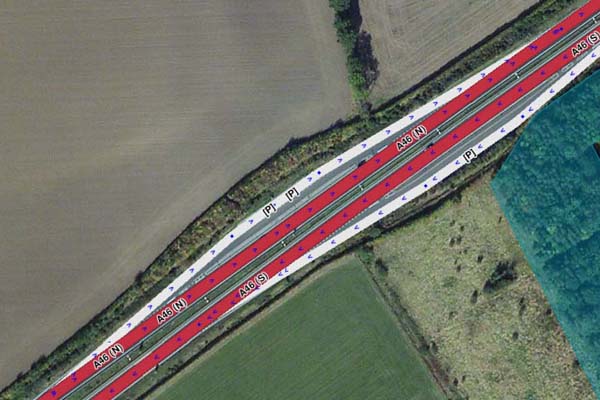
- Lay-bys should only be included where there is significant separation from the main carriageway (e.g. grass, trees or a physical barrier). Similar to deciding if a road is a dual carriageway.
- All segments should be mapped with Road type set to Parking Road, with appropriate directions and turns.
- The lay-by segment should have its name set to [P] and have no City name
- Do not map lay-bys with Area Places.
Lay-by with significant separation |
Minimum separation for mapping, similar to distance between (N) & (S) carriageways |
No separation, only dotted white line |
|---|


Railways
Railway lines should be mapped using the Railroad Road type. They appear in the client and keep Wazers on trains from polluting the speed data on nearby roads. Tracks should be drawn as simply as possible - they do not need to be accurate out in the country where no one can see them; a single mapped segment can cover multiple lines standard in most stations and mainlines.
Due to the potential length of railway segments, they should be split at County borders to prevent smudging County names on the map.
Segment Properties:
- Name: No Name
- City: No City
- Type: Railway
- Direction: Two-way
- Level: Ground
- Lock: 3
|
You may find railway segments locked to 5 and set to -5 Level. This was the old standard and can be set to the current standard if all road segments along their routes have been correctly mapped with bridges & level crossings. |
|---|
Railway segments can be connected to the road network at level crossings without any risk of Waze routing drivers onto the tracks. The extra granularity of segments at the crossing provides more accurate routing information. All turns should be enabled; no red arrows, please.
Underground railways, or those that pass through tunnels, should not be mapped.
Level Crossing Alerts (LCA)
See Permanent Hazards for more details
Toll Roads
All Toll Roads in the UK are listed here. They are marked on the map with the toll attribute and locked to L5 due to their special nature. All Toll roads are price-mapped to specific road segments, so if the segment ID is changed (e.g., through segment splitting), the price mapping will break. Do not change the Toll Road segment without consulting with UK Champs.
The London Congestion Charge is not considered a toll, so the Avoid Toll feature will not affect it. Waze avoid these zones by default (within their restricted times), so the user must add the relevant Pass to their app if the vehicle is exempt.
Airport drop-off zones must not be mapped with the Toll Road attribute. Most of the time, airports are a destination for a user, so having these mapped as Tolls will have a strange effect on any route to this destination, especially if the user has to Avoid Tolls and their route may involve a Toll Road, like the M6 Toll or Dartford Crossing.
Any changes to Toll prices need to be notified to the UK Admin team, as only they have access to the Toll files. Toll prices are immediately updated once the team updates them.
Ferries
Ferries should be mapped using the • • • • Ferry • • • • Road Type. This should be connected to the road network at either end and mapped to follow a single line using the average/approximate ferry service route. If the ferry service charges for the crossing, and the vast majority do, it should also have the toll attribute ticked. If the ferry service has a regular schedule, the segment should include Time-Based Restrictions to prevent Waze routing through the ferry crossing when no service is running.
Ensure that at ferry ports/terminals, the roads connecting the Ferry segments are not set to either Parking or Private road types, as this will prevent ferry routing. Preference is for the Ramp road type, but a Street or Highway segment will suffice.
Only regular vehicle ferry services will be mapped. The UK have mapped the prices for all inland ferry services, so you will find the segments locked to L5 to prevent accidental damage. If you spot an issue or need to edit these segments, contact a Country Manager / Local Champ for assistance. As with Toll Roads, please inform UK Admins of any updates to Ferry fares (only relevant to Car or Motorcycle fares).
Passenger/foot ferries must not be mapped.
Restrictions
Waze can manage routes for Private cars, Taxis, and Motorcycles. An additional option for Electric Vehicles (EVs) is also available. Segments and turns have a restriction feature that allows only certain types of vehicles to be routed through them.
Waze does not support routing for commercial vehicles or buses/public transport, so there is no requirement to use these vehicle types. If a road only allows buses, use a complete prohibition (and set the road type to Private) or a one-way road if the road is restricted in one direction.
If a road allows Taxis or Motorcycles, an Allow restriction should be added to the segments required. There is no requirement to add a turn restriction unless the turn itself is restricted, but the road is not.
Part-time restrictions can be managed by adding the relevant days and times to the restriction. If a day has multiple timed restrictions, then multiple restrictions can be added to the same day.
An additional Lane Restriction can be added to give better routing and ETAs for Taxis and Motorcycles that can use Bus Lanes. In the restriction dialogue, under Applies to:, select the relevant lane and “Bus”. N.B. Lane Guidance will not see this “lane” and cannot be used within the lane guidance feature. Wazers will be informed to use the “◇ Bus Lane” on the app.
HOV lanes can also be mapped by adding a “minimum passengers” option (rather than vehicle type). Wazers will be prompted to accept that they have the minimum number of people in their vehicle if Waze uses this route. N.B. Currently (as of 2024), there are only three areas with HOV lanes in the UK—Birmingham, Leeds, and Bristol —each of which is mapped.
|
Restrictions should not be used to manage closures. If you do not have the editing rights to add real-time closures, request on the UK Editor Request forum or UK Discord. |
|---|
Bridging segments
When a road segment passes over or under another feature (road, river, railway, etc.), the segment level should be set to the correct +ve / -ve number. It can be beneficial to split the segment to create a bridge segment. This allows editors to close the shortest possible road length when a physical bridge is closed for inspections, repairs, or other reasons.
-
“Older” roads, with properties along them, should be split by segment nodes tight to each side of the physical bridge. This enables Waze to navigate to addresses adjacent to the bridge when the bridge segment is closed.
-
“Newer” roads, with no properties, do not need to be split as the whole segment level can be changed. Such roads, like bypasses, are always closed from junction to junction.