Hey everyone! 
We hope you’re all doing well.
A new version of WME, v2.318 has just been released 
See below for what’s changed:
Community Suggestions:
- With this version, we are happy to announce that 1 map edit point will be granted for every UR you close.
- This applies whether an Update Request (UR) is closed as “Solved” or “Not identified”.
See the suggestion on UserVoice: replying and closing URs should give editors an edit point
Thanks to @LostInMyMaps for submitting the suggestion and to everyone who voted!
- Based on community feedback (link only available to WME Beta users), we’ve added a warning when applying restrictions to an entire segment.
- This change introduces a warning mechanism to prevent editors from accidentally applying high-impact restrictions to an entire segment. This also makes lane selection mandatory, disabling the “Add” button until an option is selected.
- Key changes to the restriction screen:
- The “Applies to” dropdown menu now defaults to “None” and is a required field.
- A warning is displayed when applying high-impact restrictions (Bus lane, HOV, etc.) to the entire segment.
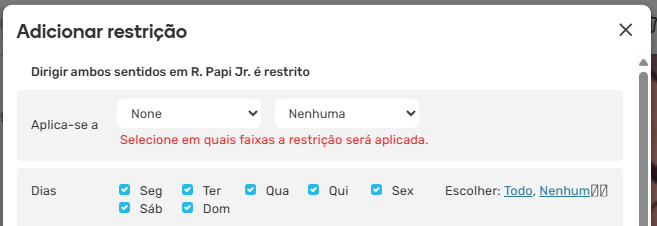
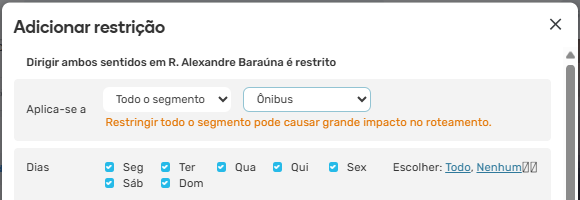
See the suggestion on UserVoice: warn if adding restrictions (bus, HOV etc.) that apply to all lanes
Thanks to @sh-oded for submitting the suggestion and to everyone who voted!
- Edit Suggestions and URs: Removal of inactive user alerts
- Following a request from the Italian community, we will now remove mapping suggestions and update requests (URs) submitted by users who have become inactive. This will help keep the map clean and free of visual clutter by eliminating outdated or irrelevant suggestions.
- The process will run periodically, meaning such suggestions and URs won’t be removed immediately. However, if you identify suggestions/URs from inactive users older than 63 days, please let us know.
- Additional house number patterns in Places and Residential Place Points (RPPs): following community suggestions to add extra formats, it is now permitted to use spaces and dots (.) in house numbers on both segments and places, including residential places (RPPs).
- This idea was previously mentioned in a post for WME v2.309.
- One more change: the pop-up notification (“Click the map to start drawing…”) that appeared when creating polygons is now only displayed for Level 1 editors.
See the suggestion on UserVoice: allow option to disable new editor help.
Thanks to @JohnDoe75 for submitting the suggestion and to everyone who voted!
New features/improvements:
- Koi Fish Permissions: We’ve implemented a change in WME to improve the management of permissions on segments suggested via Koi Fish. Now, when an editor does not have edit permission in a certain area, they will not be able to accept or reject Koi Fish suggestions there. Instead, a note will be displayed in the panel informing them of the restriction.
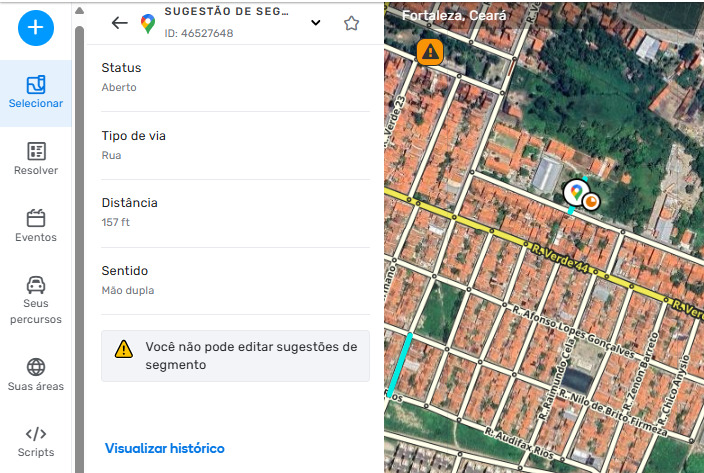
- Style update: We’ve updated the interface of the spinner that appears when reloading the WME page.

- SDK Improvements: Check out the changelog for new SDK additions.
Bug fixes:
18 bug fixes have been released, including:
- Error loading object history: resolved the issue that prevented viewing the history of segments or places.
- Permanent alert icons: fixed the bus lane camera icon. (Thanks @PatrickBLopes for reporting this bug
 )
) - School Zones and Schedules: fixed the “Schedule expired” message and the “Expired” red dot, which appeared even when the schedule repeated annually and worked correctly in the app.
- Attribute Suggestions (OSS): resolved the issue where the “invalid” tooltip was displayed even after the change had already been applied to the map.
- Closures: fixed the issue where clicking “Locate” on closure cards prevented selecting segments until refreshing the map.
- Search bar: resolved the error that prevented navigating to the same searched location in consecutive attempts.
- Location marker: the marker is now only removed when selecting another element on the map (previously, it was removed whenever the map was moved).
- Places: fixed the issue where submitting an image generated a PUR without the image, and even approving it didn’t add the image to the place.
- Event Filtering and Duplication:
- Fixed the issue where unverified, failed, or completed closures were not highlighted on the map when hovering.
- Fixed the issue where the map refresh button did not update the list of events filtered by area.
- Fixed the issue where the warning did not appear when activating the closures layer.
- Fixed the issue where failed closures were not locked for editing/verification.
- Removed redundant elements from the closure/proposal edit screen.
- Fixed the error where, when duplicating an event, the details window would close automatically when opening the “Road closures” tab. It now remains open.
- Fixed the error where the “Back to closure list” button did not appear in the closure details menu.
- Fixed the issue where end times for duplicated closures were not saved correctly.
- Fixed the issue where events would not appear or would appear duplicated in the closure association list until the page was refreshed.
Known issues:
- Koi Fish: “No permission” banners are displayed instead of disabled buttons for editors who do not have the required edit level.
- WME Search: when selecting a place in the search results, the location pin is shown on the map instead of the selected place.
You can read more about it here.
We look forward to hearing your feedback! 
Thanks,
By: Nataliia"}