I just started using waze today, and on my first 2 routes the phone went to sleep after 2 minutes. I am running Waze ver 3.0.2.8. I have a Samsung Galaxy Nexus, running android 4.0.4. Any help would be appreciated.
I have only used the iPhone, but there is a setting to “keep backlight on” that stops the iPhone from shutting down. I assume the Galaxy has the same option.
Settings -> General -> Prevent Auto-Lock
Hi guys, the “keep back light on” is checked, and I don’t have an option to disable auto-lock.
Update to Waze 3.2 that was released today.
Hasn’t the “keep backlight on” option been removed? It’s called “Prevent Auto-Lock” now.
Hi again, just downloaded new version 3.2, and yes the “leave backlight on” has been changed to “prevent auto-lock” however that is checked by default and I still have the same problem, that is that the phone goes to sleep after about 2 minutes.
Again any suggestions? The 2 min time out is the one I have set for my screen time-out after inactivity and is set through the OS.
Thanks again
Tony
Im having teh same issue.
and i have a Galaxy nexus too, but
my brother also have a Galaxy nexus and don´t have this trouble.

Yea, I can’t believe that we are the only ones with this problem. Do you know if your brother has his screen set to turn off with inactivity through the operating system? (Settings -> Display -> Sleep). Do you have your display set to turn off after a time?
Thanks,
Tony
I have just recently started having this issue as well, even though I haven’t changed my settings. I have a Droid Razr
I have the same problem, my wave reversion is Release 3.2.2.2.
It can’t keep backlight on while navigating, alway turn the backlight off due to the settings of the Android system(e.g. 30 sec). 
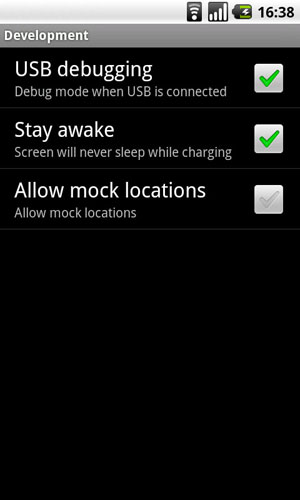
There’s a setting in Android Settings -> Applications -> Development to ‘Stay awake’ when plugged in.
Does that help?