When to Map a Car Park
Car Parks should preferably be mapped only when public parking is available. If a venue has “customer-only” parking, the Customer Parking attribute should be enabled. This will prevent the app from offering the user to find parking. If a venue’s car park is mapped, ensure the correct car park type is selected, as per below. Whether the Car Park is a venue or not, all Parking Roads within it should be mapped.
If there is a distinctly-marked area where cars can park, separated from the road and with its drivable segments, it should be mapped.
If the car parking spaces are accessed directly from the road, they are on-street parking and should not be mapped, regardless of whether there are car park signs.
Aims of car park mapping
-
We only want Waze to navigate users into their destination car park. There is no requirement to navigate the best route through a car park. Waze has no idea where the empty spaces are. We want users to concentrate on driving within the car park without being distracted by their sat nav.
-
Venues must also have their destination point mapped to the entrance to the car park, or if it’s a large car park, the car park section.
-
Should there be minor mapped destination points within a car park (collection points, pop-up businesses, EV charging points, etc), then mapping should reflect this to allow Waze to navigate correctly.
How to Map a Car Park
Mapping
All mapped car parks must be areas, editors can only create car parks as an Area polygon within the WME. Car parks should be mapped to the edge of the drivable tarmac.
Underground car parks
Underground car parks should be mapped as areas that match your best estimate of the underground parking area. However, the polygon boundaries should extend to the point where the entrance/exit road passes underground to capture Wazers entering/exiting the car park.
Lay-bys
Lay-bys along the side of major roads should not be marked with a car park landmark; instead, they should be mapped only as parking lot roads per How to classify and name roads.
Naming
Name the car park using a sensible name that indicates it’s a car park, e.g. Queen Street Car Park, Oxford Park & Ride, etc.; if a company runs it, add this to the start, e.g. NCP Tanner Row Car Park. This is particularly important when car parks include the name of a venue or location, to ensure they are distinguishable in search results. Do not use the [P] prefix.
Car Park, car park, Carpark, Parking..?
Car Park
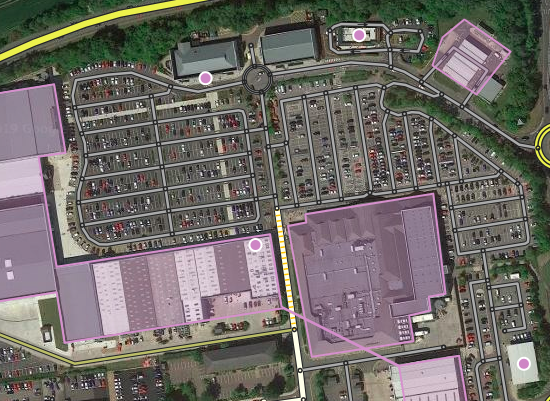
Car park with mapped Parking Road segments.
Parking lot roads
- Parking roads should not be named, as it looks better to have a label on the landmark
- Parking roads should never be marked as a “Toll Road”
Navigation points
Set the navigation point at the entrance, on the first segment of the car park, not the road outside. This will enable Waze to navigate to the car park, including the turn into it, and then announce you have arrived, leaving the user to find a space without further instruction. Should the car park have multiple entrances, each entry point should be mapped with a navigation point. Each navigation point should be named as simply as possible to differentiate them.
Car park type
Setting the correct Car Park Type is essential, as Waze should not offer users Restricted or Private car park types when they are nearing their destination.
- Public: Unrestricted access If you can park and then go where you please, it is classed as Public; most Council-managed car parks are Public; supermarket car parks which allow time-limited public parking. Where a car park is associated with several businesses, you should use your best judgment.
- Restricted: Public access with some restrictions (customers only, visitors, patrons, etc.) Frequently, car parks associated with supermarkets, retail parks, and other businesses have notices displayed stating that the car park is for customer use only, these are classed as Restricted.
- Private: Limited access (residents, employees, etc.) Car Parks that are signed as staff/residents only are classed as Private; these car parks often have barriers or gates across the access. These rarely need to be mapped, but on occasions can be helpful (i.e. Airport Staff Parking).
 |
You may wish to use the WME Color Highlights script to help visualise car parks of different types. |
Operator
The Operator field should be set if the car park is owned and operated by the Local Council or a car park operator such as NCP.
Do not set the operator for regular car parks owned by a business and provided for customers.
 |
For any car park run by the local authority (councils) the operator should be set to Local Council. Please do not submit requests to add individual councils to the operator list. |
Cost
The Cost field should be set to Free for car parks that do not charge; for those that require payment, it should remain blank. Without the ability to enter actual prices, the options available are subjective and based on the judgement of the editor, for example, visitors to London would find all prices Expensive but comparing prices within a limited area, the cheapest prices would be classed as Low.
Opening hours
Opening hours should be set based on the ability to access the car park and not when parking charges apply.
Attributes
All other attributes should be filled in to provide as much information as possible about the car park.