I thought I would post this here, before requesting it to be moved to the client section for a wider audience.
Anyway, first of all, I appreciate Waze have restricted the use of closures, to only the adjacent segments to make it harder to abuse, however, earlier I had to mark a road closed off a fairly small roundabout, you know how hard that is to do when waze insists on pinning you to the route you should be taking. I think it should take into account roundabouts as the only reason I was able to do it was there was an old exit on the roundabout, which is now closed so was able to pull over on a roundabout, which would normally be impossible and pretty sure illegal lol.
Also, can someone can confirm whether closures effect all people, I was under the impression they do, and if so, why can I route through it on live map, surely that should also have the closure.
I used this last weekend, when the M1 was closed northbound at Jct with A421 due to an overturned car.
I too found the adjacent segment rule to be too restrictive. The only point I could put the closure marker was the junction for the sliproad, but this was so close to the main carriageway that waze auto-removed the road closure marker after 5 minutes because it thought people were driving past it (when actually they were all being funnelled onto the spliroad)
I managed to get a screenshot. The closure marker (shown here on the right) was in the true point of the closure, but to avoid waze thinking the road was still in use, it should have been placed a little further to the left but no other junction /position for the marker was an option.
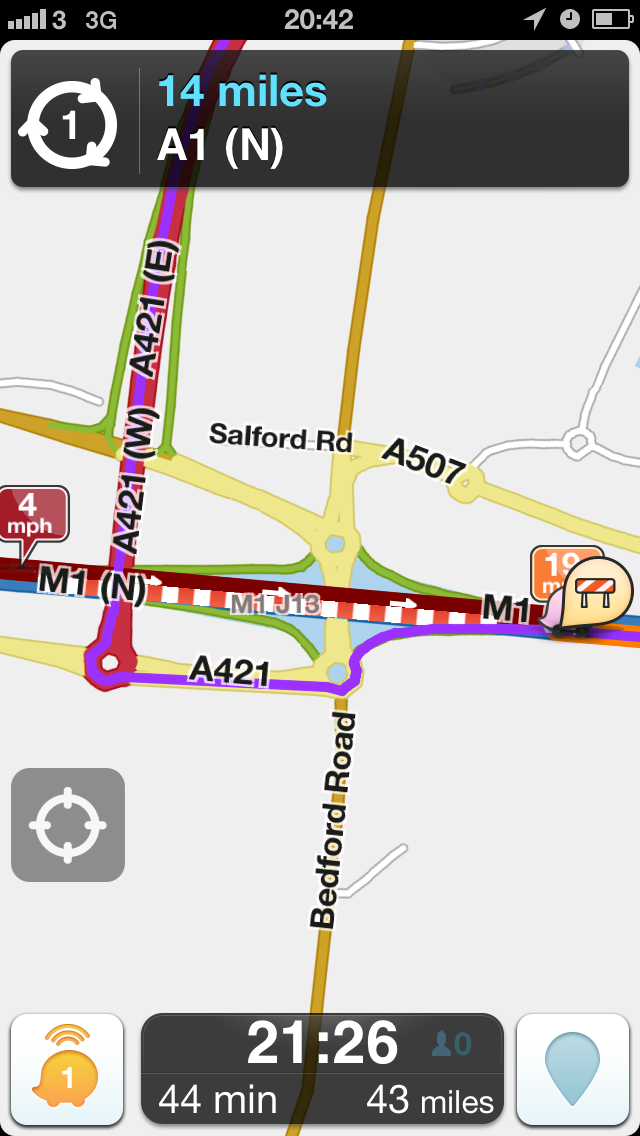
Just to check my understanding of the issue here, from your screenshot.
The piece of the M1 displayed as red/white check was closed, and correctly marked as such. Cars were getting diverted off the exit slip road, and then back onto the M1 via the entry slip road. But possibly due to Waze snapping, the client wasn’t detecting the detour and assumed cars were still going along the M1, so removed the closure.
Just to address the OPs question about Closure reports affecting everyone - it is believed Waze is doing some kind of weighted calculation to decide whether a closure report is genuine or not based upon the users who are reporting it. Until it reaches an (unknown) threshold it only affects routing for the users who reported it.
Easy way to test, if someone can try and route through this road.
https://world.waze.com/editor/?zoom=5&lon=0.22079&lat=51.44762&layers=BFTFFTTTTFTTFTTTTTTTTTFTT&segments=165180414
I was surprised it doesnt affect livemap, my reason for thinking it should, I know some people like to to test unknown routes prior to driving them, so they would look on livemap and see it goes x route, then when they go and drive it, waze heads a different way, and they could think thats not right, and go their own way, only to then take a longer route.
EDIT: Also unless I missed something, to close a road in both directions you then have to drive to the other end of the road, which may be out of your way. But I might just have missed an option for that.
We were being diverted into the A421, rather than just using the junction/roundabout as a short detour
The first few metres, upto about the centre of the roundabout where the sliproad is beside the M1, waze thought the sliproad traffic (I.e. all of us) were actually on the M1, ahead of the closure point, so thought it was invalid and quickly removed it.
I watched it on the public incident list page, first the barber-polling went then a few minutes later the icon went
So for the same reason I had trouble reporting mine, waze often takes a while to realise a change in direction, especially when routing. I am guessing the algorithm used had already re-opened the road before it even realised the users were not even on that road.