Hi All
Had an issue in Luton whereby Waze tried to direct me down a closed road. I was driving down the A505 Dunstable Rd and Waze wanted me to turn right into Cardiff Rd which is currently closed (My destination was Malvern Rd)
Permalink
I’ve checked this on the Live Map and it’s still doing it this morning. If you set the origin as just before the closure on the A505 and the destination somewhere after the closure, it routes you through the closure
https://www.waze.com/livemap?lon=-0.42283&lat=51.88&zoom=17
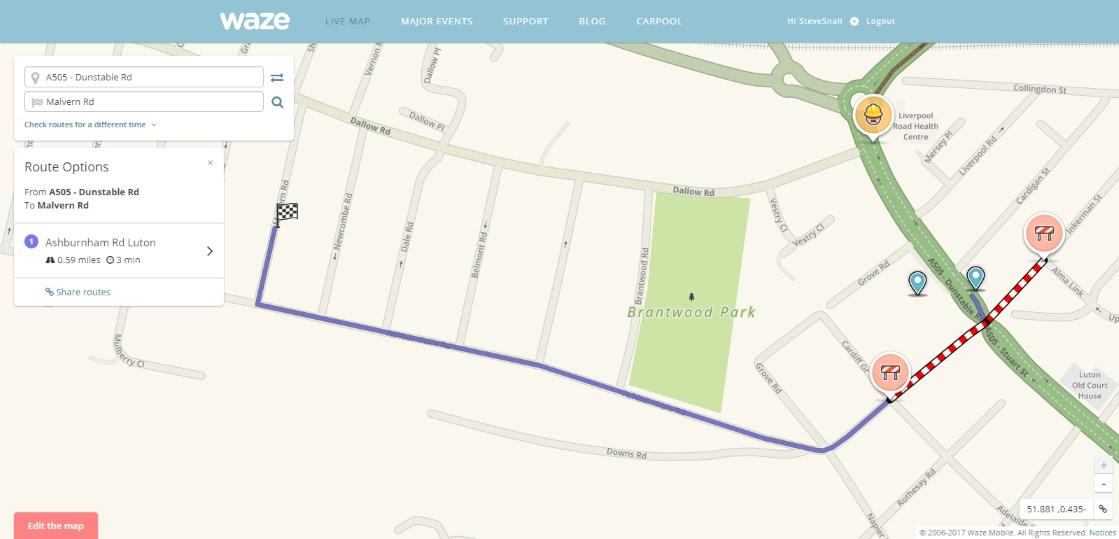
Any idea why? The only thing that looks unusual to me is that the closure on the affected A->B segment seems to have been applied by a Level 1 editor somehow…
Not sure what is going on here, I added this closure based upon info from a wazer, they had also highlighted the closure in the App and then I corrected the dates etc. This is why it showed as an L1 editor in 1 direction.
I have deleted the closure and reset it to try and get Waze to behave.
Thanks, looks like that’s done the trick.
Perhaps there’s a bug in the initial way it was done via the original info from the wazer.
When you add a closure via the App it shows in WME and can be amended as required and will then appear in the App. If other wazers enter the same closure (without anything from WME) then the App will also show the closure. If nothing is done the closure will disappear, this seems to be that the L1 entered closure ‘expired’ but it failed to pick up the amended detail I had made… did we mention Waze has it’s quirks 
I believe that you can’t successfully reuse a closure applied from the app by a user. Whenever I’ve tried to do so, I’ve received an error message to the effect that the duration is too long. If I try and add one overlapping the duration of a user-applied closure, I get a duplicate error message, hence I always delete user-added closures, then add my own for the correct duration.
I have found occasionally that when I try and add a closure, I’m told it’s a duplicate but there’s nothing visible in WME or Live Map. It seems that WME knows about a user-applied closure on the Live Map even before it’s displayed. I usually wait for a few minutes, it becomes visible and I can delete it.
Yes, WME and app closures don’t seem to play all that nicely together, so if you need to adjust a closure in WME it’s always preferable to start afresh with a native WME closure, and delete any app closures which are still present on that segment.
If it’s a heavily used segment, you’ll also need to then pay attention for any new app closures which are added in the time it takes you to edit the WME closure, or in the short period afterwards before it shows up in the app.