=====
21-11-2022
if you have problem with original script (text below), try use this fork:
https://greasyfork.org/scripts/457548-wme-street-to-river-plus-mod
This is a modified version of Street to River Script that I call Street to River PLUS.
Mini howto:
- as Greasemonkey script, Chrome extension or Tampermonkey script.
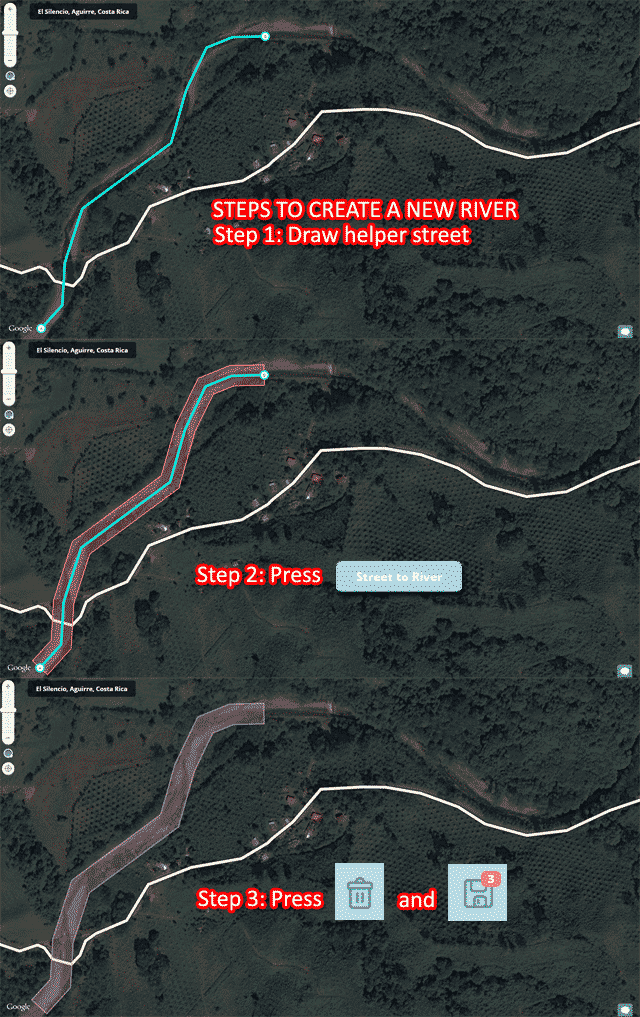
To add a new river:
- Draw a new street but do not save the Street.
- Optionally add and apply a street name to define the rivers name and the width of the river.
Example: “20m Spree” creates a 20 meters width river named “Spree”. - Select the helper Street.
- Click the “Street to river” button.
- Delete the helper Street.
- Edit the new landmark as you like.
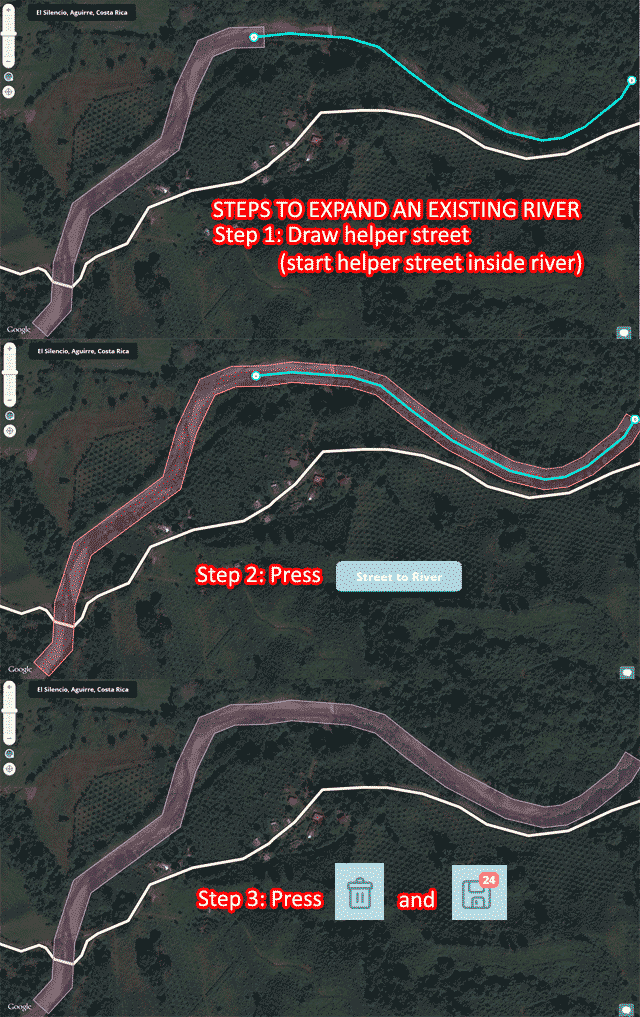
To expand an existing river:
- Draw a new Street that starts inside an existing river, but do not save the Street.
- Make sure that you see on map the begining of the street (the instersection point of the street and the river)
- Select the helper Street.
- Click the “Street to river” button.
- Delete the helper Street.
- Edit the new landmark as you like.
- Minor fix: Beta editor compatibility issues
- Minor fix: Beta editor compatibility issues
- Auto-delete helper street (by ruskinz).
- Minor Slovak language adjustment.
- Slovak translation (by Turrican7).
- Remove auto-added city from newly created river (by ruskinz)
- Italian translation (by savex67).
- Now you can add and expand rivers inside another landmark (like a Forest).
- Fix Firefox compatibility problems.
- Fix compatibility problems with new Waze Editor.
- Minor fix to Português (Brasil) translation.
Special thanks to resmota for Português (Brasil) translation.
Version 15.04.05
- New language added: Português (Brasil).
Special thanks to resmota for Português (Brasil) translation.
Version 14.11.08
- New language added: Polish.
Special thanks to Zniwek for Polish translation.
Version 14.07.02
- Fix all compatibility problems with new Waze Editor (Places)
Special thanks to buchet37 for his contribution.
Version 14.07.01
- Partially fix compatibility problems with new Waze Editor (Places)
Special thanks to tkr85 for his contribution.
- New language added: Czech.
Special thanks to Zirland for Czech translation.
- New language added: Hungarian.
- Namespace updated.
Special thanks to Szata76 for Hungarian translation.
- Fix: script not working if the map have one or more “Place (point)”.
- Multilingual interface: English, Spanish, Russian and French.
- Hyperlink to Waze forum added.
Special thanks to sapulmart for Russian translation.
- Fix saving problem after changing river size.
- Obsolete Street to Railway button removed
- Fix compatibility problems with new Waze Editor (Places)
Version 14.02.01
- Fix compatibility problems with new Waze Editor.
Version 13.10.20
- Unlimited river size option added.
Version 13.10.18
- “Twisted” river problem solved
Version 13.10.09
- Added support to multilingual version of Waze editor.
Version 13.6.3.1
- Added support to Google Chrome and Tampermonkey.
- Now it’s possible to expand an existing river.
- Fixed save problem on large rivers.
Tampermonkey for Chrome is the easy way to install or upgrade the script. Please follow this simple steps:
-
If you manually install the script on Chrome, go to Tools -> Extensions and manually delete Street to River or Street to River Plus script.
-
Install Tampermonkey for Chrome from Chrome Web Store (it’s free). Here it is the link: Tampermonkey
-
Once you install Tampermonkey, go to GreasyFork.org using the following link: Street to River Plus
-
Press Install button (upper right corner of your screen)
Please note that Tampermonkey automatically upgrade the Street to River PLUS script every time a new version is released.

