Also seeing the same issues here. Latest version I am seeing on Greasy Fork is 2023.11.22.01
Version 2024.01.22.01 should be available now and fixes recurring closures with the latest WME.
Dave
Tested and confirmed working - it successfully applied the closure that I couldn’t do yesterday. Many thanks!
Tim
This may be a known issue but in setting daily repeating closures, if the timespan goes over a Daylight Saving time switch, the times are shifted incorrectly.
To recreate:
Create daily closures 9am - 3 pm Fri 3/8/24 - Mon 3/11
Other options as you prefer
Save
Results:
Fri + Sat closures will be for 9 am - 3 pm
Sun + Mon closures will be for 8 am - 2 pm
I have not tested the Fall time switch but assume it would act similarly
It would be better to either handle the time change or give a warning and direct user to create a “before” and “after” set of closures.
Thanks for everything you do!
Eric
Gonna be honest with you here, it’s a problem one night every 4 years - we won’t be putting in to to fix it. If someone wants to submit a pull request, we welcome it.
Correction ~ Leap Year is every 4 years, Daylight Savings is twice a year. Still not worth stressing about putting a fix in place IMO
Ahem.
That’s what I said. The vodka was thinking leap year because it was still stuck on the article I just read. Bad vodka, bad.
I understand everyone’s busy, and this is not a critical or breaking issue by any means, I mostly wanted to get it on the radar, and sorry, my JS skills aren’t up to coding a change.
It’s not uncommon for utilities or municipalities to provide advance notice of closures where the closure is every weekday (or every weekend) for a period of weeks. When those closures span one of the 2 time change weekends, WME Advanced Closures does generate a closure that is mostly correct.
OTOH, this feature has existed for years I’m sure,
Hi,
The last WME update broke AC 
Once the Apply button clicked, it stays at 0%
Please help the Teams Closures
I have some changes that I think fix this problem in processing a CSV closures file. I have not submitted a pull request yet. I am going to do some more testing, but if anyone wants to try it and let me know how it works, use the Tampermonkey Import from URL feature with this URL:
https://github.com/dalverson/WME-Advanced-Closures/raw/master/wme-ac.js
You’re awesome !
it’s working fine.
Édit: the editor who test… Told me it was OK before waiting for the end, it blocked 6%.
But it can click on the arrow to the right of the line to put the closure manually
Version 2024.04.09.01 is now available on greasyfork, which has the fix for the error I saw in my testing.
If others are still getting errors, we will need to get more details on those errors to be able to fix them.
Dave
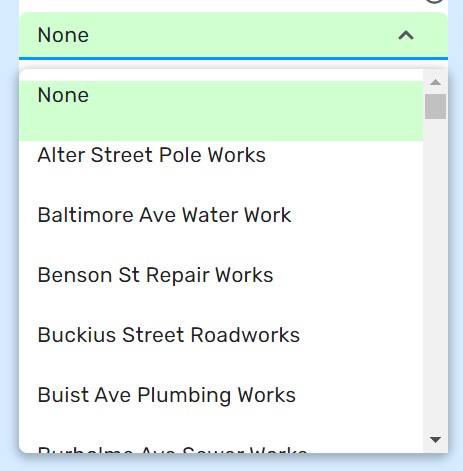
Is it possible to have Advanced Closures list MTEs in alphabetical order?
In WME prod they are listed that way:
Here is how they show in Advanced Closures:
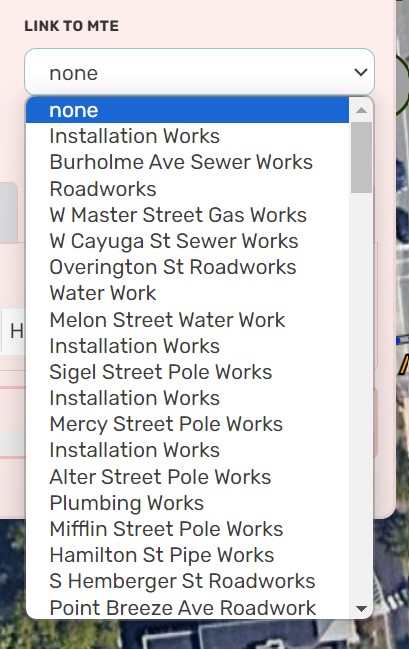
In cities where there are a large number of MTEs it’s helpful having them listed in alphabetical order.
Version 2024.04.11.01 should be available now from greasyfork and should fix the error that can occur during applying closures from a CSV file.
In addition, I am now able to merge updates into the wazedev AC repository, which means we wont have to wait for someone to approve any updates that I create for Advanced Closures.
Dave
And AC is faster \o/

Version 2024.04.15.01 adds sorting of the MTE menu and makes sure it is initialized when the AC dialog first opens.
Dave
Hi Dave,
In version 2024.04.15.01 I can’t Parse CSV.
When I click the button, it doesn’t open the menu to select the file in my computer.
Thanks for your help.
I appear to get the open file dialog box and can select a file to open. - Chrome
It is working for me right now. I cant think of anything that would prevent the file dialog from opening.
Have you tried with all other scripts disabled?
Do you get any errors in the console when you click the Parse CSV button?
It was a problem with my browser. I deleted all cookies and now I am able to run the script.
Thanks for your response.