This isn’t a script that we should’ve had to make, but Waze completely ruined the native interface.
This will restore the layout and order of the conversation.
:!: If you’re using URC-E, you do not need to use this script.
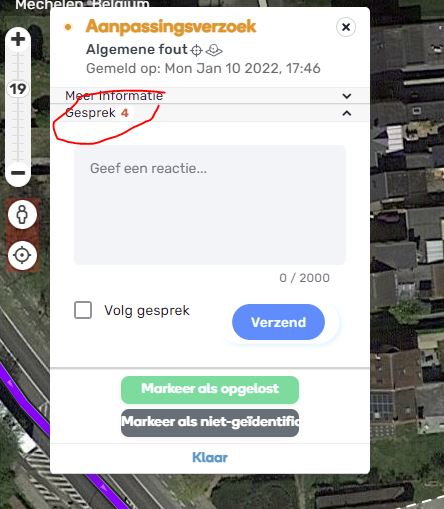
All comments are hidden?
Same for me (using Chrome). Not sure if another script interferes or if it’s something else.

I just added clarification. If you’re using URC-E, you don’t need this. dBsooner has already incorporated a fix into URC-E.
Great work with this!
Just pushed v1.03 with bug fixes and better UI. If there’s still any issues, let me know.
I still can’t see any previous comments when running this script. I use Chrome daily with a load of other scripts enabled, but the issue was reproduced in Firefox with no other scripts running.

Any console errors? If you close the UR and re-open it, does the conversation then show up?
Yup. In case the below isn’t readable here’s a screenshot too.

[code]Content Security Policy: The page’s settings observed the loading of a resource at eval (“script-src”). A CSP report is being sent.
Content Security Policy: The page’s settings observed the loading of a resource at eval (“script-src”). A CSP report is being sent. eval:15:23
Content Security Policy: The page’s settings observed the loading of a resource at eval (“script-src”). A CSP report is being sent. eval:2:114
Content Security Policy: The page’s settings observed the loading of a resource at https://editor-assets.waze.com/production/js/third_party-60cee3a00789a7d46f06.js.gz (“script-src”). A CSP report is being sent.
Content Security Policy: The page’s settings observed the loading of a resource at https://editor-assets.waze.com/production/js/app-dec6049c1541310903fa.js.gz (“script-src”). A CSP report is being sent.
Content Security Policy: The page’s settings observed the loading of a resource at eval (“script-src”). A CSP report is being sent. eval:4:79
Content Security Policy: The page’s settings observed the loading of a resource at inline (“script-src”). A CSP report is being sent. 3 eval line 4 > eval:54:11929
Content Security Policy: The page’s settings observed the loading of a resource at inline (“script-src”). A CSP report is being sent. 3 eval line 4 > eval:54:12054
GEThttps://greasyfork.org/scripts/427721-jquery-ui-1-11-4-custom-min-js/code/jquery ui 1-11-4 custom min js.js?_=1645798231902
[HTTP/1.1 404 Not Found 488ms]
The resource from “https://greasyfork.org/scripts/427721-jquery-ui-1-11-4-custom-min-js/code/jquery%20ui%201-11-4%20custom%20min%20js.js?_=1645798231902” was blocked due to MIME type (“text/html”) mismatch (X-Content-Type-Options: nosniff). www.waze.com
Error: Promised response from onMessage listener went out of scope common.js:4:491
Security Error: Content at https://www.waze.com/editor/# may not load or link to moz-extension://748719b5-786f-486e-9fef-d4023d97c1e2/userscripts/WME%20Fix%20UR%20Interface.user.js?id=c20a151f-6da3-4ab0-b0c8-dd8633f4054b.
Uncaught TypeError: result.updateRequestSessions.objects[0] is undefined
onload moz-extension://748719b5-786f-486e-9fef-d4023d97c1e2/userscripts/WME Fix UR Interface.user.js?id=c20a151f-6da3-4ab0-b0c8-dd8633f4054b:178
s eval:4
i eval line 2 > Function:28
s eval:4
i eval line 2 > Function:5
s eval line 2 > Function:5
v eval:13
v eval:13
s eval:4
t eval:12
s eval:4
h eval:12
h eval:12
send eval:13
s eval line 2 > Function:5
setTimeout eval line 2 > Function:6
i eval line 2 > Function:28
xmlhttpRequest eval line 2 > Function:35
message eval line 2 > Function:11
s eval:4
t eval:3
message eval line 2 > Function:11
message eval line 2 > Function:11
anonymous eval line 2 > Function:70
v eval:13
eval line 4 > eval:178:25
XHRGEThttps://www.waze.com/editor/eval
[HTTP/1.1 404 Not Found 237ms]
XHRGEThttps://www.waze.com/editor/eval line 2 > Function
[HTTP/1.1 404 Not Found 315ms][/code]
Are you getting this on every UR?
Can you try on another computer (VM?)
Are you running another UR script?
No one else has mentioned anything and they are opening fine for me, error-free.
Yes I get this on every UR. This is how it looks if I click between URs, only this error repeats.
Unfortunately I don’t have another machine to run it on.
No other scripts running at all. Some other are installed, but Disabled from Tampermonkey.


Has this ever worked for you?
I was able to duplicate the issue. Sending Discord DM to phuz
@YanisKyr
You are going to need to delete the script and re-install it. This time, click “Allow Always” when it prompts you for the cross domain access to www.waze.com.
This is required to pull the UR information.
Thanks to jm6087 for helping figure this out.
Thanks for looking into this guys. I didn’t get a prompt at all in neither Chrome nor Firefox actually.
I didn’t either, but jm6087 did with his test. I can’t help but think this is related to something within your Chrome config.
I am unable to reproduce this, and I’ve asked a few others to check as well; No issues.
I’ve loaded up this script on a VM with zero other scripts running and it works fine there, too. Unfortunately, I don’t have any other suggestions at the moment.
Here is something I tested that seemed to work for me. Might be worth a shot.
First I would look at your security settings in TM.
For me, my @connect option is set to "Ask if unknown"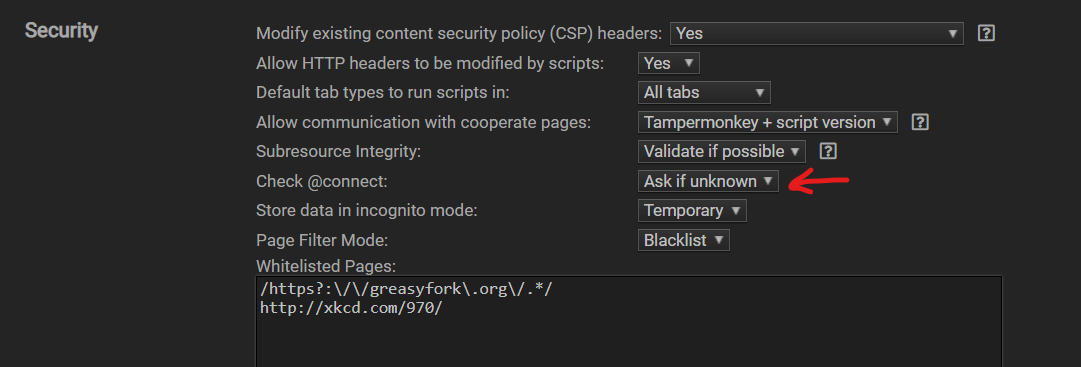
Try changing the setting to “Always Ask” and save.
Open a UR with comments and see if you get the popup
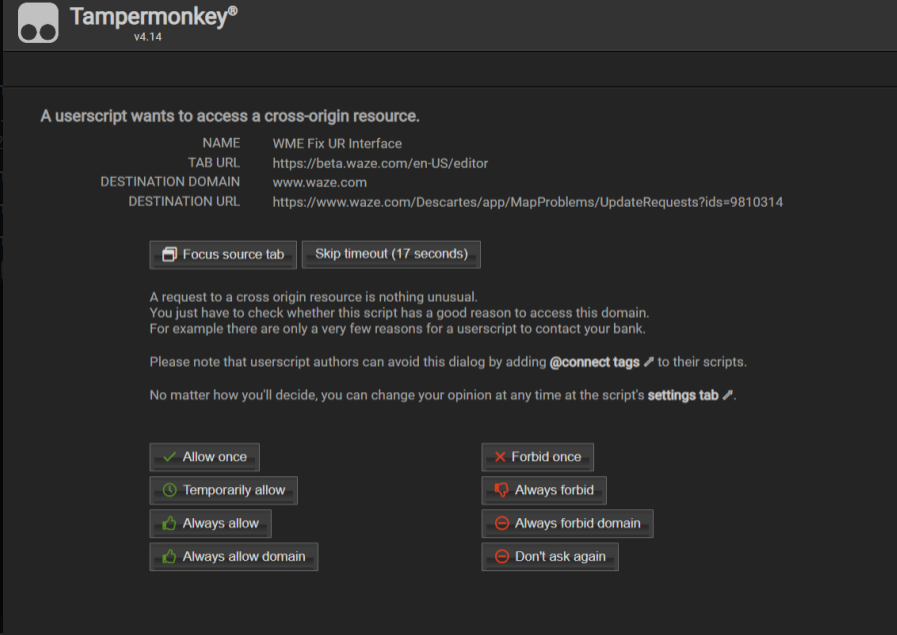
If you do, select “Always Allow” or “Always Allow Domain”
The you can go back to your TM settings and set it back to whatever you had it before.
Hopefully that helps. If not, then I am at a loss.