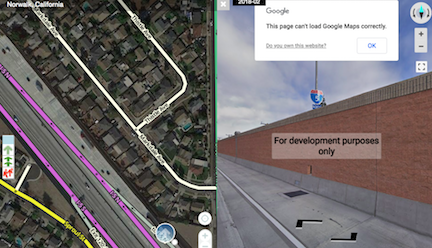
It appears that Waze have forgotten to put some money in the meter - reports from around the world are coming in of Google Street View opening in WME with the images inverted and a warning dialog box! :lol:
If you have WME FixUI installed, this is not a problem for you. Quite a while back, I added controls to adjust the brightness/contrast of GSV images. Whilst doing so, I discovered it was also very easy to invert those images. I wasn’t at all sure that would be useful; I added it anyway as something people could play around with if they wanted. Well now the usefulness is all too apparent! :ugeek:
Anyway, if you aren’t running WME FixUI (traitor! :evil: ), this script might help you. It is an extremely quick & dirty attempt to invert the GSV images. If hasn’t been carefully tested. It has no checks in place. It may not work for you. I am, however, fairly confident that it shouldn’t mess anything up.
So if the only UI alteration you want to make is inverting GSV images, then this is the script for you. :mrgreen:
The only thing the script does is invert the image.
I took a very quick look at hiding/cancelling the dialogue box and the “For development purposes only” banner, but I couldn’t immediately see a way of doing so simply & reliably.
For that matter, WME FixUI only inverts the image as well.
I’m not sure it’s worth investing a lot of effort into fixing what is likely a temporary problem. I just had the idea this morning that the single part of WME FixUI could be implemented as an extremely simple script without needing any of the complications associated with dealing with WME. In fact, I was initially just going to post the text and say “paste this into a new Tampermonkey script window” - but publishing it was easier than explaining how to do that! :lol:
LOL, I actually liked the inverted SV. It made it easier to make out signs in the older SV. I’ll probably use this script for that (if it sticks around). But at least I know there is a checkbox in Fix UI that I’d never noticed before for inverting SV.
This was actually my primary thinking with adding the option - that it might be easier to pick out signs. I did try it quite a bit when doing speed limits, but the UK signs (white circle with red border and black digits) didn’t really stand out any better inverted - to me at least. If anyone finds it helpful I’m pleased.
Indeed, they’ve posted that in the WME Beta forum and it seems to be back to normal in the UK.
This little incident has seen a big spike in installs of WME FixUI - probably about 40-50 extra installs and the best single-day figure of 21 installs. Invert GSV has also seen 32 installs. I’m very pleased to have been able to help so many people. :mrgreen: