So, any chance of getting a uturn colour? 
send from my SGS4, using Tapatalk
So, any chance of getting a uturn colour?
send from my SGS4, using Tapatalk
The feature is already developed and is waiting for merge into the official GH repo by @milkboy.
We’ll likely use a violet color for the U-turn instructions in a default colors scheme:

If you are interested you may try a JAI development version that supports it.
Excellent, thanks for implementing this. The angle is often hidden under the segments, so a dedicated colour helps a lot!
For people that think it doesn’t work yet (like me in first instance), don’t forget to disable the “old” Chrome extension 
EDIT: just noticed a 168.6 angle gets purple as well.
But on the angles I’ve done tests with, (without checking the first decimal), a 169 angle still gave a turn left. A 170 degr was a uturn prompt.
The u-turn angle in use currently is 168.24 with a “gray zone” ±0.2 degrees.
These values are based on my multiple map experiments performed last week.
The recent series of these experiments is still on the map and all examples matches the current values:

The anomalies - which were a basis for a gray (in fact yellow ) zone approximation - has been observed so far just for the two unselected examples in the above picture.
Could you post the permalinks to examples you mention that violates current rules?
Together we can find better approximation of a u-turn and/or a gray zone angles.
Did you actually navigate and get a uturn prompt at 168.5 degr?
send from my SGS4, using Tapatalk
Sure, see the route going through this segment with a u-turn prompt at 168.47 degrees:

ok, that looks different from my experience.
When it was first introduced I set up some different angles where I drive to work. testing in the app showed 169 didnt work, 170 did. Livemap routing did not have uturns enabled then. After that I didn’t perfom any tests on angles lower then 170. I guess waze is still “improving” it.
I have been very much enjoying the new turn instruction prediction in JAI. I found a case where JAI does not reach the same conclusion on BC as the mobile app or route checker:
Waze announced “stay to the right” because Sin Name matches Sout name and also S1 alt name.
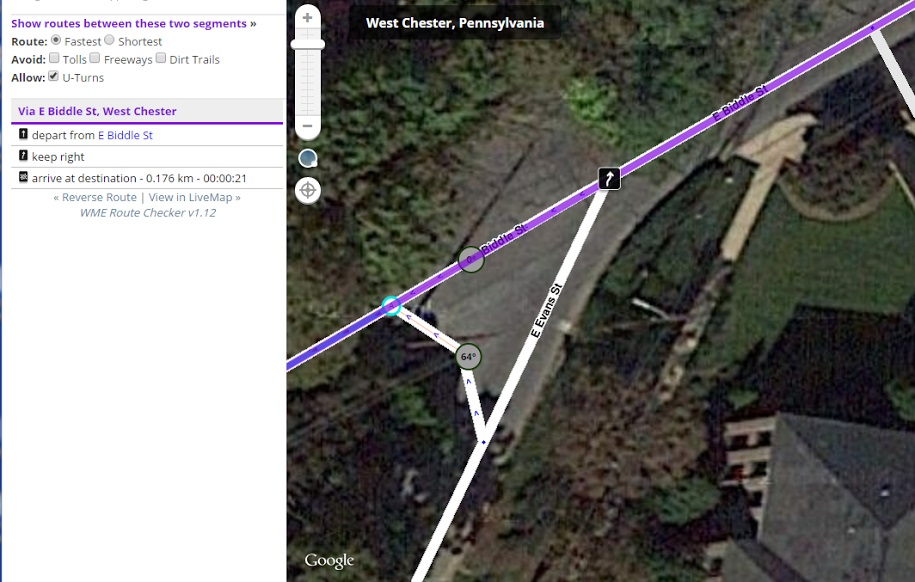
JAI does not catch on to this.
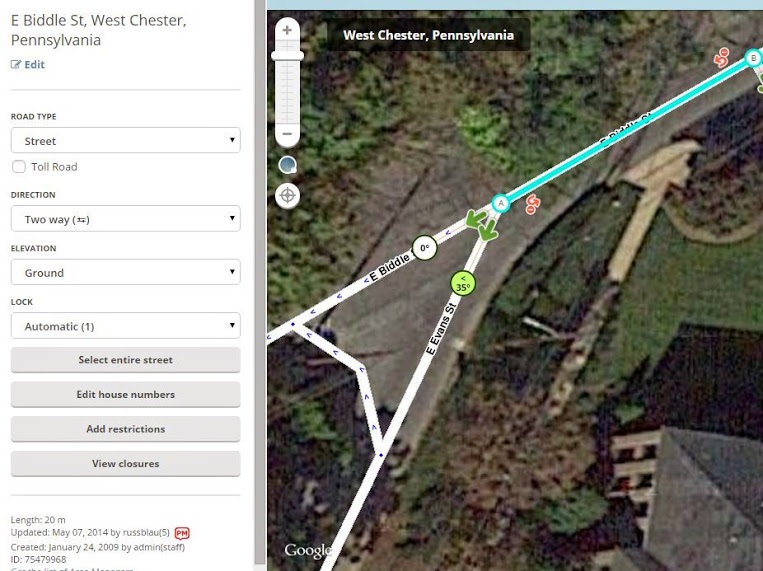
Thanks for posting. This is line with the recently announced changes to the BC algorithm. The algorithm is being simplified so any name (primary or alternate) is given equal weight.
Sent using Tapatalk for Android 4.4.2
Thanks for finding this.
You may try another JAI development version that correctly handles this case.
The changes in the routing instruction estimation algorithm still requires further testing (all implemented conditions are rather my guessing than knowledge ), but all the cases tested so far looks promising. 
After trying the latest development version, I found wild rapid ‘scrolling’ when attempting to click and drag to move the view. 
So, turned it off and turned regular JAI on, F5 to load, and all works normally now so, there may be a conflict of some kind.
I’m not aware of any changes in JAI that could cause such a strange behaviour.
I personally experienced “rapid scrolling” even without any addon enabled, thus maybe it just coincidentally happened to you after installing JAI.
Did you try F5 having only JAI development version enabled?
If the problem persists please describe closer your environment (the browser version, what other addons are used etc.).
I’m currently using latest JAI development version and it works without any problems in Chrome and Firefox with over 20 other WME addons enabled.
Can’t get it to act up this morning.
Win 7 enterprise, service pack 1, up to date.
Google Chrome , up to date. Version 42.0.2311.152 m
Adblock Plus 1.8.12
Chrome Apps & Extensions Developer Tool 0.1.18
Google Docs 0.9
Hangouts 2015.302.433.1
LMUR 2.21
Tampermonkey 3.10.109
UROverview 3.45
Waze Editor - layout tweaking 1.0
WME Color Highlights 1.98
WME Route Checker 1.12
WME Toolbox 1.5.9
WME Validator 1.1.8
TAMPERMONKEY:
Waze Editor - layout tweaking 1.0
*DrivesTabEnhancer 0.6
SearchInPM 1.31
*WME Beta/Prod switcher 0.1
WME Bookmarks 0.50b2
WME center to begin-end of street 0.0.5
WME Chat addon 1.2.1
WME Chat Jumper 0.0.8
WME Chat Resizer and Auto Scroll 0.2.5
WME FC Color Highlights 0.7.1
WME HardHats 0.2.7
*WME Junction Angle Info 1.9.0
WME Junction Angle Info (developmen… 1.9.1
WME LiveMap closures 1.2
WME Me 0.0.3
WME Place tools 0.9
WME PlaceNames 0.51
WME Road History 1.2.2
WME Road Selector 0.8
WME Route Checker 1.12
WME Route Speeds 1.4.3
WME UR Comments (Stable) 0.9.4
WME UR Comments Custom List 0.0.1.bz25
WME UR-MP tracking
*disabled
I guess, then, that everything is working properly. So why are you sad?
Every time I’ve experienced this bug – and it’s happened a few times over the years – it’s been some interaction between Toolbox and URO.
I just noticed one of my tests showing a “turn left” at the 168.45 angle. It could be the bug that gives a left instead of uturn, but I don’t think so, since the livemap gives the same result. Have a look here:
https://www.waze.com/editor/?env=row&lon=6.04126&lat=52.01167&layers=453&zoom=7&segments=274372385,274372422
Oh, and i noticed another thing:
On a 2 segment uturn at 170degr+, JAI gives a Best continuation, however the actual instruction is also a uturn:
https://www.waze.com/editor/?env=row&lon=6.03940&lat=52.01139&layers=453&zoom=8&segments=280755690
What is this construction for?
It’s my private testing area
send from my SGS4, using Tapatalk
Thanks for finding this another anomaly.
Foreseeing other unknown cases the gray zone has been extended into 1 degree (i.e. 168.24 ± 0.5).
Hmm, another interesting change to the algorithm. Previously, no instruction was the only option in case of just one s-out.
This JAI development version fixes the problems.
Thank you Arnoniem for the reports.