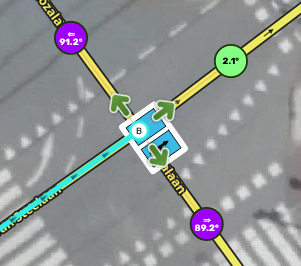
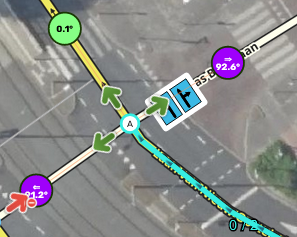
Low level users (who can’t change lanes) don’t see Lane icons, there is only white line. Is it possible show it for them or WME doesn’t share this information for them?
Crap… I forgot to add a check for that… The feature has been in development for a year now and I left it and came back so many times I knew I’d forget something.
Unfortunately, due to the way the feature is built there is no way to show the lanes icons to users who can’t see the lanes tab as I scrape the icons and their order from the page rather than manually building it all from the back end data. I’ll add that check in there so the blank box won’t appear when the editor can’t see the tab.
I think it is a very needed update, sometimes it is hard to visualize them upside down and this make it much easier. But I had to learn to write backwards in the Navy on the tactical board for enemy threats
You are wanting some sort of pop-up or something to explain a specific heuristic failure? That would be a call for Bruce to decide if it is worth the effort or possible, but I still think this is answered in the wiki. If it is not clear then maybe the wiki needs to be revisited.
Small suggestion for H and # intersections to extend ClickSaver.
Let’s take an H-intersection, focusing on the “cross-bar”.
If I enter “4” on the entering segment, it will generate 3 straight and 1 right. [no changes]
Then in the middle segment, through heuristics, we know it should be 3 lanes. This is information LaneTools has, since it knows to highlight it if it isn’t 3. LaneTools can help fill this when opening the crossbar segment’s lanes.
Then, through the existing ClickSaver logic, LaneTools can also fill out 1 left, 2 straight.
Perhaps, even an extra “Auto-fill and apply” would save another click.
This helps with any “oopsies” when filling out the cross-bar correctly, and more clicks saved.
I’m finding that when I go to the Lanes & Road Width tab for a segment that hasn’t had anything previously entered, with LT enabled, the tab opens with the road width set to one (1) lane, even if the lane guidance for the previous segment shows that the road is multiple lanes wide. This is easy to overlook and will lead to a lot of incorrect widths being entered.
Fully appreciating the difficulties: the turn arrows now in some cases overlap the icons. Is that something you can fix? Example 1 on zoomlevel 21
and Example 2 on zoomlevel 20: