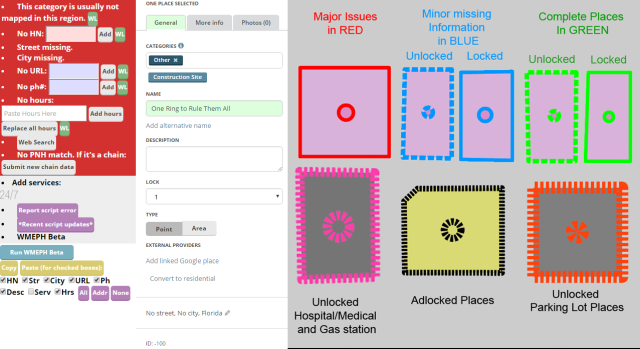
This is the new forum home for WMEPH, as of v1.3.
WME Place Harmonizer (WMEPH) is a script originally written by BMTG. The current lead developer is MapOMatic.
Yellow borders around places were added later. They indicate an unusual situation that may need to be addressed, e.g. a bad phone # format or a place that hasn’t been edited/nudged in a long time.
The thick red hashed lines no longer indicate unlocked parking lot places. They are used for “other unlocked important or non-standard places”.
Color highlights and borders are placed on each place on the map according to the image above. Each type indicates a problem, or completion level. There is also a setting to disable highlights for places you cannot update without approval.
When “Run WMEPH” is pressed several items appear at the top of the Place panel. Text Boxes appear for you to input the relevant information as well as buttons for various services (Not on Parking lots). You will search accordingly and input information into each field and click add. WMEPH formats and inserts the information into the right place in the place panel. Re running the checks by pressing “Run WMEPH” will recheck the fields and lock the place when the values are all present.
The script will match names to chains in the Place Name Harmonization list when matches are found.
For more information about PNH, contact your regional moderators. PNH Moderators and Submission Forms
Editors in USA and Canada can use the script.
Full features and Use
For expanded information about the script please refer to the WME Place Harmonizer Wiki
Issues WMEPH Github Issues page
Please check above for any existing issues. If you aren’t sure about adding an issue please contact MapOMatic directly.
Installation
WME Place harmonizer requires Tampermonkey (Chrome or Firefox)
As far as a PLA is concerned, is it possible (or even safe) to assume that a parking lot contains accessible parking? In other words, when running the script, could there be an option to auto-toggle the accessible parking flag to save yet another step?
IMO, that wouldn’t be a good option to have set. There are too many cases where there aren’t handicapped spaces available. It’s only a one-button click, how hard is that while clicking the others as you work your way through them?
Truth, but remember that we are at the point where we are in WMEPH because the phrase “it’s only a one-button click” was uttered and dreamers dreamed of days where even more buttons wouldn’t have to be clicked anymore.
Thanks for the bug reports. The latest WME update messed up quite a few things in WMEPH, so I have a few things in beta testing at the moment, and more to implement. Here’s what I’m aware of at the moment (off the top of my head…):
Scrolling the edit panel leaves some odd “hovering” horizontal artifacts.
Running WMEPH fails in some cases, and takes two (or more) clicks to work in other cases.
No green highlighting of fields that have changed.
Fonts are messed up on some buttons (and really the whole banner area, in general).
“Edit address” buttons don’t work.
“Add services” icons take two clicks to work and can appear out of sync with services checkboxes.
There’s one thing I noticed yesterday and I’m unsure if this is WMEPH or PIE related, so please forgive me if this is incorrectly placed. When I develop a new place, the Draw PLA shortcut is not showing up in the General tab of said place. If I save and then depart to a new place and then return, the Draw PLA icon will then appear.
No worries. People often confuse those buttons because of the overlap in some functionality between WMEPH and PIE. The buttons near the Categories section are added by PIE.
I can’t imagine the work it takes to keep these scripts maintained as you are constantly having to keep up with the changes that are coming down the pipeline. Really wish there was something we could do instead of just a bunch of thank-you’s.
v1.3.33
Lots of little things and fixes for the new WME UI:
FIXED - Bad formatting of “Lot type” buttons.
FIXED - “Change to point” button is broken.
FIXED - Add Google Link pops up at the top left corner of screen sometimes.
FIXED - Crash when undoing changes in some scenarios.
FIXED - Latest WME update still breaks things.
FIXED - Latest WME update breaks things.
NEW (again) - Hours won’t parse if open and close time is the same.
FIXED - Hours text box extends outside panel if Fix UI is used to shrink the side panel width.
FIXED - Removed “same hours” check to fix bug caused by that feature. Will add in a later release.
NEW - If hours can’t be parsed, entry box turns red instead of replacing with message.
NEW - Hours buttons moved above the hours entry box.
NEW - Hours won’t parse if open and close time is the same.
NEW - Places with Military category will show the hours entry box.
FIXED - Crashes when address cannot be inferred from closest segment.
NEW - Hours parsing handles “today” and “tomorrow”.
NEW - “Force title case” handles Mac surnames like MacMillan.
I keep having issues after I have clicked the WMEPH button for a place I am not able to click off of it. I have to click another place or a segment to get off of the place I was on.
I found a bug when WMEPH adds an alternate place name. That should be fixed in v1.3.34 (just released). Not sure if this fixes your issue, but let me know if not.