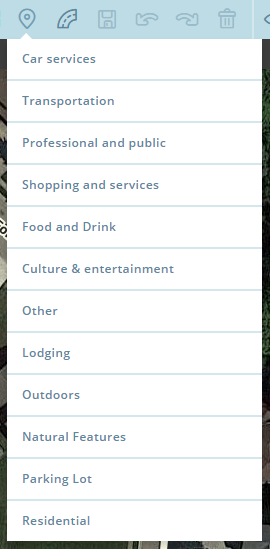
Description: The new Place list currently does not have an option for Residential Place Points - only the main Place categories. Due to this, you must create a Place using one of the given options then manually change it to residential via the “Convert to residential” link in the panel.
This script adds a Residential option to the Place menu, allowing you to place it like the other Place types, as a residential Place.
By request, I also added a shortcut (Alt+r) for creating a RPP.
Note: This makes it easier/faster to create multiple RPPs before saving - make sure you only create the ones you need and save often; WME has some bugs when there are multiple unsaved RPPs on screen (such as when deleting one it will not fully delete and you must hard refresh to recover, losing all your changes).
Changelog:
2017-01-03 - v.11.2 - Fixing id naming and CSS declarations
2016-12-21 - v.11.1 - Updating to work with the latest WME release.
2016-12-19 - v.11 - An options panel is now available from the gear icon on the Residential option.
2016-12-14 - v.10 - added picking up the street and city names from the closest segment & automatically opening the edit screen for the address. Yay less clicking! Both of these will be options in the next version when the option panel is available.
2016-12-14 - v.9.3 - Bug fixes - The category would not set correctly in FF after the latest WME update.
2016-12-12 - v.9 - Added lock buttons - thanks to MoM for letting me copy his ClickSaver format!
2016-12-09 - v.8 - Hiding the script’s layer from the layer switcher
Thank you so much, Justin! As a newer editor, I’ve been baffled on why this option wasn’t already there. The first time I wanted to create one, I had to go dig through the wiki to figure out how. Now, it is as easy as pie!
If you are experiencing problems with it not going into edit mode for the RPP, try turning off the Place Names script - I experienced this problem during my testing. I will look into Place Names to see why it is causing issues.
Fixed! Cannot create a Place inside multiaction and modify it since the latest update. This means when you create a RPP using this script, you’ll see the save counter increment by 2 now.
Works well for me. Not sure if we need a lock level in this. But, in WME beta, I see this for lock levels, all spread out and no indication of current selection.