[Script] WME Simplify Place Geometry

Description: WME Simplify Place Geometry allows you to (surprise!) simplify the geometry of area places.

Purpose: The purpose of this script is not to go around simplifying area places just because it provides that ability. The purpose is to allow editors to more easily update the geometry of an area that has many more geometry nodes than are necessary.

For example, if a place needs its geometry updated but has 20 geometry points along an almost-straight line, you can simplify the geometry. Not using this script, you would have needed to move or delete each one of those extra geometry points manually.

Current version: 1.01

Install using Greasemonkey or Tampermonkey: here

To use:

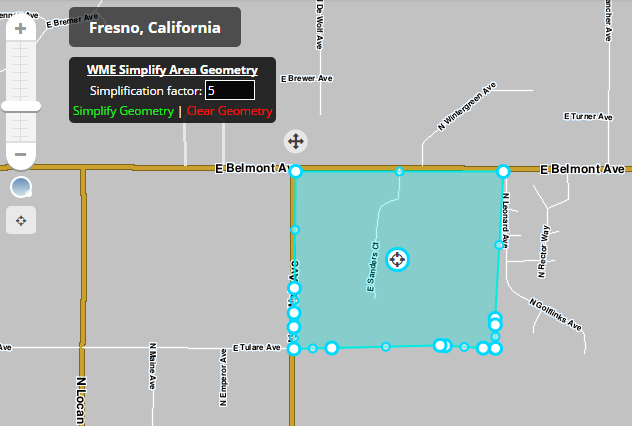
  • Select an area place to simplify. A window will appear in the map area.
  • Click the appropriate link to simplify or clear the geometry. Alternatively, press ‘shift+j’ to simplify or ‘ctrl+shift+j’ to clear the geometry.
  • Check the results and adjust geometry as necessary.
  • If it looks good, save your changes.

Note: Please report bugs, feature requests, or other issues here.

[Edited to update version, use, and clarify purpose of script.]

WMESAG screenshot.PNG

Looks promising. Gonna give it a shot. Thank you!

P. S. Have your thought about having this implemented with WME Toolbox? It would with well with it.

“J” will be the default keyboard shortcut for some future functionality coming to WME. You will want to choose a different hotkey–preferably a combination and not a single key.

Or maybe WME could use a combination, such as “JB” :mrgreen: :lol:

Thanks for the input. The script has been updated for the shortcut to be handled “properly” and it is now “shift+j”. Also added a clear geometry feature that uses “ctrl+shift+j”.
I’ve been playing around with it and it works great!

Would it be possible to have a box below the slider displaying the number of the sensitivity? Or maybe notches on the slider every 10?

That should be pretty easy and is on the list for the next update.

This script doesn’t appear to exist at the link in the OP. Where is it now?

UPDATE: There was a period at the end of the URL which caused it to not load the correct page. I updated the OP.

Now I am missing Shift+J shortcut. Is it a bug or is it problem on my side?