Description: The length displayed when selecting a segment is not the segments “true” length - this value is displayed from a length that is rounded to whole meters and displayed. Due to this, the displayed value can be off by up to .5 meters (or more when converting to feet!) which is important when working with smaller segments.
This script calculates the geodesic length of the segment and displays the value in both feet and meters, to two decimal places. This will work for a single segment or multiple selected segments.
Changelog:
2017-01-09 - v.6 - Only displays both imperial and metric if editing in the USA, per request.
2016-12-07 - v.5 - You can now measure the length of unsaved segments! This fixes a bug in FF and allows you to use unsaved segments as a measuring tape.
2016-12-07 - v.4 - Fixed a bug where using the Speed Limit script would cause this script to continuously add lengths to the panel
2016-12-06 - v.3 - detecting changes and updating the measured length when the segment geometry is changed or the user uses Undo. The length of the segment will be bold when there are changes to that segment (working on if it is possible to only detect geometry changes).
Thank you for this script. I am having an issue however, When saving after creating new segments the screen stays dark and hangs. When I turn this script off I no longer have the issue. I am using Chrome on a W10 laptop.
I haven’t been able to reproduce this issue. WME occasionally locks up for me upon saving without this script. Are you getting any errors in your console?
I don’t really want to create yet another settings tab for just a single option (I don’t know about you, but my side bar is cluttered enough as-is with tabs).
Maybe this should be rolled into the WME FU script?
And some users don’t want cluttered side bar with two lines of script output. If you don’ť want to add a tab merge the two lines into one. For example: Length: 187 ft / 57 m.
Is anyone aware of a memory leak in this script? I’ve tracked down an issue that I’m only seeing when I have this script enabled, and the issue goes away when it’s not enabled. It occurs when I pan too many times, and each time the pan seems to take longer and longer to finish loading. In the Chrome Developer Tools, I can see the time take longer and longer until the request processing takes over 15 seconds and then the dev tools says “Paused before potential out-of-memory crash.” Without the dev tools open, the Chrome tab just crashes.
Thanks. I am seeing this issue as well, although I had not been able to determine what was causing it. I will disable this script to see if the issue goes away.
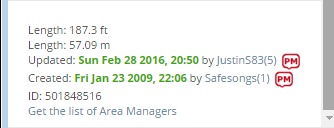

 If you don’ť want to add a tab merge the two lines into one. For example: