No, you cannot edit kml exports. Well, you can edit them, but I will not import it.
I wrote a little how to. I can send you the sample file by email (PM me):
In this howto, “element” is a country, a state, a county, a town, or whatever you want.
The main idea is to draw lines between elements and name it correctly. Then, I can generate polygons for each element if the element is closed.
open google earth
draw a line that is a boundary between 2 elements.
DO NOT draw multiple line or polygons!
Try to follow borders given by google earth (activate the layer)
Don’t draw too many points or borders will be too heavy for WME
On sea coast, draw long straight lines in the sea: do not draw details on coast.
Do not draw lakes or any “holes” inside an element
Those borders are used to know if an UR or MP is inside an element or not. So it is useless to draw details in no man’s land (no road’s land :)).
See the sample file.
give a name to this line. It should contain at least 2 elements names. Borders with seas can contain only one name. Use ‘-’ to separate names. Order is not important. Eg: USA-Canada, California-Nevada. Since I will not generate borders of Pacific, you can name California-Pacific or California. But California-Pacific is easy to read and can help you (and me) for building lines and borders.
If all elements you want to draw is a whole country, or any element of higher level, you should name it in your lines: eg: California-Pacific-USA, Montana-USA-Canada-Alberta then I can generate polygons for states AND for country (or for an element and the higher element)
group all lines in one kml file. Each line should be at the root of the kml (no subfolder please)
a kml file sample with all US states should be given with this howto. Ask me if not.
[quote=“dummyd2”] @ramblinwreck_81: I don’t understand your problem. What are you seeing / not seeing? After what kind of event (someone respond/someone closed / …)/ action (manual scan / autoscan / …)?
What I don’t see is all UR’s that I’m following when I do a manual scan. I used to do an auto scan but that seemed to make the returned URs more confusing so I’m back at manual.
I know there are UR’s not returned in the scan b/c I get emails stating that other editors have closed them and they weren’t on my list in URMP.
Other editors mentioned that there was some interface between other settings on other scripts such as URO+ that would impact the returned list in URMP tracking. So I’ve disabled all settings in URO+ for URs other than ‘with comments from me’ is set to “no”.
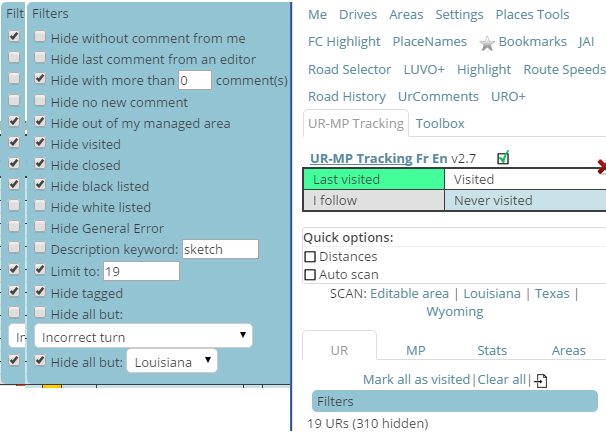
As SM for Louisiana, I scan my state every day for URs and MPs using UR-MP tracking.
I clear and do a fresh scan. I sort so the oldest are at the top and filter.
Two different filter settings, one ‘hide without comments from me’.
The other with ‘hide with more than 0 comments’.
I leave ‘new’ URs for locals. (younger than 4 days).
I query the reporter for additional information if I can’t solve immediately.
If no response, I follow up 4 days later.
If still no response, I close after another 4 days.
I also scan the state for PURs manually.
I occasionally happen upon a UR that has gone longer than 4 days without anyone touching it.
That ‘should not happen’.
I occasionally happen upon a UR that has my initial message and my follow up that has gone more than 4 days since the follow up.
That ‘should not happen’.
I don’t see any pattern except UR-MP tracking has missed tracking these.
That is not normal. It can happen when using multiple tabs/windows open at the same time. I have to find a workaround for that…
Manual scan query directly the waze server. It can not be interactions with other scripts.
Auto scan look into the waze objects. No scripts are supposed to add, delete, of modify those objects. The only thing I recommended was for closed UR and MP: if the layer is disabled, closed UR and MP are not loaded in waze objects, so the auto scan can’t see them. The idea was enabling the layer, and hide them with URO+.
@bz2012: when you find such UR, is it in the UR list of URMPT or when editing the map? Is the UR in the list but with bad dates?
Usually, when I happen across such a UR it is NOT in the URMPT listing, it is as I scan the map, (usually starting at the top left corner and using the down arrow (x3) until I reach the lower edge, then scroll (x6) right arrows and scroll up arrows (x3) until I reach the top.
Repeated.
Using ‘WME *Bookmarks’ to keep track of where I am, in case I get lost for some reason.
I will occasionally happen across an ‘old UR’ that ‘should’ have been picked up by URMPT.
No pattern I can find.
I do want to thank you for a tool that helps make life much easier, as it would be MUCH more time consuming to make the ‘manual scan’ for PURs if I had to ALSO tackle the URs at the same time.
(it would be very nice to have a URMP-PUR-T tool. :))
Added info; the URMPT scans are manual scans of ‘Louisiana’ (my SM area) after clearing all.
Manual scan will scan the bounding box of the area, and reject UR outside the area.
Auto scan will scan the screen, and validate UR only if the UR is inside your editable area (as shown in the layer even if the layer is disabled) OR if the UR is in one of your areas (country, custom…).
With the new WME, we can see all UR (out of editable area).
So, what you describe could be an UR out of your editable area (drives and managed) AND out of URMPT areas (country and custom).
If not, it is weird…
Is the UR added to the list when displayed on screen and autoscan enabled?
Not quite sure what you mean by scripts aren’t supposed to add, delete or modify objects - there’s no way to do some of the stuff our scripts do without in some way modifying the data held in W.model… Thinking specifically about the problem being discussed here, could it be getting triggered by having the backfill option enabled in URO+, as that will create new UR objects whenever a “missing” UR is found?
Sometimes the scan stops and I get an error at the console:
Uncaught TypeError: Cannot read property ‘lon’ of null (program):3776
It may happen at any stage of the scan…
Most of the time it is solved by switching the window from “Maximize” to “Restore” and vice-versa (because it may happens with both modes).
I haven’t tried to re-size the window instead of maximizing it though
It is a very large area (over 157’000 Km2) but with very low activity. So this error may happen with the same UR’s that the day before caused no problems.
I guess is related to the scanning at the edges of the area… may be some number rounding… but not necessarily in the first row. Last time it happened at 43% of the scan.
I have found that disabling the distance checking when scanning prevents this error from occurring. If I scan and run into this problem, unchecking the box and scanning again lets the scan finish successfully.
So, disabling the distance checking during scan end re-enabling it after it would patch (not fix) the code. And may be accelerate by some milliseconds…
Yes but I must ask waze server for an area (bounding box of lon/lat). So to update 1 UR, I will ask for a small area around this UR, and make as much queries as UR to scan. In most of cases, this will lead to more queries than a manual scan.
Follow up. Got closely related weirdness with new, different browser.
FireFox (v39.0). Newly installed Greasemonkey (3.4.1) and UR-MP Tracking (ver 2.8), only script loaded. UR-MP now will not record any URs Outside of Managed Area (OMA). Changing any and all options had no effect on display of OMA URs. (options did have the other expected results). No change after restart to update FF to ver 41.0.2.
In the latest beta WME, the tabs have had some changes and the UR-MP Tracking tab is no longer available. Instead, it shows up as a list item underneath the tabs. Once the “tab” is selected and you move away from it (to another tab), you cannot access the URMP tab again until the page is reloaded.
bugfix: manual scan stops when waze server returns an error: the tile scanned is split and each subtile is retried. It aborts when the tile is less than 0.2 lon x 0.2 lat