I dont understand the idea of the implementation of Speed Bumps. They show up randomly on the map. There might be a warning on some of them, but not always. It would be nice if all of them was shown on the map allways. The verbal warning is only neccesary for the first bump on the route. As implemented it is not usefull because you can’t trust it.
I addressed this subject at MeetUp Brazil. It is undeniable that we use Waze for the purpose of being alerted to traffic-related events under any pretext.
My route from home to work is very short, but I still activate Waze, so it reminds me of what I don’t see.
Yes, I pass by the same street several times in the same week.
And I don’t want to use my memory to record where there are radars or speed bumps.
For that I hand over this task to Waze.
Boa tarde…
Eu já falei quando foi feito o novo Alerta e até fiz testes para ver como se portava a gente add as lombadas forçando elas antes de da 500mt e foi um sucesso avisou a 1 lombada e se tiver mais no raio de até 500mt só aparece a lombada e não avisa.
Também comentei sobre as lombadas aparecer no trajeto que a gente for percorrer, todas as lombadas e tirar isso de aparecer a cada 21 dias novamente mesmo vc passando pela mesma via inúmeras vezes. Eu viajo muito no meu estado do MS e muito de noite tem vez que vc não vê a placa pois roubaram ou quebrou aí não vê a lombada pq não está pintada e aí vai… Com esse método seria top demais…
Eu quando fiz o teste de forca as lombadas cheguei ser até penalizado com meu Level rebaixado de L4 para L2. Sei que fiz errado mas quis mostrar que mesmo vc forçando ela aparecer não avisava só mostrava o ícone da lombada
Eu sou a favor de deixar as lombadas aparecer tudo no seu trajeto e não no mapa no seu todo pois iria poluir mas, eu não vou sem o Waze ali na esquina de casa ligado já é costume isso…
Mas vamos ver oque acontece né… Ainda tô aqui sofrendo com meu L2
Vamo que Vamo Galera
Agree as well with @clauscd and @Jefresongil , at least the speed bump should be always alerted visually, maybe it could be smaller then a radar alert but still show it on the route.
It is common to have URs from users that report the the speed bump is not on the map but in fact it is but it was not reported.
I agree with everything!!! 
I disagree. This was discussed in the beta phase and showing every speedbump in the app was way overwhelming.
Boa noite… Não é mostrar todas as lombadas no mapa todo e sim mostrar a lombadas que tiver no trecho que você está com rota, o restante ficaria a mesma coisa. Acho que era isso que o colega queria falar, eu TB acho errado aparecer tudo no mapa geral vai deixa ele muito poluído mas se for só na rota de cada um que fizer não há problema e também aparece independente de quantas vezes for na rota pra não ter problema de esquecer ou até mesmo voce passa hj tem placa e marca na lombada e passa alguém e quebra placa e etc…
It should be an option, if you want to receive the alerts, ok, if not, hide it, I prefere to see, my memory is not so good as begore.
I have no issue with it being an option. I am sure that was mentioned during the beta phase as well.
Since this is already in production, the best place to ask for feature requests is here: https://waze.uservoice.com/forums/59223-waze-suggestion-box
We recommend adding your suggestion there, or upvoting a similar suggestion to make it more popular to the developers.
This is not entirely true.
Long time ago, before this feature was implemented, there was a survey to the community about what road hazards could be included in this feature. At that time, driving safety was a main goal. There was a discussion about if speed bumps were really a road hazard, because not all of them are really hazards. Then, it was demonstrated that some of them are really road hazards in some countries.
When this feature was originally implemented, the first version in beta, it worked great. However, some communities start mapping all and every speed bump in the map, including those in residential areas. Hence, of course, they had a new issue, the map in the app was crowded with speed bumps. Because of this Waze implemented “Familiarity Capping” and this functionality basically hide the new “permanent hazards” once you get the alert two or three times.
Now, we forgot about the original goal of “road safety” and editors are mapping things that are not really a road hazard and because of this we hide the alerts with the familiarity capping, including those that are real road hazards, turning this feature useless from the original goal perspective.
My personal opinion is if you don’t want to get an alert about a speed bump then don’t map it. We can think the same with lane guidance. Think what could happen if you add lane guidance for every residential corner, then you say this is overwhelming and apply familiarity capping to all lane guidance, including those in freeways, minor and mayor highways. It is exactly the same.
+100
Good day from Sint Maarten,
My 2 cents…
Why don’t we add an indicated speed that is proper to go over the added speed bump?
Concerning the alarm sounds. I have the opinion to be as flexible a posible and that it must be set by the user. Not only with the alarm sound of the speed bumps, also sharp curves, …
Three options should be given:
- Always alarm
- If the speed is higher than the indicated speed, a warning sound is given
- Only visible, no alarm sound
If a suggestion needs to be made in the SUGGESTIONS FORUM, I am happy to do this.
Generally speaking (at least in my area), most speed bumps don’t have a suggested speed limit to go over them, so it would make it a judgement call on what speed to list.
Please feel free to make the suggestion in Uservoice if you like.
A propósito, se fosse marcada a Check Box de lombada destrutiva, em casos específicos, foi divulgado que estas seriam alertadas sempre.
Ocorre que nos últimos dias tenho feito um trajeto que possui umas 3 lombadas que marquei como destrutivas, porque de fato são, mas em momento algum tenho recebido alerta.
Esse algoritmo está zuado.,
In my opinion, Waze should show — or, at least, allow each user to choose thether they want the app to show — every speed bump on the route, just limiting the voice alert to once at each 500 metres.
By the way, we don’t need to show all speed bumps during the whole trip, only those that are close to the current location. I think that a 500 metres radius is also a good starting point.
We’ve been mapping every speed bump (and, as far as I know, there isn’t any official instruction to not to do this) and, as the URs let us now, many users like this feature and want Waze to show every speed bump on their screens.
About what has been said on the beta phase, we should always let Waze improve its features, not imposing what has been decided before as a unchangeable rule.
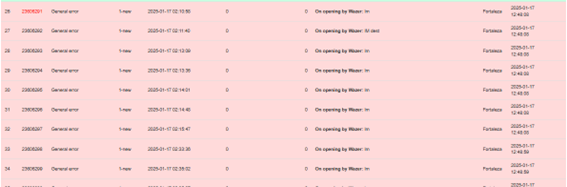
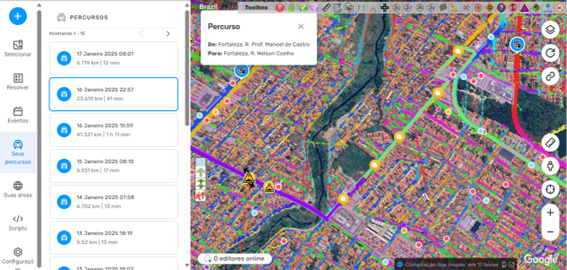
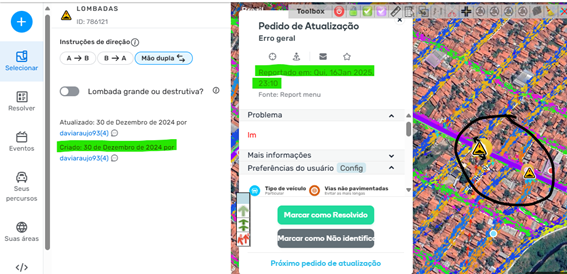
Yesterday, 01/16/2025, around 11 pm, when returning home, I went through a route that has not realise with traced route for more than 2 years, I saw in this stretch that there were unmarked speed bumps. Something expected according to the functioning determined by the algorithm.
All appointments made through UR’s in the exact location are reported through the URs by State Web application in the city of Fortaleza/CE.
See Imagem1
As can be seen in the picture below on the Permalink https://waze.com/pt-BR/editor?env=row&lat=-3.80324&lon=-38.59517&zoomLevel=16 the creation of the aforementioned Ur’s is visible.
However, it is already noticeable that the algorithm failed in execution while the first two annotations were already shown to exist.
See Imagem2
In the figure below, it is possible to identify that these speed bumps were created on a date much earlier than the fact by the user daviarqujo93(4), thus clearly demonstrating the failure in the execution of the aforementioned signaling algorithm.
See Imagem3
Conclude on your own.
You don’t need to correct it. Just admit that it is incorrect and that it does not meet the expectations of users.
There have been many URs for speed bumps where we have already added them. This tells us that users are happy with the speed bump alerts, but not so happy with them being hidden by Waze.
Beyond my personal opinion, I see that many users share the same sentiment: the speed bump alert should always be notified.
Today, I received feedback from a user in a UR regarding a location where she had already reported the absence of three speed bumps on a state highway. These bumps have neither vertical nor horizontal signage, creating a significant hazard, especially at night.
A few days later, an error appeared on the map in the same location, indicating that the speed bump alert had not been reported. I changed the status to ‘destructive.’ Then, today, I received feedback stating that the alert was still not being displayed.
Here is the user’s report:
*"Good afternoon. These are the same speed bumps I’ve been marking for about four weeks. When I return from Porto Alegre to Santa Maria, they don’t appear on my map. These roads are poorly marked and extremely dark at night, in the middle of nowhere.
Yesterday, I received emails saying that the alerts might not appear specifically on my map because I could have been out of signal range or because I pass by that location frequently. Honestly, I found that explanation terrible. It’s frustrating that the warning doesn’t show up for me.
During Carnival, I was really happy because I went back there for work, driving my family in the car, and all the speed bumps I had suggested appeared at that time. As a PhD in remote sensing, I always want geoprocessing to assist in civil defense. I truly believe that having warnings for these dangerous speed bumps can help many people."
I suggest that the developers create a poll to gather real feedback from the community regarding the use of ‘Familiarity Capping.’ Perhaps, in countries like Brazil, this feature should be adjusted due to local conditions, which we know are quite different from those in Europe or the United States.
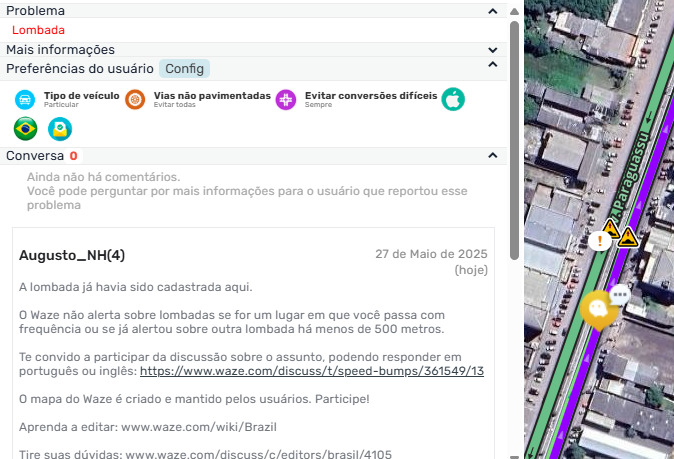
Inviting users here won’t help much. If they want something, it should be done as @jm6087 mentioned: by making a suggestion through UserVoice. They’ll be able to vote.