FRENCH VERSION HERE : http://www.waze.com/forum/viewtopic.php?f=34&t=40620#p369062
I finally found a solution!
Let’s go for the tutorial (for android. … sorry apple addicts… but nevertheless you can try the 5 first steps)
- Clear all cookies by clicking on the link at the bottom (“Delete all board cookies”)

it must have the effect normally to disconnect your login on the forum
- Browser Forum to return in a forum where you are able to post a new topic, then click the “New Topic” button :

This should normally ask you to login (login + password), so fill in the fields… and there normally:
:
- you will be asked the famous Captcha! (Tapatalk does not support captchas…)

Complete the fields login + pass + CAPTCHA and also check the “Automatically Log me …” box
- Normally you should now be logged on again :

Normally the captcha should not be asked again anywhere
- On your android, I did not found any another way to “erase” the Tapatalk memory as this one : go to “Parameters”, then “Manage Applications”:
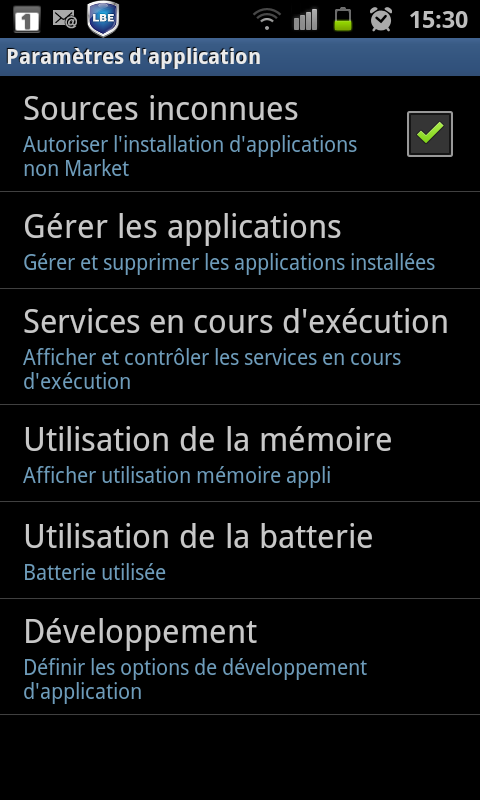
(sorry for french screenshot !)
- Click on Tapatalk and then click on “Clear Data” :
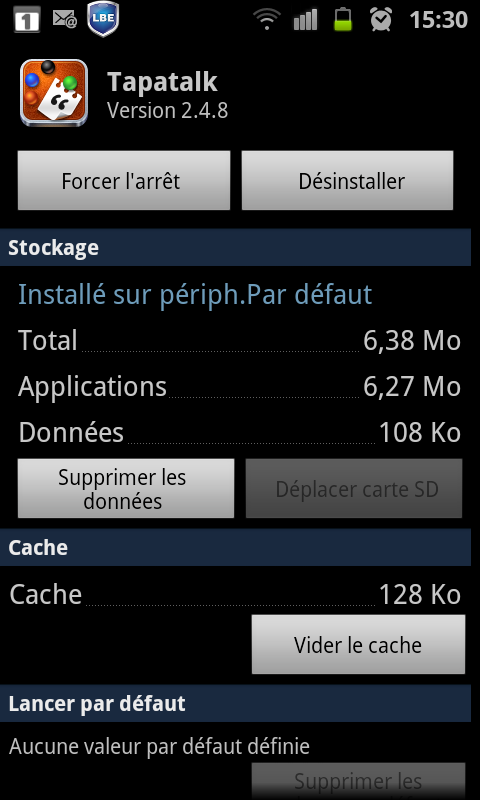
Warning: this will erase all the Tapatalk config, as if you just would have done a fresh install of the application. So if you have other forums, you will also have to reconfig them.
- Start Tapatalk and there add the Waze forum, and log normally Login + password (normally without this ugly “Captcha” message !)
et voilà !
Hope it helps…
For iPhones, I do not know if you can do the equivalent to steps 6 and 7 to “erase” the memory Tapatalk … But this step is key to the success of this procedure! However, you can try to log back on after step 5, we never know …