Template of topic 380525, post 1
Template of topic 380209, post 4
With Waze, drivers can see which routes include tolls and quickly compare them with non-tolled options, making it easier to choose the route that best fits their journey. Whether seeking the fastest route, the most budget-friendly option, or simply avoiding surprises on the road, Wazers gain the information they need to plan with confidence. This visibility puts drivers in control, helping them navigate smoothly from daily commutes to long road trips. None of this would be possible without the volunteer map editors who keep toll information accurate and up to date for everyone.
In Australia, we follow the comprehensive guidelines from the USA Wazeopedia tolls page and have also gathered additional information specific to Australian tolls. This page highlights points unique to Australia as well as clarifies details that are especially useful to consider for drivers navigating our roads.
Toll Road Flag
Toll roads are mapped by ticking the toll road flag (under Edit Restrictions) on dedicated segments entering and exiting a toll road. These dedicated segments are usually flagged with a map comment and locked to a higher level to prevent adjustment. It is important that the segment ID not change on these segments - if it does, a new segment ID will need to be placed in the toll pricing tool.
Waze adds a 3 minute penalty to the route so users aren’t routed onto a toll road if there’s little or no advantage, and to cater for the stop/start of old cash booths. This occurs when the toll road flag (under Edit Restrictions) is ticked.
Toll Free Driving Restriction
A segment may be marked as a toll road, or configured using a toll free driving restriction to provide more specific control over when, which vehicles, and which direction tolls apply — the editor supports only one of these approaches per segment.
By default, a segment has no tolls for any vehicle.
A toll free driving restriction only changes this behaviour while the restriction is active. During that time, only vehicles that meet the toll free criteria are exempt; all other vehicles are tolled in the direction(s) covered by the restriction.
When the toll free restriction is not active, the segment returns to its default state — no tolls apply to any vehicle, in either direction, unless another toll or restriction applies.
Example:
If a toll free restriction applies to the private vehicle type from 7:00am–8:59am daily in one direction:
- 7:00am–8:59am - Private vehicles are toll free; other vehicles are tolled in that direction
- 9:00am–6:59am the next day - No tolls apply to any vehicle in either direction
Do not assume tolls apply outside the restriction window. Tolls only exist when explicitly defined by an active toll setting or restriction.
Mapping Entry/Exit Only
Where a toll road has toll points on the entry and exits of the road, map the road and toll road flag as such.
Broken link removed
Mapping Whole Road as Toll Road
Where a toll road has multiple toll points along the entire length of the road, charging people for each point they pass, you need to map the map the road and toll road flag as such to avoid cumulative penalty. This was observed in Melbourne.
Broken link removed
If you fail to map it correctly, the cumulative penalty will apply as such:
Broken link removed
Mapping Toll Free Periods
Temporary toll free periods (for example, toll free weekends or special events) are typically mapped in reverse. This avoids the need to explicitly exempt every vehicle type and aligns with the default behaviour of a segment having no tolls.
Rather than mapping the toll free period itself, editors use time-bounded toll free driving restrictions before and after the event, allowing the gap between them to represent the toll free period.
How this works in practice
If a segment is normally marked as a toll road and there is an upcoming toll free period:
- Remove the toll road flag.
- Add a toll free driving restriction that starts immediately and ends at the beginning of the toll free period, using the Public Transport vehicle type.
- Add a second toll free driving restriction that starts at the end of the toll free period and extends long enough to allow time to return to the editor and restore the standard toll road flag.
Because the Public Transport vehicle type is not supported in the Waze app, this restriction effectively applies to all users. The gap between the two restrictions represents the toll free window.
After the event, the segment should be returned to its normal toll road configuration.
Toll pricing considerations
Tolling in Waze is handled by two separate systems:
- The toll road flag in the Waze Map Editor, which determines whether a route is treated as tolled.
- The Toll Tool, which calculates toll prices.
When a route encounters any segment marked as a toll road at the time of traversal, Waze will request pricing from the Toll Tool. The Toll Tool will return prices for all toll roads on that route, even if one of those roads is experiencing a toll free period in the editor.
In areas with multiple toll roads, this means that any segment that would normally be tolled must have its toll price set to $0 in the Toll Tool for the toll free period. If this is not done, the standard toll cost for that road will still be included in the route total when the route also crosses another actively tolled segment.
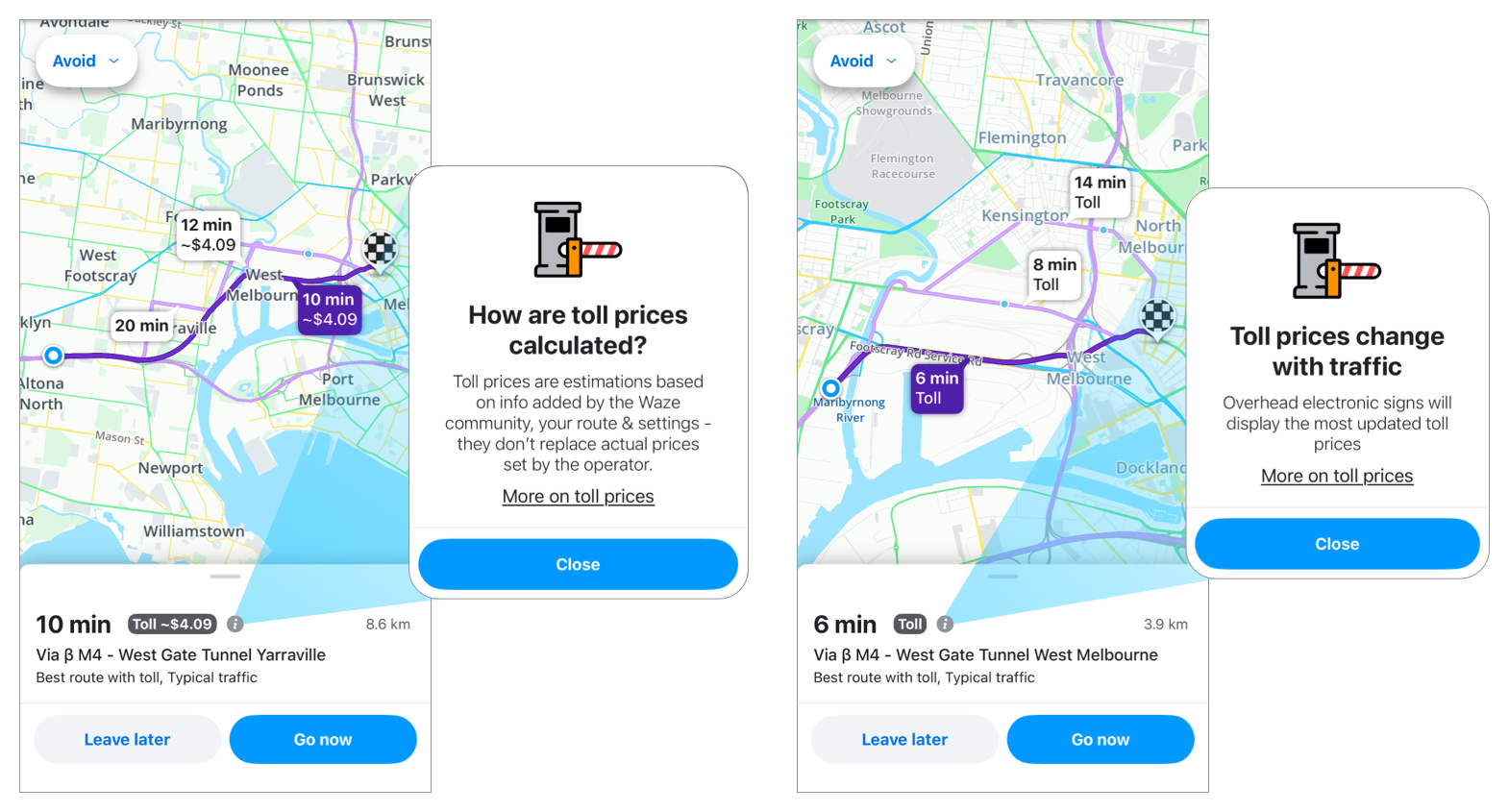
Example of toll information shown on the route selection screen in the Waze app. On the left, a route where toll pricing is configured in the Toll Tool shows an estimated cost. On the right, a route where pricing is unconfigured or set to $0 shows a toll alert without an amount.
How a $0 toll price appears in the app
Setting a toll price to $0 does not display as $0 in the Waze app.
From a driver’s perspective, a segment with a toll price set to $0 appears the same as a segment with no toll price configured. In both cases, the app shows a toll alert and advises the driver to refer to signage.
This is why we recommend making the adjustments described above — mapping the toll free period in the editor using driving restrictions wherever possible — rather than relying solely on a $0 toll price to communicate toll free conditions to drivers.
Public holidays
Test pending.
Toll Pricing Team
This team is responsible for updating the price of tolls in the Waze app for Australia. View the team here.
Toll Roads in Australia
New South Wales
| Road name | Update frequency | Helpful links |
|---|---|---|
| A8 Military Rd E-Ramps | Quarterly | Linkt website |
| Cross City Tunnel | Quarterly | Linkt website |
| Eastern Distributor | Quarterly | Linkt website |
| Hills M2 | Quarterly | Linkt website Pricing cannot be determined in advance |
| Lane Cove Tunnel | Quarterly | Linkt website |
| M2 NorthConnex | Quarterly | NorthConnex website |
| M5 South Western Motorway | Quarterly | Linkt website |
| Sydney Harbour Bridge Sydney Harbour Tunnel |
Irregularly | E-Toll pricing page E-Toll newsroom |
| WestConnex M4/M8 | Annually | Linkt website NSW Government website Pricing cannot be determined in advance nor without using the Linkt toll calculator |
| WestConnex M5 | Annually | Linkt website NSW Government website Pricing cannot be determined in advance nor without using the Linkt toll calculator |
| WestLink M7 | Quarterly | Westlink M7 website Westlink M7 newsroom |
Queensland
| Road name | Update frequency | Helpful links |
|---|---|---|
| AirportlinkM7 | Annually | Linkt website |
| Clem7 | Annually | Linkt website |
| Gateway Motorway | Annually | Linkt website |
| Go Between Bridge | Annually | Linkt website |
| Legacy Way | Annually | Linkt website |
| Logan Motorway | Annually | Linkt website |
| Toowoomba Bypass | Annually | Linkt website Queensland Government website |
Victoria
| Road name | Update frequency | Helpful links |
|---|---|---|
| CityLink | Quarterly | Linkt website Victoria Government Gazette |
| M3 - EastLink | Annually | EastLink website Victoria Government Gazette |
| M4 - West Gate Tunnel | Quarterly | Linkt website Victoria Government Gazette |
Resources
- Feature announcement post
- Wazer to Wazer site on toll prices
- APAC pre-project webinar with the Waze Community Management Team
- Internal toll roads spreadsheet - do not change without consulting the toll pricing team
- Toll Tool - The website where toll pricing is adjusted. Authorised users only. Consult the toll pricing team before making any changes.
- Toll Tool Request Access Form - Access is only granted to senior and experienced editors.
- Toll Pricing Forum