The UR visually appeared on the map as not handled / not already taken by an editor.
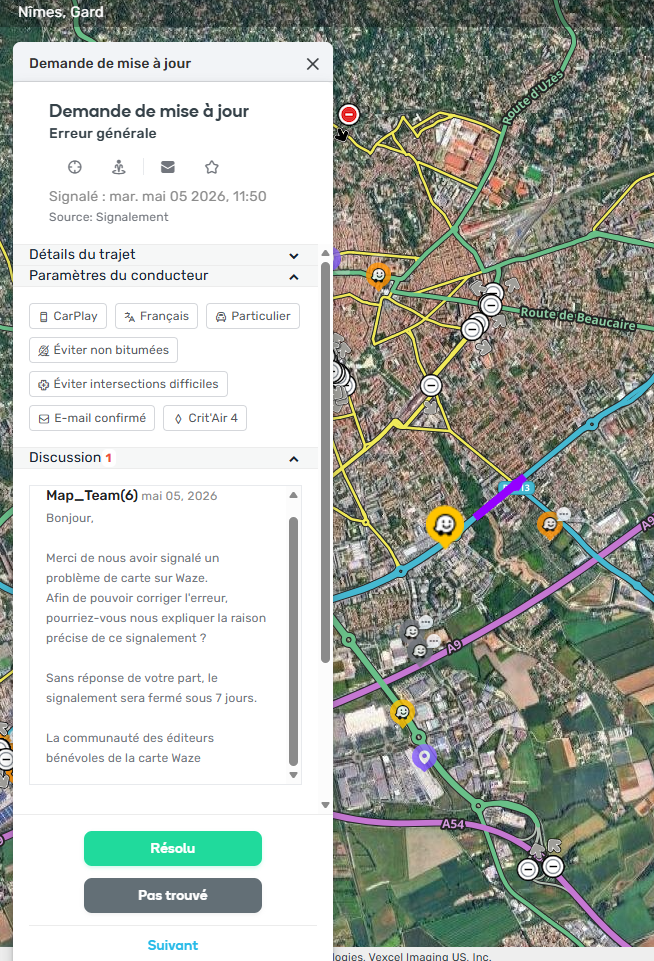
After opening it, I noticed that a comment had already been posted by an account named Map_Team(6). The message was written in French and looked very similar to the usual first-reply template used by French community editors when asking users for more details.
The account appears as level 6, is unknown to the French community, and its profile shows 0 edits.
Actual behavior:
A localized French comment was posted on the UR by Map_Team(6), an unknown level 6 account with 0 edits. Despite this existing comment, the UR visually appeared as not handled on the map before opening it.
Expected behavior:
If Map_Team(6) is an official Waze/Staff/system account, its behavior should be clearly identifiable and consistent. If a comment has already been posted on a UR, the UR should visually reflect that it has already been handled/commented on, or the intended behavior should be clarified.
Could you please confirm:
Whether Map_Team(6) is an official Waze/Staff/system account.
Whether it is expected for this account to post localized replies on URs.
Whether such comments should change the visual status of the UR in WME.
How this behavior is triggered, if it is automated or staff-side.
Yes, I can confirm this is part of a newly released feature . It is an official Waze Account and it is expected that the account will automatically add customized messages to URs without description.
The How to doc with all details is here.
The message you see was submitted by the French community, and you can read more about it here.
Thanks for the additional information and for sharing the documentation.
After reading it, I understand that the Map_Team comment is expected and that the system-generated comment is intentionally not counted as a user/editor comment in the Issue Tracker filters. This makes sense if the goal is to keep URs without description visible through the “User content: none” filter and avoid breaking existing local workflows.
However, I still think two points need clarification.
First, the documentation explains the expected behavior for Issue Tracker filters, but it does not clearly say whether the UR icon/status on the map should also remain visually unchanged after the automated comment is posted.
In the case I reported, the UR visually appeared as not handled before opening it, even though the automatic message had already been sent. Is this also the intended behavior?
If yes, it may be useful to explicitly document it, because from an editor perspective the UR looks untouched, while the reporter has already received a message from Waze.
Second, could you clarify the expected workflow after the reporter replies to the automated message?
My understanding is that once the reporter replies, the UR should then be treated as actionable and appear through the new “Actionable URs” saved search / user content filters. But since no real editor has taken ownership of the UR, can you confirm that the local community is expected to manually take over from that point?
More specifically:
Will a reporter reply after the automated message be counted as a normal user comment?
Will the UR then appear in “Actionable URs”?
Should the map icon/status change once the reporter replies?
Is there any notification or visual cue for local editors that a reporter has answered an automated Map_Team message?
The feature itself is useful, but these details are important to make sure no reporter replies remain unnoticed and to avoid confusion in local UR handling workflows.
Yes. While the initial automated message from “Map_Team” is excluded from the comment count (to prevent interference with filters), any response sent by the reporter will be treated as a standard user comment and will increment the comment count accordingly.
Yes, it will. The “Actionable URs” saved search highlights reports that contain useful information. Since this filter includes URs with one comment from the reporter and no description, a reporter replying to the automated message will cause the UR to appear in this view.
A reply generates standard behavior:
The UR moves from having “None” in the User Content section to having “Comments.”
It will show up under filters for URs with 1 or more comments.
A new comment from a user changes the UR’s visual state to indicate an unread/active conversation (comment bubble).
Yes, there are two ways letting you know that there is a reply from the reporter:
The system utilizes all existing communication channels. When a user replies, it activates the standard notifications (email/push) that occur when any user comments on URs you follow.
Because the system-generated message isn’t counted as a comment, the UR will jump from the “None” filter (0 comments) to the “Comments only” or “Actionable URs” filters as soon as the user replies. Another visual cue is the comment bubble attached to the UR.
Let me know if there is anything else I can clarify.
 . It is an official Waze Account and it is expected that the account will automatically add customized messages to URs without description.