Hi, I am managing the digital presence for Alan Mance LDV in Melton. We need to add/update our official listing on Waze. Can a local editor please plot this for us?
Hi, thanks for reaching out.
What error are you experiencing that needs rectifying in Waze?
Currently Waze is pulling your business from your Google My Business listing which I can see was updated less than a week ago.
Hi Brandon,
Thanks for the quick response!
The issue is that I am managing the digital presence for this client from overseas. Since I don’t have a local driving history in Victoria, my Waze Map Editor account is at Rank 1.
Whenever I try to add or update the venue details (like the exact entrance pin, phone, or website) directly in WME, I keep getting the “Saving Error: You don’t have permission to make some of the changes” block.
Since you mentioned it’s already syncing from Google My Business, could you please double-check if the Waze lock level on this specific venue/place can be adjusted, or if you could manually approve the permanent link to our Google listing so we don’t hit the permission error in the future?
Here is the exact business name: Alan Mance LDV - Melton Address: 1 Holland Dr, Melton, Victoria
Highly appreciate your help as a State Manager!
Best regards,
Jack
Hi Jack,
So currently this business doesn’t have a Waze place, and unless there is a specific issue we need to solve, there really isn’t a point in making one.
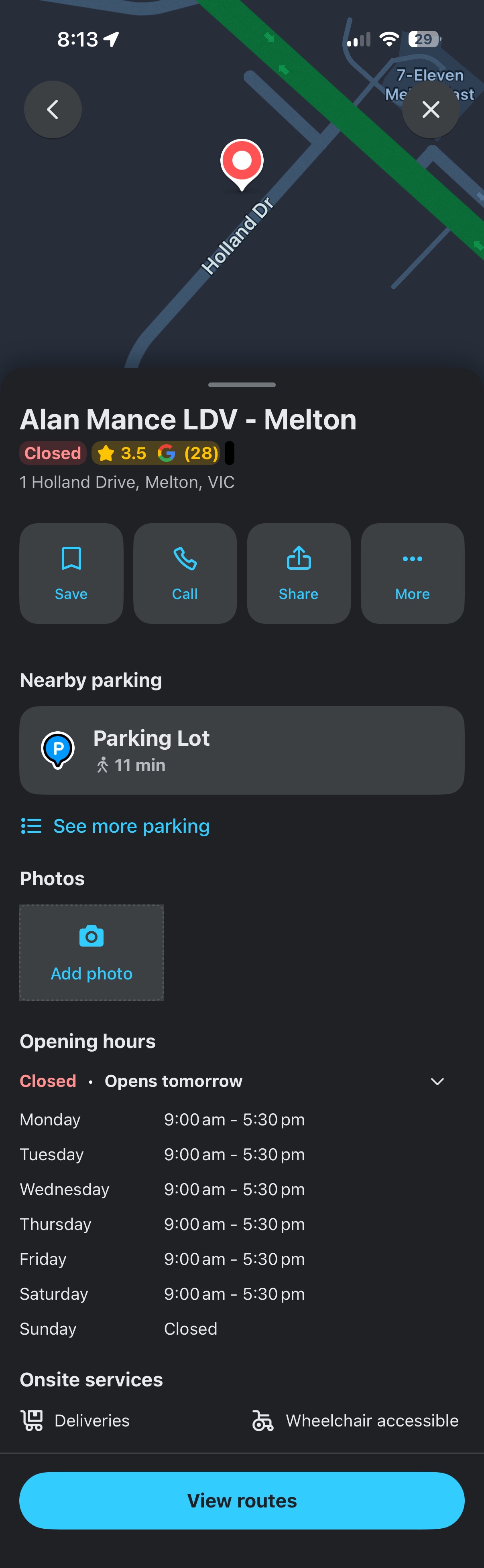
When Wazers search for your business on Waze it’s going to pull your details directly from your Google My Business listing. I can confirm that routing is already providing the best route and that your details are up to date, and you can see for yourself in the below screenshot.
Keeping your business as is also makes it super easy for you to manage - assuming you’ve set up Google My Business. Any edits go through Google’s processes and yourself as a manager/owner in their system, with any changes made - whether it’s address, phone number, website or more - syncing across all their products and services as well as Waze.
I did see your request about one of your other dealerships, where the Waze information was outdated so you needed someone else to update that. With your current set up here, you’re in control and can make changes whenever you need. So unless there’s a specific issue we need to resolve, I highly recommend keeping this as is.
Hope that helps 
Hi Brandon,
Thank you so much for the detailed explanation and for checking the backend sync!
That makes complete sense. Since it automatically pulls the updated data directly from our verified Google My Business listing and the routing is perfectly fine, we are happy to keep it as is. It definitely makes managing the presence much easier for us.
I really appreciate your time and support on this!
Best regards, Jack