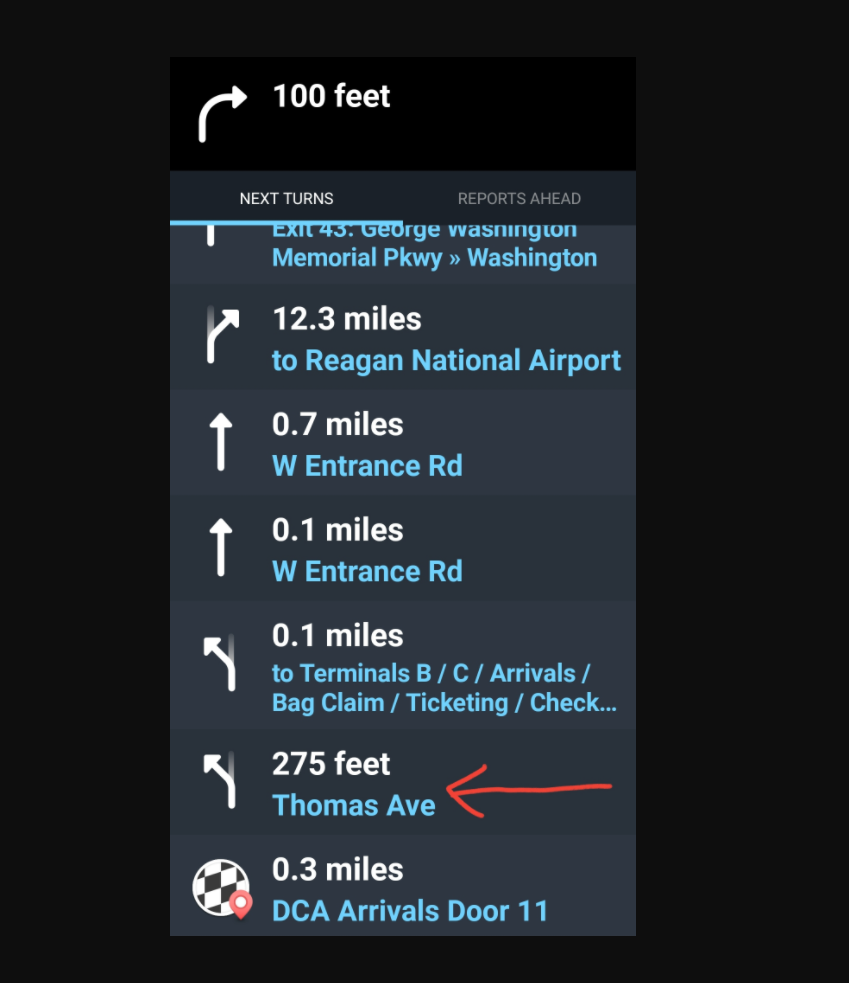
We’ve received a map update request to Waze support and we’re posting here on the user’s behalf. The link to this post will be forwarded for the user to follow up.
This is the user’s request:
STATE: VIRGINIA
CITY: ARLINGTON
REQUEST TYPE: Regan National Airport Departure - Waze is providing wrong directions
The user’s request content:
Everytime I use waze to go to Regan National Airport Departure (upper level), it redirects me to Arrivals(lower level).
When you drive to DCA terminal B&C, you get to a junction point for two lanes. Each lane goes to different locations.
On the left side is:
B/C Arrival/ Bag Claim (leads to lower level )
On the right side is>:
B/C Ticketing checking. (leads to upper level )
Whenever I want to go to Departure using waze, and reach this junction point, waze always tells me to keep left to Thomas Ave. It’s very misleading.
We have separate points for Terminal A (arrivals amd departure same spot) and for Terminal B Arrivals, Terminal B Departures, Terminal C Arrivals , and Terminal C Departures.
We also have each arrival door marked and each airline arrival and departure from location list that the airport gave us.
The B/C arrival and B/C Departure is not listed in Waze since they are two separate buildings.
So can you tell us exactly what is shown in your route history?
Also for the record we do announce the split by the words on the signage.
The keep left to Terminals B / C / Arrivals / Bag Claim / Ticketing / Check-in
The exit right Terminal A /Ticketing /Check-in / Arrivals / Bag Claim
if you went left to Terminals B/C then you eventually get keep right to Smith Blvd which is departures or keep left to Thomas Ave which is Arrivals. (For android auto
or CarPlay
If you are using the app the you would get visually and verbally keep left to Terminals B / C / Arrivals / Bag Claim and keep right to Terminals B / C / Ticketing / Check-in