Hi all,
I have a situation where waze does not route to the navigation point of a place.
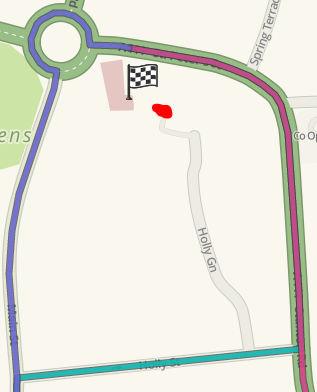
In the screenshot, you see the destination; a surgery. The carpark of said surgery is where the little attachement at the top of Holly Gn ends, this last tiny bit is a private road to the carpark. I put the navigation point at the little private road, where I demonstrated my Paint skills in a beautiful red, but not quite round, dot.
Yet, as you can see, none of the routes go up Holly Gn to the carpark. They all go to the listed address of the place. Only thing is, there’s no way to park or stop at the listed address. In fact it’s a double yellow line.
So how can we force waze to go to the carkpark? Atrophicshiner suggested adding the google place, but that option seems to have disappeared for me in WME.
Perma link:
https://www.waze.com/en-GB/editor/?env=row&lon=-1.62163&lat=52.79471&layers=16293&zoom=7&mode=0&mapProblemFilter=0&mapUpdateRequestFilter=0&venueFilter=0&update_requestsFilter=false&problemsFilter=false&u
pdate_requestsFilter=false&lo%20...%20ueFilter=0&apProblemFilter=0&%3BapProblemFilter=0maar
As always, thank you for any insights. 
Hi,
I’ve just tested it on my Android phone and it takes me to the end of the private road where the red spot is. However, on a Windows Phone and the live map, it does stop on the A444 - St Peter’s St adjacent to the building - this being the road set as the address for the building rather than the car park at the rear. This lack of consistency between apps is odd, although I’ve seen similar before.
Where was the point for the surgery before you moved it to the private road? Was it on or very close to St Peter’s Rd?
The latest map update was only for edits before midday on 31st October, which is the day you last made any adjustments to the map. Were you edits made in the afternoon or evening? If so, they’ll only get updated at the next map update (or even the one after that).
Something else to be aware of with respect to the app after the next map update happens is, it doesn’t update an old search with a stale/updated location/address. If you’ve searched for it in the app already and then search for it again, it’ll cache the stale data and the route will default to the old address every time. You’ll have to manually delete it from the ‘recents’ list otherwise it’s likely it’ll keep misrouting.
Dave
Hi Dave,
Thank you for your reply.
I checked the routing on my browser with cookies and cache deleted just in case. Same result for me. I’ll check it with my and my SO’s phone later today, iOS and Android. I hadn’t thought of cached data, so thank you for pointing that out.
Let’s see, I made the private road last week, and named it Monday. I didn’t know if no name would make a difference. I don’t believe I altered the point on Monday, pretty sure I did that last week. It was near the entrance, which is the lower right part of the building, that sticks out a bit.
I’ll have another play after another map update, just in case that might change things.
Since you’ve seen this kind of inconsistency before, what was done to resolve it in the past? Is it often due to one or two types of “mistakes”?
Hi,
No problem.
To delete a destination from the app is simple. In Android, hit the mag glass in the bottom-left of Waze when it’s running, then scroll down to any entry that you have for the surgery in the list. Tap on the … to the right of the entry, and then select ‘Remove’ from the pop up menu. If you’ve saved it to favourites, also do the same again in there. It is the same method with IOS.
The name of the road won’t make a difference, but when it was connected to the rest of the map will. It sounds like the original point for the surgery is more-or-less exactly where the Google Maps link is. However, when using Google driving directions, it tells you to dump the car in the main road outside and finish off with a walk! I suppose that makes sense given the street address of the place.
A fresh search for the surgery in both Android & IOS takes you (correctly) to the end of Holly Green. However, Windows Phone takes you to the A444 - St Peter’s St - exactly as per the GM directions. Although this is odd, WP hasn’t been supported by Waze for over a year now so I know what they’d say about that! :roll:
Personally, I’d try two things here. Firstly, if you’re using Android or IOS, delete any old searches for the surgery and then search again from fresh. Chances are that it’ll work. Secondly, try and get the Google link working.
The inconsistency that I experienced was more to do with Android/IOS/WP returning different search results for the same places, and calling some of them different names. There wasn’t a fix as such. I was just using this as an example to highlight the lack of consistency across the different platforms.
Dave