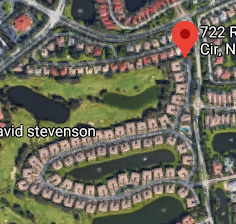
When using Waze for my home address it goes to the wrong street. I went on the Waze Map Editor to try to fix the issue, but it shows the correct location online (I didn’t have to edit/change it). Any advice on how to have the correct location on the app?
Address: 722 Regency Reserve Cir. Naples FL
Attached picture: Left side app view while in my house, right side online Waze Editor
I took a look at the issue and the resolution my seem a bit strange, but it’s because Waze using a Google maps result. In order to fix the issue that should be corrected by submitting a incorrect location on the Google map pin you can also add a Residential Place Point (RPP) on your house in the Waze Map Editor, which would override the Google result and route properly to your house.
Please help. How can we fix this? Delivery drivers and friends using Waze keep being taken to the wrong location when in putting my address: 3111 W. Ave. M-6, Lancaster, CA 93536.
However–See Google Maps displaying the correct address attached–but Waze takes people about 1.5 miles away from my actual home location.
This is a bit out of my area as this was posted in Florida and the issue is in California.
Here’s the complicated part of the issue. The Waze app displays both Waze results and Google results. In the case of this issue there are 3 addresses that show up on the Waze app.
3111 Ave M 6, Lancaster, CA, USA <- This is the correct location in Waze that matches Google.
3111 W Ave M-6, Lancaster, CA, USA
3111 West Avenue M 6, Lancaster, CA, USA
The Waze results should take precedence over the Google results.
I have made a request to Google to move the errant pin to the proper location, but as of this morning it is still under review.
I have also made some adjustment to the Waze map, that should help resolve the issue and should update in the next couple days.