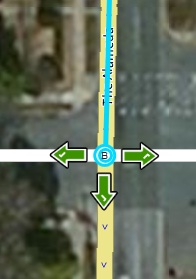
User Reported Error says: “alameda southbound directions wrong-- says to turn left at 35st [sic] instead of staying straight. route shows correctly on map though”
There is a stray geometry node right at the end of the segment that ends at 35th that I think is causing the instruction. If you try to select the end node you can see the double circles.
If you delete the stray node the problem should go away.
The intersection of Alameda and Loch Raven needs help. Let me know if you can’t correct either intersection.
To be perfectly honest, when I first clicked on the segment, I had the landmark layer on and the bug where you can’t properly select segments reared it’s head. Thus, I saw the blue line without the A/B circles and I could see a tiny little jog at the end of the segment.