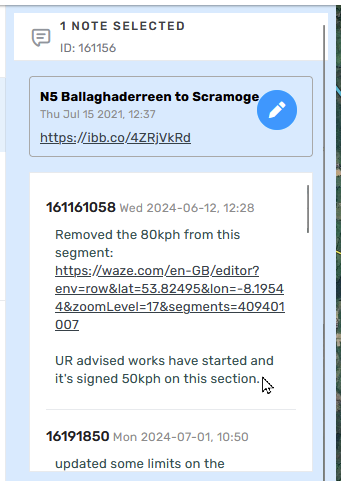
Same appears to happen with Map Notes sometimes:
6 Likes
I reported to Waze since end of last year ….but nothing is happening ….
5 Likes
Hi Silvio,
I hear you and have highlighted this issue to the team accordingly. I’ll let you know when I hear back.
In the meantime, can you please let me know when it happens on your end most often?
Does the number of returned URs make any difference, such as in the example mentioned by @Olestas?
Thank you and regards,
Olesya
4 Likes
4 Likes
Hi Olesya
I sent mal to Shira April 19 2025 with a log doc full of examples …than further reminders
If needed , I will add you to the doc and share link by mail
4 Likes
Anyway Olesya
I believe is something know to Waze as today I received some nicknames in this form :
441b986a8807481eaff8279db880b3c6
Clearly useless
4 Likes
Overall.. like if I set only show open or only show without comments… but count can be different by country of course
5 Likes
I was told that a username like 441b986a8807481eaff8279db880b3c6 belongs to someone who registered several years ago through his/her Google account. As of now, no such usernames are given in such cases.
5 Likes
I don’t have one at hand, but the issue happens inconsistently on any Map Note. Similar to how it manifests itself in URs.
Meaning the same Map Note might display usernames correctly now, and might display the numbers instead of the username in 1h.
4 Likes
Thank you for your response, @YanisKyr. For Map Notes, here might be a different root cause, therefore, it would be great to have an example so we can investigate it further. Please let me know when you come across numbers instead of usernames on Map Notes again.
Best,
Olesya
3 Likes
Hi @Olesya-Staff ,
Here another example from today - https://waze.com/en-US/editor?env=il&lat=32.70742&lon=35.51009&zoomLevel=17&mapUpdateRequest=4511430
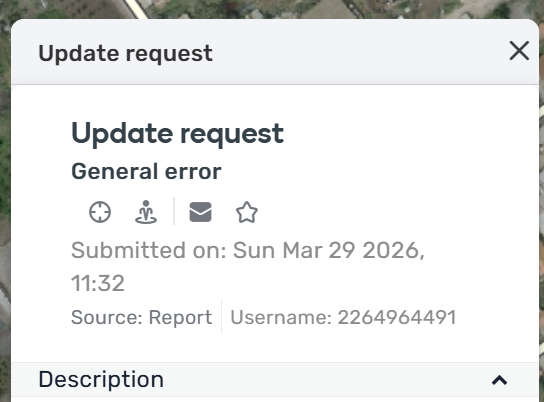
I’ve tried also in incognito mode and with more than one browser …
3 Likes
Hello @sh-oded,
Thank you for providing this example. The issue is still being investigated. I will keep you posted on our progress.
All the best,
Olesya
3 Likes
Happened again with this map comment.
3 Likes
I don’t see usernames in >80% of the URs. Reopening, refreshing, selecting it from the issue tracker - all fails and I see only IDs (numbers).
It doesn’t seem to be affected by scripts as I could reproduce that even without them. It is consistent for me.
1 Like
I managed to do some more testing. When using the “Map area” filter, it seems that usernames are showing up. Only when using the managed areas or specific area filters do the usernames disappear.
I don’t think it is related because in my managed area there are only 8 URs, yet in none of them can I see the username. When I switch the filter to the map area filter only then I do see them.
It also does not related to reopening the UR multiple times. I did try that with the managed areas/specific area filters and never got them to show up. Also, when switching back to these filters, the usernames are gone, despite I was just seeing them.
1 Like
One thing I’ve noticed is that usernames will most often appear on the first open, after that it goes to the usernumber.
As such, one test I’ve done is I’ll create a permalink with the UR active and open it in a new tab - when this loads, the UR has the username.
If I go to another UR, it reverts back to numbered username, but I can do the selected UR permalink/new tab again and that UR will show.
Its unaffected by Issue Tracker filters or scripts.
1 Like
This behaviour also affects wmeSDK (@Gal-Staff @elanhamiprod ), when retrieving the results of the getUpdateRequestDetails. The userName of the ConversationElement becomes null.
Hi @gutrixio,
Thank you for letting us know. I have added this information to the internal ticket. The issue has been marked as a high priority, and the team is currently working on it. I’ll keep you posted on further updates.
Best,
Olesya
1 Like
Hi @Olesya-Staff
Any updates on this?
Regards
Hi @andres_twins,
No major updates just yet, but the team is working on a fix.
Thank you for your patience, and I’ll let you know the moment we have news.
Best,
Olesya
1 Like