Any update on this?
Is this still a Local issue? Or is it a full blown bug? WME is not working as designed.
Any update on this?
Is this still a Local issue? Or is it a full blown bug? WME is not working as designed.
Hi Mike,
From the examples we’ve analyzed, it seems that the reported cases are related to editors’ permissions, possibly due to changes in permission levels. We addressing each case separately.
If you come across new examples, please send them to us, and we’ll recheck them with the team.
Thank you in advance!
Nataliia
Addressing each case per editor? Or per editing example (the segments included in the junction box)?
Hi Mike,
We need an example of the problematic segment and also a name of the editor who has issues.
Regards,
Nataliia
Here’s another case where I’m unable to remove the junction node on these two segments, because the northernmost segment goes into the junction box.
https://www.waze.com/en-US/editor?env=usa&lon=-111.97710&lat=33.42002&zoomLevel=18&segments=535223215,535626749(unavailable attachment: Screenshot 2024-01-11 at 9.28.45 AM.jpg)
Thank you Ryan. I have forwarded all the information to the team, they will recheck it.
Regards,
Nataliia
There are also three users (possible more), both L4, no WME Beta Testers which have the problem that they can’t split segments which have one node inside the JB.
Permalink Prod: https://waze.com/en-GB/editor?env=row&lat=51.15268&lon=6.45325&zoomLevel=19&segments=251198987
Permalink Beta: https://beta.waze.com/de/editor?env=row&lon=6.45369&lat=51.15268&zoomLevel=19&segments=251198987
Screenshot of Error Message: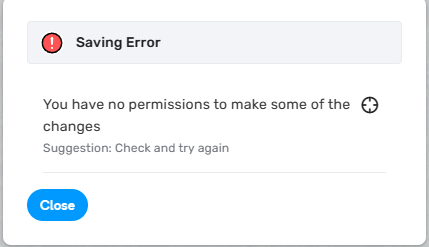
Permalink Prod: https://waze.com/de/editor?env=row&lat=49.40798&lon=8.67329&marker=true&zoomLevel=19&segments=142721851
Permalink Beta: https://beta.waze.com/de/editor?env=row&lon=8.67378&lat=49.40808&zoomLevel=19&segments=142721851
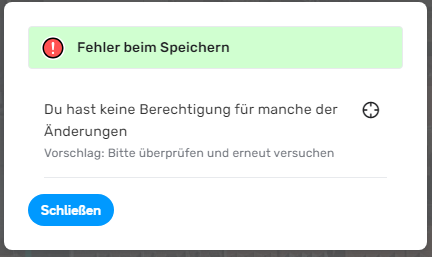
Screenshot of Error Message:
3. Dancingman81
Permalink Prod: https://www.waze.com/de/editor?env=row&lon=10.12559&lat=53.64472&zoomLevel=19&segments=439223152
Permalink Beta: https://beta.waze.com/de/editor?env=row&lon=10.12632&lat=53.64475&zoomLevel=18&segments=439223152
Same Error Message as the two above.
Regards
Peter
Thank you Peter for reports. I have forwarded them to the team.
Regards,
Nataliia
Hi,
I found an example of this error, in which I am unable to Merge two segments (that is, delete a Junction Node), where the other node of one of the segments is inside a Junction Box. I have isolated the error to this one action, and have it happen in vanilla WME (incognito mode, no old cookie data, no scripts).
My task is to reconfigure parking lot roads and consolidate 3 JNs into 1, as illustrated: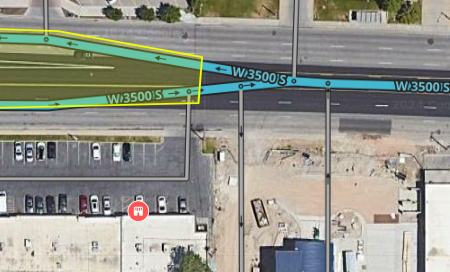
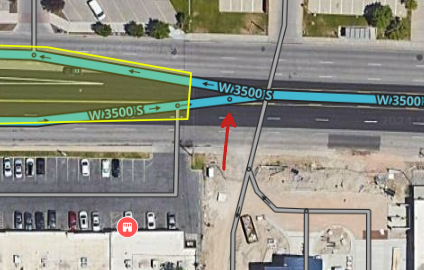
When I attempt to delete the Junction Node indicated with the red arrow, I receive the following error message while the center of the adjoining Junction Box is highlighted:
The Junction Box is locked at Auto(4), and the highest lock level of any segment attached to the JB is also 4. As a Rank 5 editor, I should be able to make the edit. The only clue about there being a rank/lock associated with the JB is that it was created and last edited by a Rank 6 editor, @turbomkt.
I hope this information helps troubleshoot this bug. Thanks and good luck!
Hi Rocketsciguy,
Thank you. for sending this case. I will forward it to the team.
Regards,
Nataliia
@Nataliia_Staff
Here’s another example of one where I can’t merge the segments as I don’t have “permission.” Is there an update from devs as to why I can’t do this?
Hi SunDevil2213,
No updates right now, sorry. I have added this example also to the internal ticket and pinged the team.
Regards,
Nataliia
I have another example of this problem. A Rank 3 editor was mapping a new neighborhood that I had identified (UR and MP in the screenshot), but was unable to connect it. The existing road, S Desert Color Pkwy, is part of a Junction Box which set up by a Rank 6 editor (@turbomkt) to provide proper routing through a roundabout. The R3 editor asked for help, so I tried and was also unable to connect it. All segments involved are local Streets locked at Level 1 or Auto(1), and the JB is at Auto(4).
Please note that this bug occurs in Production WME with no scripts or extensions.
Since the new neighborhood is only accessible from S Desert Color Pkwy, I will need to use a workaround (delete the JB, make the connection, rebuild the JB) soon in order to make the homes here routable in Waze. Rebuilding the Junction Box will likely make the bug disappear, so I will delay doing that for a few days. Or a R6 editor or Staff will need to connect one of the west entrances and we can see if the bug is preserved on the east entrance closest to the JB.
Permalink to location and segments: https://waze.com/en-US/editor?env=usa&lat=37.01730&lon=-113.59709&zoomLevel=19&segments=535919862,529287669!Saving Error Cutting and Connecting a Segment Involved in a Junction Box (St George, UT).png|1231x401
I wonder if the issue is related to the fact that an R6 editor created the JB and something in the background is locking to L6. I don’t know if the other cases are the same or not but just a thought.
It’s a thought, but I don’t think it’s the issue. Looking at each example, some are where I created the JB. Some are where Ryan or someone else created it, and I edited the JB. Others were only touched by level 5 editors.
Thank you Rocketsciguy forthe new report.
I have forwarded it to the team.
Regards,
Nataliia
@Nataliia_Staff,
I have received three more requests from @SunDevil2213
https://waze.com/en-US/editor?env=usa&lat=33.40900&lon=-111.97481&zoomLevel=19&segments=535694020,532379017
https://waze.com/en-US/editor?env=usa&lat=33.41086&lon=-111.99891&zoomLevel=18&segments=535294834,535294830
https://waze.com/en-US/editor?env=usa&lat=33.41092&lon=-112.00482&zoomLevel=18&segments=535294835,535294836
Do we keep provided examples? Or should we simply fix and move on? This issue has been ongoing for more than a year.
Hi @turbomkt,
The team is actively working on fixing this issue. Right now no new examples needed. I will update when we have news.
Regards,
Nataliia
Hi Everyone,
I’d like to inform you that the team is actively addressing this issue. In the meantime, they suggest the following workaround:
(Renaming the JB expands the editing bbox to include the entire JB area).
Please try these steps and let us know if they help! I will keep you posted about further updates.
Regards,
Nataliia
I just tested this and can report that this workaround, naming the adjacent Junction Box before clicking Save , worked for me. The case I tested was one where I wanted to merge two segments and remove a Junction Node that wasn’t needed anymore (posted here in January).
Of course this workaround only works for editors who have rights to edit Junction Boxes, so a permanent solution is eagerly anticipated. 
