Is this a…:
Standard bug Steps to reproduce this issue:
0. Create or find a point of interest with type CHARGING STATION.
Add information to any of the charging station fields:
Location in venue
Network
Cost
Payment methods
Charger
Access type
Save
Change information in any other charging station field (see previous list).
Save
Refresh view
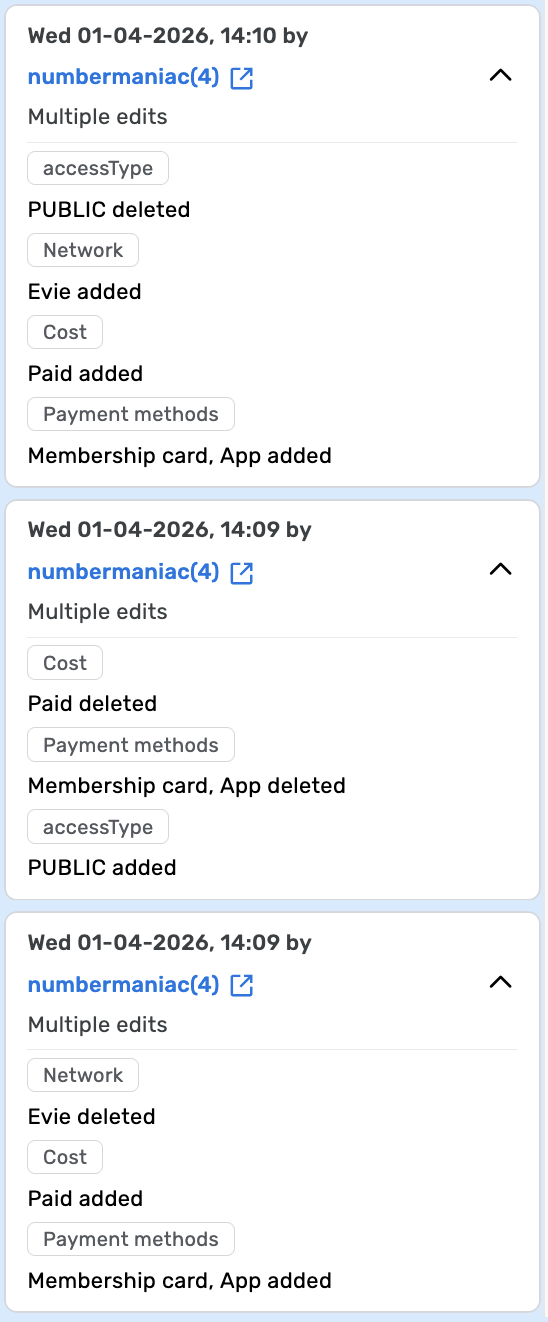
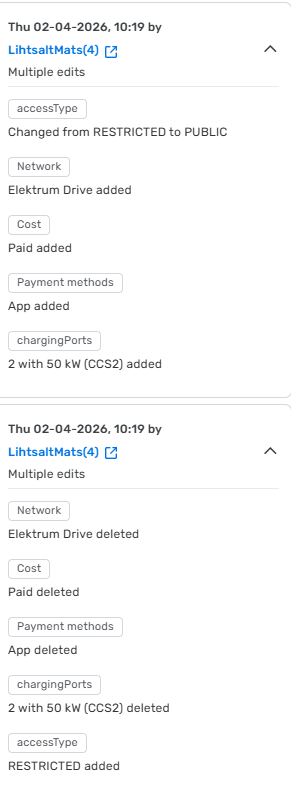
Problem: the data added in the first step will revert to default.
Expected: keep previously added data in place, change when it’s actually modified.
Seems to happen with Charging Stations only.
Environment where the bug occurs…:
ROW Permalink:
Any charging station Browser name and version:
Google Chrome 146.0.7680.165 Are you using scripts? Please detail which ones.:
No scripts.
@numbermaniac
The workaround seems to be to modify every field once again, then it seems to stick. Changing only some of the fields will reset the others.
Can this be checked and if needed fixed from the backend? As an editor it’s difficult to find charging stations without the value as everything seems correct in the user interface.
@brandon28au , I have checked with the team and the fix should be already available. Could you please check on your end and confirm if everything works as intended?
@LihtsaltMats , could you please share any permalink as an example of the issue so that we could look into the problem further? I tried to reproduce the issue on my end but all data remain in place after saving the changes.
Hi @Kasia-staff, yes everything looks good from here. Just wanted official confirmation from staff for anyone who comes across this thread as well as us lowering the lock level in Australia so more editors can contribute without being worried about this bug, so thank you for that.
Sadly I don’t remember anymore if I left any charging stations in broken state, went over some and seems like I fixed those. You’re right that new stations are working fine, because the access type is added automatically. The problem was caused by the bug in this topic. The access type value was deleted. If you check in the backend if there are any charging stations which are missing the access type value then those are likely problematic and won’t show up in the client’s map search.
Hi, @Nataliia_Staff
Would it be possible to check the last historical value as well, before it was deleted? If it exists then that should be used.
If there’s no historical value then PUBLIC is correct as it is the default value in WME.
The automatic update would be immensely helpful, because there’s no good way to check the missing value in the editor.