Closure status in WME
In the Waze Map Editor (WME), closures are used to temporarily restrict traffic due to local events, construction works, road incidents and more. The WME displays both the current status of a closure and its historic status. This addresses previous limitations in reflecting real-time closure statuses and working with different map data, allowing editors to review closure details and their timelines even after a closure’s scheduled end time.
To view active and past closures (in the last 7 days):
- Log in to the Waze Map Editor
- Click
 , in the top-right of the map display
 - Turn on the Road Closures layer
Types of closure statuses
Segments with closures will display an icon of their current status directly on the map and on the closure card, providing a quick overview of the current traffic restrictions. A closure can have the following statuses:
| Status | Description | Status tag |
|---|---|---|
| Not started | The closure has not yet begun. |  |
| Active | The closure is currently in effect, impacting traffic flow. |  |
| Suspended | The closure is currently in effect, but the server has suspended it due to unexpected traffic on the segment. |  |
| Finished | The closure has ended and is no longer active. |  |
| Finished early | The closure ended before its scheduled time. |  |
About past closures
- You can edit the segment if it has only past closures
- You can delete the segment if it has only past closures
- Past closures cannot be edited, such as changing their end time and reactivating them
- If the segment has only past closures, the closure sign on the map segment is colored according to the set design

Got questions?
Can I view a closure’s “Status history”?
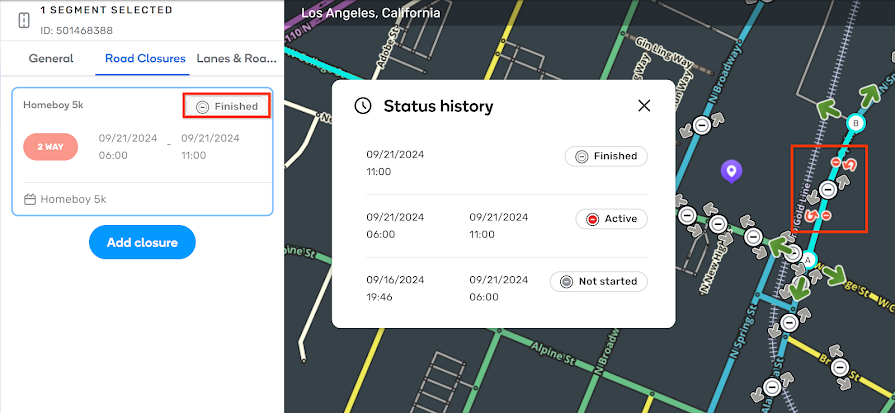
Yes. To view a closure’s status history, including the start and end dates and times:
- Log in to the Waze Map Editor
- Select the relevant segment
- Under the segment’s Road Closures tab, in the relevant closure, click the status tag. A popup will appear with the “Status history”.
How are multiple closures on a segment displayed?
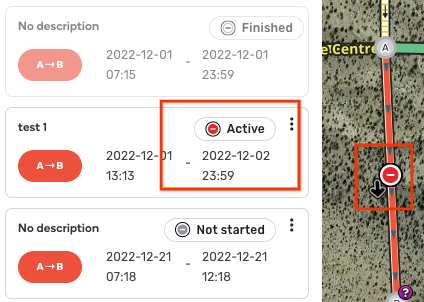
When a segment has multiple closures, we prioritize and display only one icon for the most urgent status:
- If there’s an “Active” closure, it will be displayed
- If no “Active” closures exist, we’ll display the closure with a “Suspended” status
- If no “Suspended” closures exist, we’ll display the closure with a “Not started” status
- If there are no closures in any of these statuses, we’ll display the closure with a “Finished” status
How are closures from feeds displayed?
Closures from feeds won’t appear for 7 days after their finish due to our current database structure. However, we are working on a solution to store these closures after they finish.
What happens if a closure is deleted?
If a closure is deleted (and not just “finished”), it’ll be removed from the database and won’t appear in the Road Closures tab.