So the current pin shows where 16 would be but it’s not there. 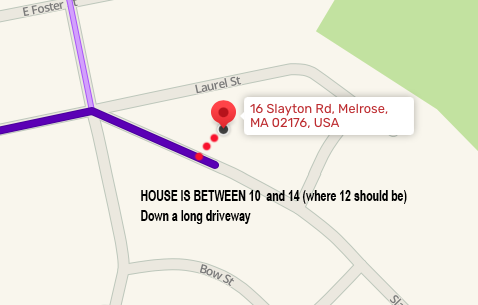
16 Slayton Road, Melrose, MA is between #10 and #14 (were 12 should be) down a long driveway. It is important to not pin the house too far back or it will auto-correct to the back street.
I have made edits to that address which corrects navigation to that address. As you know, GPS will snap you to the closest street. If the house is set back from the street and closer to the street behind it, you will be snapped to the street behind the house.
To get these edits in your app and be navigated correctly to this address you will have to delete all drives to this address from your app, including any preset favorites including “home” When you reenter this destination you should be navigated correctly. Thank you for your report. Please continue to report any map issues that you find in your travels
SNYOWL
I’m sorry but your correct made it worse. It is auto-correcting to the back of my house. I run an airbnb and this is a MAJOR problem.
Is there anyway you can place the pin to the house closer to the street between 10 and 14? If not, then I need you to remove the correction you made because it’s worse.
The correction that snyowl made hasn’t taken effect yet. Address location changes are not immediate - it could take a week or so for this change to be reflected in the Waze app.
Thanks!
That’s odd because before It showed it in the wrong location on Slayton and now it’s showing Laurel St.