Hi, I’ve approved your changes but we can’t include the postcode in your house name. That postcode is for multiple properties.
Regards
Steve
Thank you so much.
But why do I still get the wrong address on my phone when I enter the address?
Because it takes a tile update before the information entered on WME updates and becomes searchable on the app. That normally happens overnight but sometimes takes a day or two longer.
You will also need to remove the search history from your device and search for it again so the app pulls the updated information.
Thanks
Ok, but what can I do with post code how can I attach it to this house?
Can I now see the correct path to all of this after the update?
You shouldn’t be attaching a postcode that covers multiple addresses to a single place. Waze by default does not contain any postcode data,
Postcodes generally cover areas, not individual properties. When you search for them, Google Maps provides the area of the postcode to Waze, and then Waze navigates to the closest road to the centre of the postcode so is not very accurate. Many postcodes cover large areas.
You should navigate in Waze using the House number and road name, or by the place point. In your case, searching for “Aldworth House, Tennyson’s Lane” will result in you being navigated correctly via the new access roads added today, once they update on the app.
Regards
Steve
Perfect, thank you so much Steve.
Best regards
Oleksii
No worries. If you need any more help, feel free to join us on the UK Discord server here: https://discord.gg/E7KeMcpD
There’s generally people online who can help you, as well as a mentoring channel for new editors.
Regards
Steve
Can I send You a private message if I have other questions?
Best regards
Oleksii
Best thing to do is join the Discord server, that way anyone can help you. I may not be around if you contact me directly
Tell me please why Waze can’t use my new road?
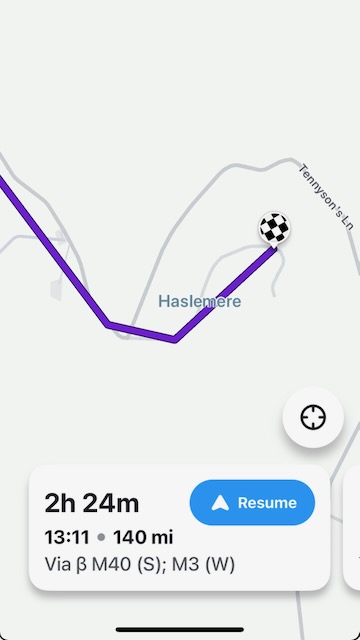
I am trying to use the route to the house, but it is not being built correctly, namely, I am not using the street that I added. Maybe it should be made like a main street?
https://prnt.sc/rLekl-S46iTt
It hasn’t fully updated on the app yet. The live map (your screen shot) and the app also update with different timescales and often don’t same information. You should test it on your app (after deleting any previous searches for it) to try it out.
On my iPhone’s app I have the same problem:
https://prnt.sc/-Pj55E6QBG3i
Have you done what you’ve been told to do, delete this from your recent history / saved locations so that the app isn’t using cached data :?: Testing in my own app routes correctly as currently mapped.