I cant believe Im not finding anyone else with this problem. Ive spent idk how much time staring at the navigation screen of the app tryin to figure out how the hell I type in a location then navigate to it…am I the only one that cant figure this out??/
So first you you hit the menu button, then select navigate. Then you type in, or say a location, address or whatever into the search field.
Once your location you wish to navigate to is entered into the search field, then what??? There is no button that says “go” or “navigate” or anything of the sort to tap on that screen. I only have “close” at the top right of the screen, the voice button to the right of the search field, then the preentered destination fields below like work and home, then at the bottom, I have “favorites”, and “history”.
So what, pray tell am I spose to tap to start up navigation??
Click on the blue search button on the keyboard. (iPhone)
After you hit the blue search button on key board, you will get results. Then you can scroll across bottom to see results from Bing, Google, your contacts, Waze, etc. pick the best and it will calculate.
Just FYI, waze doesn’t have address turned on right now, so for specific address routing, look at bing or google. Waze might get you close, but not to the door. Once you play with it a little, you will see.
Sent from my iPhone using Tapatalk
omg I have to use the keypad…well crap man youd think they would have somthing u hit on that screen, because if I voice it in, then I have to bring up the keypad then hit enter. Be nice if they added somthin down the road.
Thx for the replys
I’m having the same problem.
What blue button? I’ve checked all the keyboards on my phone and there are no Go buttons. I’m betting there are more scenarios without a blue button than there are with a blue button. There needs to be a way to tell Waze that you have finished inputting your destination.
Apparently the blue button is specific to one type of keyboard (iPhone??). Where is the blue button for voice input? Why have voice input if there is no way to tell Waze you are finished inputting?? What about Graffiti text input? What about Swype input? What about all the rest of the input methods that don’t have blue buttons? I believe the Go button needs to be built into the screen to satisfy all input methods.
And I might add that if you design a Go button onto the screen, it cannot be at the bottom of the screen because there are input devices which overlay the bottom of the screen that would block the Go button. I’ve run into this frustration on other apps.
Yep, that is what iPhone has.
What phone are you using?
I just figured it out myself. For Android phones, on the keyboard it is the button with an arrow pointing left. Looks like an enter button.
Or the magnifying glass button which is the default “Search” symbol on Android.
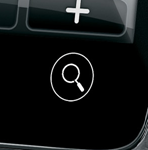
When typing in an address in Waze you have one on the virtual keyboard that you should use, the one below the screen (like the one in the picture) does not work, only the on-screen one. Hitting the return as you found also works if that is given.