 |
The MapRaid will run from 9 AM EDT on Sunday 4/26/2026 thru Saturday 5/09/2026 (likely 0ː00 UTC, which is 8ː00 PM EDT on 5/9/2026). Please do not make any edits in the raid area until after the raid begins |
The main goal of this MapRaid is to add External Provider (Google) links to Waze Places that currently don’t have them and to ensure that the places are updated with information as much as possible.
MapRaid Goals
- Add External Providers
a. Navigate to a pre-identified place via the provided file
b. Add external provider link - Confirm place details
a. Use the company website and/or WMEPH - Confirm the place is routable via the road system
a. There is still quite a bit of base map in WV, please verify that the place is routable.
Communication
We will use Discord to communicate. You must be in the Waze MAR Discord server to be able to edit in this MapRaid.
If you do not understand anything, please askǃ If you need help figuring out where to start, please askǃ If you think you did something correctly, but aren’t sure, please askǃ Between all of us editors and leaders, it is likely there be someone online to help you.
MapRaid Leadership Team
| Username | Roles |
|---|---|
| JasonN899 | Raid Leader, MAR Culture Chair & MSM |
| fuji2086 | MAR Local Champ & WV SM |
| nzahn1 | MAR Regional Coordinator |
| ldriveskier | MAR & GLR ARC |
| N4DOG | SER Local Champ & AL SM |
| Umarth735 | GLR Country Manager & OH SM |


Pre-raid NA Waze Study Hall
Guidance
If you have any questions regarding WV standards during editing and you cannot find the answer on this page, please visit the West Virginia Wiki Page and/or the MAR Wiki Page.
Places
West Virginia follows the USA national Places guidance.
For specific WV naming standards please review the WV Naming Standards
To prevent loss of data due to automatic acceptance of submissions from “trusted users”, all area places and points with complete data should be locked to Level 2 at a minimum. Additionally, please consult the following table for minimum lock level for completed places.
| Place Type | Minimum Lock Level |
|---|---|
| Area/Point Places | 2 |
| Gas Stations | 3 |
| Hospital/Medical Care | 4 |
| Fire Department | 4 |
| Police Station | 4 |
| Airports | 4 |
| Parking Lot Area (PLA) | 3 |
WV Roads
Road names in West Virginia follow the nationwide Road Name guidance. Pay specific attention to the list of approved Abbreviations and acronyms, and when in doubt: “spell it out”.
Base Map
In some counties, such as Wayne County, the state and county GIS road layers may contain far more “roads” than should be mapped in Waze. They may include logging paths, hiking trails, or other types outside of the scope of Waze. These are typically unnamed. Use caution in areas where unmapped segments appear in GIS data.
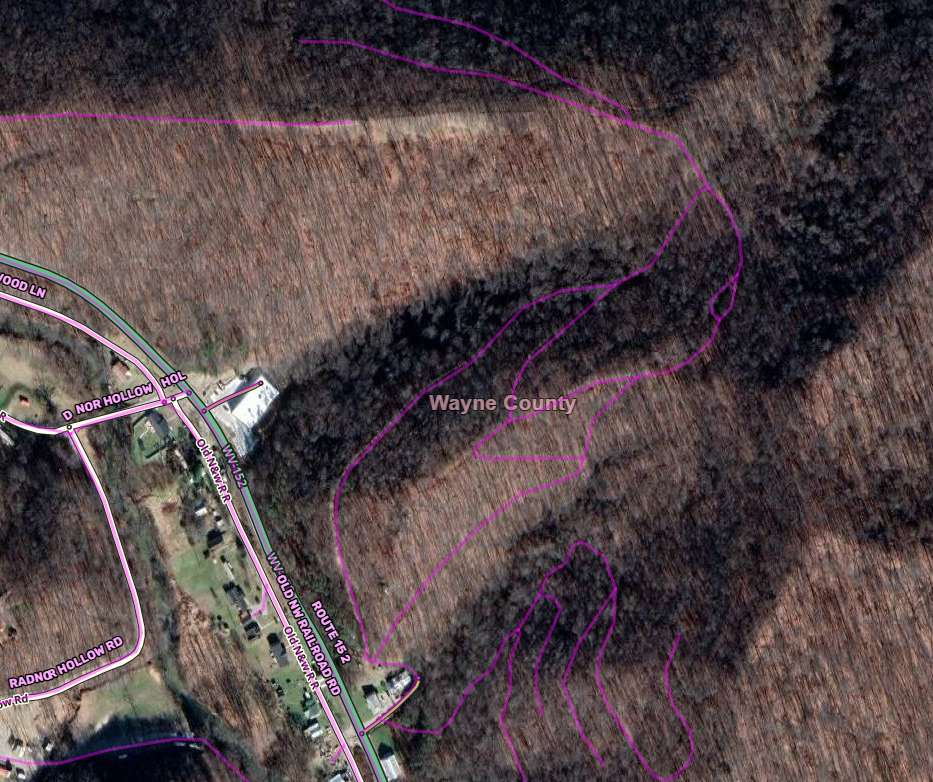
Road Naming
In general, use the data you find first on this list as the primary name and all other names/numbers as alternates. ̈If you get confused digging through all of the different GIS sites, which will probably happen (it has to all of us), please contact a member of the Raid Leadership team for guidance.
- Use SV to find BGS/LGS - if available, this is the primary name.
- State road layer and address point layer in GIS-Layers (This pulls from the 911 database statewide. In most counties, the data is great.) - This info is also on WV Flood Tool
- County road layer in GIS-Layers or County GIS.
- County address point layers in GIS-Layers or County GIS
- USPS Address Search - check addresses and add as an alternate, as appropriate per the City Name guidance (which is clarified for West Virginia below).
- Parcel information from state/county.
Notes:
- If data is only available from a single source, use it.
- If multiple sources conflict with a single source, use the road name confirmed by multiple sources and add the other names as alternates.
- If it isn’t possible to be sure about the primary name and there is already a primary name on the segment that matches any of the possibilities, then leave that name as primary and add the others as alternates.
- Always include the name from the BGS/LGS and the name from parcel data.
- If an address is outside the bounds of a CDP, include the USPS City as an alternate.
Recommended Tools & Scripts
There are many scripts and extensions that editors use to assist with editing that not only make some jobs easier, but verifies what we do is correct. The use of these scripts is highly encouraged and those listed below are the ones you should install, at a minimum, to get started.
TamperMonkey
You will need to install a browser extension to manage the additional scripts. Some scripts do not work with the current version of GreaseMonkey, so we recommend installation of TamperMonkey.
Scripts
- Place Harmonizer (WMEPH) harmonizes, formats and locks a selected place.
- Place Interface Enhancements modifies the place menu and assists with saving steps & clicks.
- WME US Government Boundaries displays USPS Zip Code boundaries and County boundaries.
- WME GIS Layers adds GIS layers to WME for states and counties that provide a public ESRI/ArcGIS interface. Typically, these layers include tax parcels (often with address labels) and/or address points. Please use caution with these layers as information may be inconsistent due to the E911 changes in West Virginia.
- WME FS MVUM GIS Map opens a Forest Service Motor Vehicle Use Map in another window, at the same location as the WME map. Keeps the location of the GIS map synced to WME.