Please be advised that this page is currently under revision. The information contained herein is presented in draft form and should not be relied upon as complete or accurate. For immediate assistance, please contact the community via this forum & sub-forums.
Road Segment Length
When creating a segment, it is important to ensure that any individual segment is at least 6 meters. Segments longer than about 100 km cannot be saved. In addition, there are several good reasons to keep segments shorter than 10 km.
Road Types (Drivable)
Roads in Nepal are administered by three levels of government, as below:
Current administration of roads in Nepal (2021 onwards)
| # | Government | Administrative Body | Coordination with | Type | Used type in Waze editor |
| 1 | Federal Government | Department of Roads (under MoPIT) | National Highway | Mwy#, MH | |
| 2 | Provincial Government | TID or IDD or IDO (under MoPID) | DOLI | Provincial Highway | mH## |
| 3 | Local Government | Municipal government | DOLI | Urban/Rural Road | PS, Streets, and others |
: At the moment, only NH-01 is classified as Mwy.
: Feeder roads were used before 2021 as a part of the old Strategic Road Network. So any feeder roads that are still in use will be considered minor highway.
Motorway (Freeway) 
A freeway or expressway is a highway designed for high speed traffic, with fully controlled access over entrance to, and exit from, the highway. Freeway is the highest functional class of road.
- Freeway, motorway, expressway and tollway
- Highways appointed by local champs to enable long routes
Ramp 
Typically the entry and exit roads for Freeways or Freeway-styled roads. This road type has several unique properties that allow it to be useful in a variety of scenarios. These special road types are never pruned in long-distance routing checks, have unique TTS properties, suitable for use as wayfinders and other special case scenarios. Please do not use this road type in standard connecting roads, as a standard road type may be sufficient. Always discuss the use of ramps before application to the map.
- Connecting roads to and from highways
- Not for At-grade “street” connectors or turn lanes
- Yield an “Exit to …” in TTS
- Median U-turn Intersection
Major Highway 
- All National Highways
- Highways appointed by local champs to enable long routes
Minor Highway 
- All Province/State Highways
- Feeder Roads
- Some of the longer primary routes between towns have been promoted to Minor Highway to aid long-distance routing.
Primary Street 
- All Province/State Roads
- Busy Roads within Cities, and/or Feeder Roads to Arterial Roads
Street 
- Normal roads, publicly accessible
Private Road 
- Roads that are restricted for local traffic only or not accessible to the general public.
- Closed residential compounds
- Some complexes have multiple entrances that connect to the national grid at opposite ends, and if they are not marked as Private Road, Waze will incorrectly attempt to route people through there.
Parking Lot Road 
- Used for petrol stations, car parks, Motorcycle Parks
Off-road / Not Maintained 
- Road is in a very bad state
- There is a bigger penalty for the road type “Off-road / Not maintained”.
- Roads to be used only be used if no other routing option exists.
- High-clearance vehicle is needed.
Private farm roads and trails that are used exclusively as 4x4 trails should preferably not be mapped. They provide no functionality for the general commuter and will not be routed over.
Narrow Street (Narrow Passageway) 
- If the roads are good for motorcycles, but difficult to pass for cars.
- It will have a routing penalty for cars and taxis, not for motorcycles.
Road Types (Non - Drivable)
Footpath / Routable Pedestrian Path / Walking Trail 
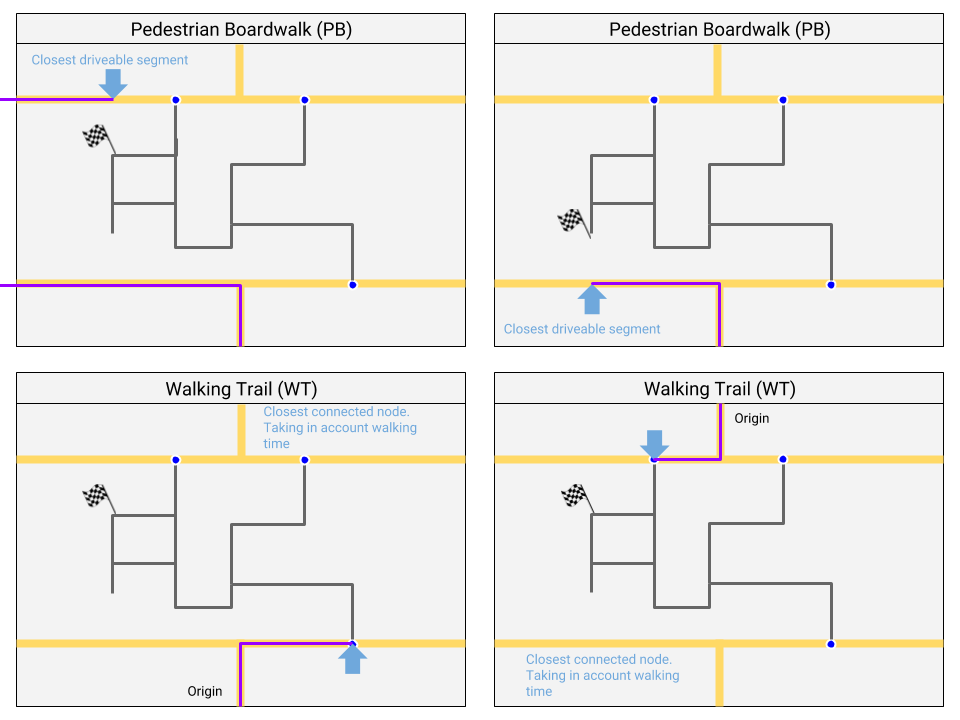
When mapped using this type, Wazers will be routed to an access point regardless of where the destination is along the Footpath. These are used for segments on which you are not able to drive but that have or lead to a destination. Waze will stop routing at the start of the WT, where the Wazer should ideally park and finish on foot. i.e., (the connected virtual node of the footpath.)
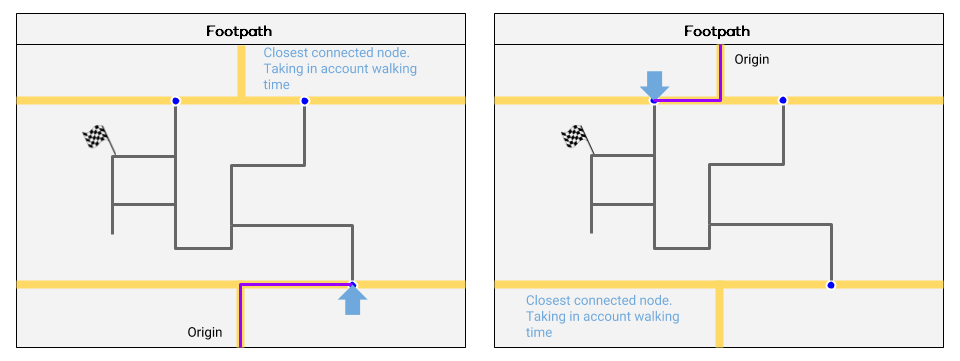
This example illustrates how Waze will route using footpaths.
Pedestrianized Area / Non-routable Pedestrian Path / Pedestrian Boardwalk 
In contrast to drivable roadways or routable pedestrian walkways, pedestrianised areas have no bearing on routing and do not alert cars to their presence. This makes them safe for use in mapping certain non-drivable roads as navigational references or for other particular non-routing applications. Mapping with a Pedestrianised Area would avoid pollution of the speed data of nearby drivable segments.
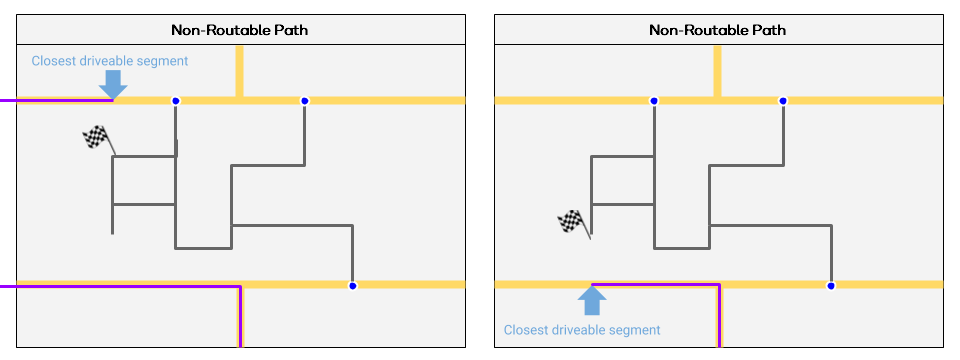
This example illustrates how Waze will route using non-routable paths.
Clear explanation of Routing difference between WT and PB:
Stairways
Stairways appear and behave identically in the app to non-routable pedestrian paths. They have no effect on routing.
In general, the applications and methods of creation of non-routable pedestrian paths apply also to stairways. Certain public stairways are visually obvious and/or useful as destinations for drivers. These can be mapped with the stairway type. Connect existing stairways to other roads.
Railroads
In Waze, the railway road type fulfils two functions. It first gives drivers visual direction relative to railway and light-rail tracks. More crucially, mapping the rails lets Waze identify and remove false speed data from persons Wazing on the train in the typical situation when passenger-carrying tracks run parallel with the road. This prevents corruption of speed data for the adjacent road.
Runways
Airport runways and private airstrips can be mapped with the Runway road type. The Runway type is intended for exhibition purposes only and should never be connected to drivable road segments. If a drivable road and a runway intersect, set the road’s elevation below that of the runway and make sure there is no link. Draw each runway as a single segment and secure it to keep lower-level editors from attaching a road. Do not build junctions where runways intersect.
Roundabouts
Roundabouts are a specific sort of road. They are not included in the list of road types; instead, they must be drawn (linked) separately. Roundabouts, rotaries, or traffic circles are distinct portions of the Waze routing engine. When a motorist approaches a roundabout segment, a specific emblem is displayed in the turn direction region of the display, along with a number representing the exit count from the driver’s entry into the roundabout. Manually building a circular road does not instruct Waze to navigate the region as a roundabout. A roundabout gives you instructions such as “On the roundabout, take the 3rd exit” or “On the roundabout, go left” depending on how you depict it. A roundabout should be awarded the same road category as the highest-classified, continuous connecting route.
More details about Roundabouts can be found at Global wiki.
Road Attributes
Speed Limits
Speed limits can be imposed for each direction of movement on a route. This speed limit has no effect on Waze’s routing decisions. Waze uses the speed limit to (optionally) alert the driver when they exceed it. Editors should map the speed limits on routes using the following criteria:
- Only clearly defined, legally enforceable speed limits should be mapped when applicable. Otherwise, below is the list of the default standards to be added when there is none.
- Roundabouts are useless for mapping speed limits, thus avoid doing so.
- Map only the speed restrictions, not the advisory speeds.
- Editors should always map at the higher speed restriction in areas with variable speed limits (such as school zones, alternate speed in the event of rain, and digital signage).
Speed Limits on Roadworks
We don’t alter speed limits because of construction. This is due to the fact that roadwork-related changes are frequently quite dynamic, there is a lack of accurate and transparent information regarding the zone or zones affected, and—above all—we lack the volunteer resources necessary to maintain and keep an eye on them.
Although this is not a comprehensive list of exclusions, an AM (for that area) or an SM (or higher) may decide to make the modifications if:
- the roadwork be long term (12+ months),
- speed limits remain static, or
- the segment carries significant traffic volumes.
It is anticipated that the space will have a map comment and be continuously checked for modifications.
Lock Levels
This section of the policy is not meant to serve as a manual for deciding whether or not to lock a segment. An editor should always make an educated choice on how to best identify the type of road that would be most useful to the driver on that particular road. For the community’s convenience, this policy specifies the STANDARD locking level to be utilised.
Road Type Lock Levels and Speed Limits
| Segment Type | Lock Level | Speed Limit (Km/h)** |
|---|---|---|
| Motorway (Freeway) |
5 | 70* |
| Ramp |
HRCS# | 30* |
| Major Highway |
4 | 60* |
| Minor Highway |
3 | 60* |
| Primary Street |
2## | 50* |
| Street |
1 | 40* |
| Dead End Street | 1 | 30* |
| Private Road |
1 | 20* |
| Parking Road (Parking Lot Road) |
1 | 20* |
| Narrow Passageway (Narrow Street)*** |
1 | 30* |
| Off Road |
1 | 20* |
| Railway (Railroad) | 3 | N/A |
| Runway | 3 | N/A |
| Railroad Crossing Road (Not Underpass) | - | 20 |
*In case not assigned by the local law enforcement body.
** Under review and discussion
***One lane road for cars and motorcycles. (Discussion Needed)
# Higher Road Connected Segment Lock Type
## Service Lane Roads should have a speed limit set to 30 kmph.
Some notes :
Motorways, Major Highways & Minor Highways are crucial for routing calculation in Waze, so they need to be closed to prevent especially lower level editors from unintentionally destroying major traffic arteries. But keep in mind that a lock also prohibits lower level editors from adding streets. So only apply a lock on a segment, if all roads are connected.
If creating a new road in a not yet mapped area, you also may choose to add just one short segment of a connected road (a handle) to make the junction and let a lower level editor to connect the surrounding streets later without being prevented by the locked highway.
Road Type Checkboxes
Unpaved Checkbox
The checkbox is applicable to all types of roads. It suggests that a road is not constructed with bitumen or concrete. Routing over driveable road types is influenced by the unpaved attribute; however, it does not actually affect non-driveable road types, as the client does not utilise them for routing. The Waze client may refrain from routing them over segments that are otherwise driveable when the ‘unpaved’ attribute is selected, depending on the user’s preference, destination, and other configuration options.
Tunnel
Use this for tunnels (below ground) that are extended to the point where GPS would drop out. This box if checked helps the Waze routing system detect traffic jams and flow detection. It also allows extended periods of time without GPS signal, avoiding approximations.
Next to Carpool/HOV/Bus Lane
This is not used in Nepal. Please don’t check this box.
Restrictions
We currently have not specified guidelines for Nepal. Here is scheduled Turn restriction on Global page. In case of doubt, consult with the Community.
Direction
Two Way
This should be the direction for most roads.
A->B & B->A
One way roads, Dual Carriageways and roundabouts all have these directions. See Dividing roads for more information about road division / undivision.
Unknown
Please don’t set segments to Unknown direction, as it makes routing directions misleading.
Elevation
Elevation levels should conform to how they are in reality.
- We mark bridges with level = 1.
- We only mark a road as level 2 if there’s another bridge (1) running underneath it.
- Same logic applies for tunnels (in opposite direction), and further (3,4 & -3,-4).
This also applies to railroad segments.
Note: To properly designate only the appropriate portions of the road as a bridge or a tunnel, we frequently need to divide segments into many segments. We have been requested to “stick to an accurate representation of the map with tight marking of bridges (level greater than 0) and tunnels (level lower than 0)” after Waze investigated potential effects on routing calculations.
As seen in the accompanying illustration, bridges should be marked somewhat firmly. (This is crucial for the accuracy of the map and for drivers’ cues.) For tunnel, the “tight marking” should be placed at least 15 meters before and after a tunnel.
Dividing Roads
Please refer to the global page and here too.
Turn Instructions
For the detailed turn instructions, please refer to the global page here.
Lane guidance
We currently do not have specified the lane guidance. Please refer to the global page here.