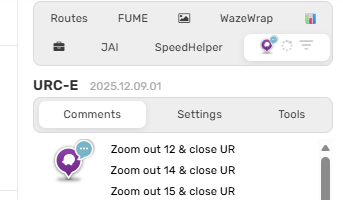
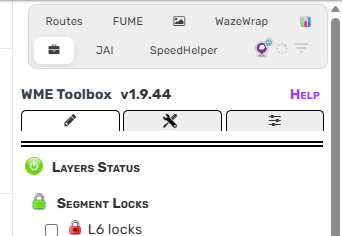
The scripts tab has no spacing / indent on the right and left side anymore:
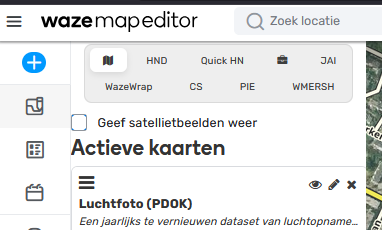
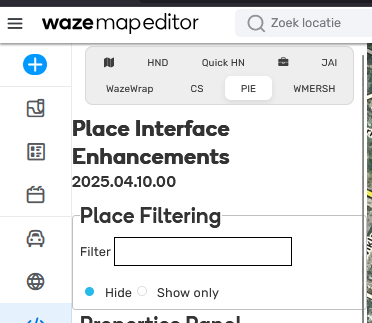
Seems like width has been set to 100% instead of 90%, or something like that.
Hi @EloheiYishi,
Thank you for the feedback. I will pass it on to the team to discuss possible ways to improve.
Regards,
Nataliia
Hi @rompompom,
Hi @EloheiYishi,
Thank you for flagging the problem. I am checking on it with the team.
Regards,
Nataliia
Maybe it’s worth considering a mechanism that will allow our to accept or reject individual suggestions?
At the same time, consider the possibility of moderation, along with the possibility of blocking edits by L5 and L6.
Hello,
Sorry for the late feedback.
From my point of view, I have identified three main issues:
More than one map suggestion can be attached to the same segment. After reviewing and accepting the first one, the second (and any subsequent) map suggestions disappear because the segment ID changes. In such cases, I have to manually complete the remaining wide-scope edits.
Less experienced editors often propose multiple types of edits within a single map suggestion. Some of these changes are correct, while others are incorrect. This is another situation where I have to manually adjust or fix the edits.
Even experienced editors (L2, L3) frequently submit map suggestions. While they usually fill in most segment properties, they often forget important details (for example, not setting the segment direction, which then remains set to “none” by default). This significantly lowers the quality of their edits and again requires manual correction on my part.
Very often, I do not have time to ask the editor to complete their work, because the corrections would only be made after map compilation. Since map suggestions are available, many editors do not request a level downgrade to apply fixes themselves.
As a result, I usually reject such edits with the comment: “Please request a level downgrade on Discord.”
Best regards,
Darek
Are you referring to this issue?
Hi @MatthiasGor,
Thank you for sharing this idea. I will add it to the feature request for the team.
Regards,
Nataliia
Hi @Wcrhu,
Thank you for sharing your point of view and providing detailed feedback. I will make sure to pass it on to the team.
Regards,
Nataliia
Exectly!
I experience the same thing.
Hi @EsdrasFarao,
Thank you for providing those details and the video recording.
My apologies for missing your previous message. I have added your case to the internal ticket and asked the team to investigate it.
Regards,
Nataliia
SV bug still here. Just work normaly when I press the update button.
Hi @GabiruX,
Does the issue happen only for locations that you check using the ‘See in Street View’ button?
Thank you,
Nataliia
Unfortunately it still happens when dragging the street view pin onto the map. The only difference after this new version is it only puts the street view panel itself in the old location and thankfully does not pan the WME map anymore.
The See in Street View button also has this issue.
Thank you @Nataliia_Staff for the support with the SUG really appreciate it.
Also just wanted to ask if there is any update about the issue with the PIN in WME, where you search for a city or different location you will get the PIN showing the location and before as soon as you move the Map it used to disappear, but now it just stays on the Map and it doesn’t dissapears unless you reload the page. which is a unwanted behaviour and this is been happening for quite a while in production and in this new release too.
Also the issue with the street view jumping from location, still occurring not all the time but still happening as mentioned above.
thank you for your help
hi, it seems my suggestion was approved, but i have still not recieved any email or in-app notification alerting me? the edit history shows 24 January, 2026, but it is currently 00:08 on 25/01/2026? https://waze.com/en-GB/editor?env=row&lat=53.46654&lon=-2.13592&zoomLevel=17&segments=123322541
edit: it seems I have received the notification but after 8 hours.
Hi @locojd1,
Thank you for highlighting these issues. I will ping the team for an update.
Sorry for the inconvenience and thank you for your patience.
Regards,
Nataliia