I have a question about levels - I’ve searched the help for an answer here but didn’t find anything definitive.
What are the requirements to level up from baby to grown up? It seems that you need to reach grown up to be able to edit the map and submit certain reports. The app has told me I need to drive at least 100 miles for the last 500 miles. Looking on the desktop version I’ve logged just over 600 miles, perhaps this is done on points as well?
Driven miles have no relation to your map editing rank. The only effect driving has on editing is the ability to edit within a 1-mile radius of your drives.
Upgrading to editing Level 2 is done automatically after a certain amount of edits. Ranking up further is done manually by the senior UK community.
If you’re interested in editing, there is a mentoring program.
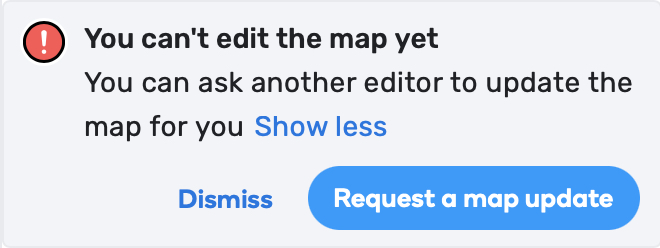
Thanks for your reply. Currently when I load up the map editor it tells me I can’t edit the map yet. Is this something that would be unlocked via the mentorship program?
Have you checked around your recent drives? Look at the side panel, there should be a car icon. Clicking on that will show you a list of you recent drives recorded by Waze. If you don’t have any listed then Waze hasn’t recorded your drives and you will not be able to edit the map currently.
You will not be given any areas to edit directly until you reach rank level 3, after being confirmed you have been editing to a satisfactory standard. For now, the mile-1 radius of your current drives is the only areas were you’ll be able to edit.
Also note that roads on the map have different lock levels depending on their traffic levels. You’ll find most A roads, for example, are locked to level 4. Any road can be unlocked by an editor at the road’s lock level on request (in the UK editor request sub-forum on this forum.)
To become a mentee, you need to do some editing first to show up on our lists. Once you on the list, you can be assigned as a mentee.
Side note. Generally the community likes to have unique usernames for editors. If you will be editing, please consider changing your username to from the generic username given by Waze.
I’ve checked my recent drives and I can see that they are listed, but I still can’t edit any of the areas I’ve driven through. This is the message I get:
Also thanks for the username info, I’ll bear that in mind
That segment you’ve linked to is definitely locked to the lowest lever. The segment must be outside of your available editing area. To see the area that you are able to edit, select the Layer icon in the top right of the map editing window and enable Editable Areas. The light areas are where you can edit, and the dark areas are where you can’t.
I’ve selected the editable areas as you suggested, and I can see the areas that I should be able to edit highlighted. The segment that I linked to is a segment that I drive down every day and definitely inside what’s shown as my editable area in the map layers so I’m not quite sure what’s going on here. From everything you’ve said it seems that I should be able to edit here but for some reason it’s not allowed.
Does it have something to do with the navigation app level or is this a completely separate thing?
I think this is part of the new L1 user restriction Waze had implemented. I checked on my brothers phone and signed up to WME, and he had the same thing, we both travel around with each other and have Waze on.
However, he has all roads locked with the same message saying to make a request in the forum, i think you need to get more edits before you can even edit a L1 segment.
Thanks for your input - I’ve now seen that someone has responded to a request that I made via the app and made an edit based on this request. I don’t know if it’s related or not but now I can make edits to L1 segments. I didn’t see any message saying now I can use WME but it seems I can edit now and I couldn’t before.
Problem solved! It would be helpful if Waze could provide a bit more clarity on this as all the info that I saw in the app and online was that map editing is open to anyone, but then when I tried to edit it wasn’t open to me!
To be honest, even the senior editors in the community haven’t been told what the new restrictions of L1 editors are, so we’re as much in the dark about this as you :lol: