Prioritization and Overlapping of Permanent Alerts

Hi all, good evening.

I’m bringing this case to the forum, which arose from a UR.
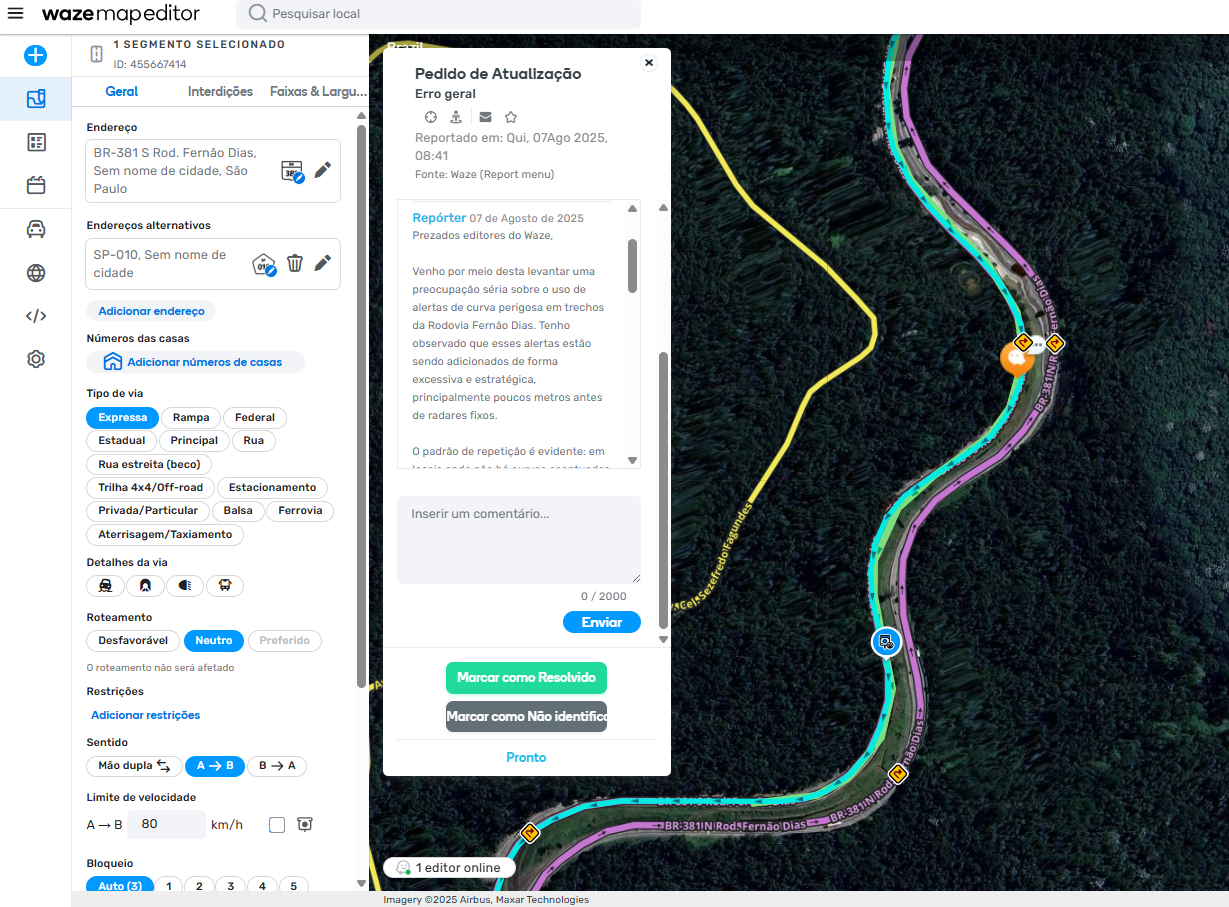
Permalink: https://waze.com/pt-BR/editor?env=row&lat=-23.38281&lon=-46.56261&s=9426862942007153784050&zoomLevel=17&segments=455667414&mapUpdateRequest=24660888

Message from the Wazer:

Dear Waze editors,

I am writing to raise a serious concern about the use of dangerous curve alerts on sections of the Fernão Dias Highway. I have observed that these alerts are being added excessively and strategically, especially just a few meters before fixed speed cameras.

The pattern of repetition is evident: in locations where there are no sharp curves or real driving risks, curve alerts appear right before speed cameras. This has a direct and harmful effect: the curve alerts overlap or drown out the speed camera alerts, distracting the driver and undermining the transparency of the signaling in the app.

Considering that Fernão Dias is a tolled, divided highway with excellent visibility and official signage present, these extra alerts do not serve a safety function; instead, they appear to be used with the intention of masking the presence of speed cameras, possibly with a bias towards increasing fine revenue, which would be extremely unethical.

This type of practice weakens the credibility of Waze and the editor community itself. The app is a tool for collaboration and transparency to help drivers — not to contribute to potential enforcement traps.

I ask that editors review these points carefully and reflect on the criteria used to position curve alerts. If there is no significant curve or real risk, the alert should not exist — especially if it coincides with a speed camera.

I am counting on the community’s seriousness to handle this matter with the proper priority. I am available to help review these stretches.

Are we familiar with the priority order of alerts and can we suggest changes?
In this case, the distance between the alerts is close to 500 meters — a bit less — and they are of different types, so do we adjust them according to the rules we have today?

What do you think?

Happy editing!

Let’s take this one step at a time…
The driver who opened the UR thinks we are intentionally placing dangerous curve alerts to hide speed cameras. Which is not true.
If the curve is dangerous, it needs to be alerted. Speed cameras end up being located near these alerts precisely because they are intended to ensure that drivers are at the correct speed to navigate the dangerous curves.

Curve alerts, just like speed bump alerts, are only sent to drivers who do not pass through the location frequently (at least that’s how it’s supposed to work).
If it’s a common route for the driver, the curve alert will stop appearing, but the speed camera alert will not.

I think we should keep it mapped as it is, which is correct.

I think the user who reported this has a good sense of UX. Waze kept this specific alert in the plural precisely to avoid excessive use. While I agree that it should be mapped, I don’t see the need to include five alerts of this same type in sequence in such a short stretch.

Since I’m not very familiar with the stretch, I suggest that state editors follow our published reference to maintain road safety and a better experience in the app:

Hello Gamasi, thank you for the response. I am the driver who reported this.

I understand that, in theory, dangerous curve alerts have a legitimate function and that their proximity to speed cameras can occur for road safety reasons. However, the situation observed on this stretch of the Fernão Dias is specific: there are points where no curve with a relevant degree of risk exists, yet the alert is still added just before the speed camera. In practice, this results in the visual and audible overlapping of the speed camera alert, reducing the effectiveness of the information for the driver.

The highway is a dual carriageway with four lanes, excellent visibility, tolled, and properly signed by the concessionaire. Under these conditions, the speed camera itself already fulfills the function of inducing speed reduction at critical points, without the need for an additional curve alert which, in this context, lacks technical justification.

Even though I drive this route frequently, I notice that the alerts sometimes appear and sometimes disappear, which may be related to app updates or the route recurrence system. This hinders predictability and reinforces the perception of mapping inconsistency.

I am not ruling out that there may be good intentions behind the current configuration, but precisely because this is a collaborative platform, I believe a careful review of the points I listed is worthwhile, verifying the actual technical necessity of the curve alert. Where no concrete risk exists, maintaining this alert can do more harm than good, both due to information clutter and the possible association with practices that benefit fine collection.

When I mention the possible association with practices that benefit fine collection, I am referring to the need to consider, even if only as a hypothesis, the existence of editors acting in alignment with or even linked to the highway concessionaires, with the aim of influencing how alerts are presented. This would include, for example, the insertion of curve alerts with the potential to suppress or reduce the visibility of fixed speed camera alerts. I recognize it is not possible to state that this occurs, but the possibility cannot be ruled out either, which is why I believe this point deserves careful attention and verification from the community.

I am available to provide more details and collaborate on the analysis of these stretches.

Hello Davi, thanks for the explanation regarding the use of “Dangerous curves” alerts.

I agree with the importance of following the published reference and technical criteria so that the alert maintains its original purpose and doesn’t become redundant. My point is that, in the specific case of this stretch, the number and proximity of the alerts do not reflect the road’s reality. It is a divided highway with good visibility, properly signed, and without curves posing significant risk at the points mentioned.

I understand that for drivers who are unfamiliar with the stretch, the alert may be useful, but when several identical alerts are positioned in a very short sequence, especially near speed cameras, there’s a risk of cluttering the app experience and even decreasing attention to more relevant warnings.

Therefore, I believe that reviewing this specific mapping, in light of the guidelines you mentioned, can help maintain both safety and a good user experience on Waze.

PS: I am a Software Engineer and thinking about UX is part of my daily life. I am just starting to collaborate with Waze. I hope to keep contributing.

Welcome to discuss and the world of editing. Keep contributing with your observations.
Take the opportunity to introduce yourself to the editors in your region at this link.
We are here to improve the maps.

But it doesn’t work. I can speak with authority as someone who drives 200 km a day and I feel like the alerts are given randomly. There are places I pass through every single day and the alert is given today, not tomorrow, then given again the day after, and so on; it’s literally random.

Respectfully, I would like to address the hypothesis that there may be editors acting in alignment with, or even linked to, concessionaires by inserting excessive alerts on the road, which would constitute a practice favoring fine collection.

As a professional trained in the field of Road Safety who has worked in the field for years, I do not agree with such an assumption. A pseudo “fine industry” would occur if the highway were poorly signed regarding speed limits, as only these signs regulate road speeds. Some users mistakenly blame Waze when they are ticketed due to an incorrect speed limit on the map or when a speed camera is not included, for example. Despite the community’s efforts to prevent these situations, they can occasionally happen. In these cases, I always remind people that Waze is an auxiliary navigation tool and never replaces the driver’s duty to pay attention to signage and road conditions.

It’s also worth noting that users can configure whether alerts appear on the map or are announced during the route.

Hello Yuri, I appreciate your perspective and the experience you bring regarding Road Safety; it is always enriching to hear the opinion of someone who works directly in the field.

I want to reinforce that my observation did not arise from having received a fine, nor from feeding any unfounded theory about a fine industry. What motivated me to open the UR was the observation, during several trips, of a repetitive and peculiar pattern: at specific points on the Fernão Dias, dangerous curve alerts are positioned very close to fixed speed cameras, in stretches where there is no curve with relevant technical risk.

This behavior was repeated on different days and in both directions of the highway, including after the installation of new speed cameras. On my commute, I usually pass through three different highways, all with truly dangerous curves, but only on this highway do I observe this systematic coincidence between curve alerts and speed cameras.

My point is that, even if it is not possible to claim a deliberate intention, statistically the pattern is atypical enough to justify a careful review by experienced editors. If, after technical analysis, it is concluded that the alerts are indeed necessary, great—that strengthens the community’s credibility. But if there is excess or inadequate positioning, the correction will bring a direct gain to the user experience and for the reliability of Waze.

I am just a driver who has used the app for years, I recently joined the community, and I believe in the collaborative purpose; that’s why I am sharing the observation with the intent of contributing so that the information on the map is increasingly faithful to the reality of the road.

Thank you!

Satellite imagery might be outdated, but I didn’t see any dangerous curve signs at the alert location, only a “reduce speed” sign.
Dangerous curve alerts are a bit subjective when there isn’t a sign on-site, so it depends a lot on the editor and users passing through the area. For me, the speed camera information is more important than the dangerous curve in this specific case, so it would be interesting if local editors could check if something can be done so that dangerous curve alerts don’t interfere with the speed camera ones.
Other than that, it’s as @gamasi said:

Curve alerts, as well as speed bump alerts, are only sent to drivers who don’t pass through the location frequently (at least that’s how it’s supposed to work).
If it’s a common route for the driver, the curve alert will stop appearing, but the speed camera alert won’t.