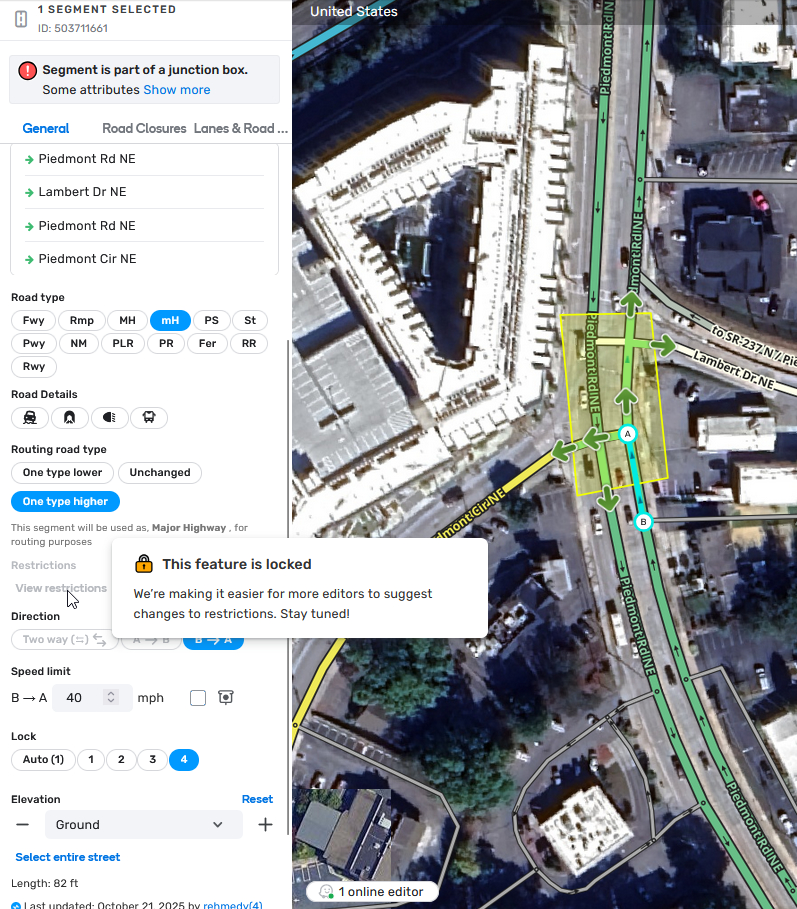
Many thanks for your report!
You cannot edit restrictions in this case because this segment is a part of the JB, it’s not because of the SaE feature. The message is misleading and we have raised an internal tocket to address the incorrect wording.
Thanks for the response! I was under the impression that restrictions were separate and still editable in JBs, but I appreciate that the error message will at least be clarified here.
Thanks, and yes, in the end I used turn restrictions to accomplish what I needed. I appreciate the suggestion!
Maybe this should be a feature request, but we can only mark a road as a toll road through the restriction menu. If there’s a junction box on the segment, this means we have to delete the junction box to adjust the toll flag which seems kind of silly if you ask me!
There is a workaround for assigning restrictions to a segment partly included into JB.
Split the segment in a point close but outside of the JB and click Save.
Assign the restrictions to the part of the segment that isn’t inside the JB.
Select the node created on the step 1 and delete it.
As the result, the assigned restrictions are applied to the whole segment. NOTE: the workaround cannot be used to modify existing restrictions because after the step 3 the segment gets a mix of old and new restrictions.
For what it’s worth at the last NA mega meetup Gil said this is a bug and restrictions on segments part of a JB should be modifiable- adding, editing, and deleting restrictions on JB segments should all be possible.