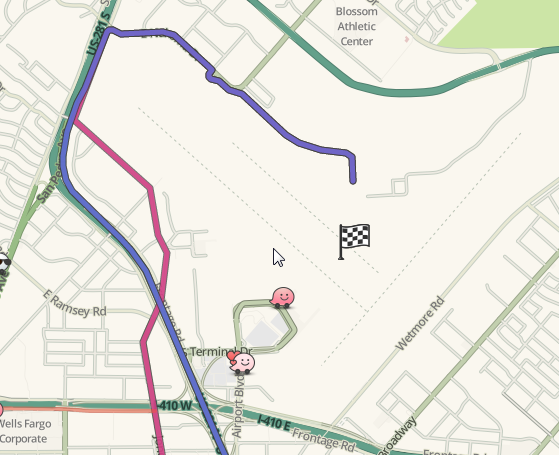
I have noticed several routing issues pop up in regard to SA airport. One of the user reports stated that after stopping navigation and then restarting they were routed correctly. The old problem of routing to maintenance areas, which had disappeared after the last update, started coming back again. Does anyone have thoughts and/or ideas?
This problem is definitely back as there is a current UR for it and I did some live map routing. Here we have the route route from Boerne to San Antonio International Airport.
And from Downtown
I know i am knew, but from what I have learned, none of this adds up since there is a clearly marked Area Place with the name and located close to the likely road.
It’s using the Google Maps marker - which is where most of these issues, especially with airports, reside. The users have to choose the Waze result when searching instead of the auto-complete result - and most users are not aware of this.
I’ve looked at the SA Airport in Google’s map maker. It appears that their marker is only slightly closer to 1st Ave than E Terminal Dr (See the images in the earlier in this topic).
If I were to move that marker to make it closer to E Terminal Dr would waze get the update too? I’ve read that waze is no longer getting bulk map downloads so I’m actually expecting this answer to be no. Still, it’s worth asking.
If waze is still getting point markers from google can I can explain in map maker that I’m making the change to improve routing in waze?
If waze isn’t getting updates could these inherited markers be added to WME?
Good luck getting it moved in Google mapmaker. The request will be denied as 99.9% of requests to move a major landmark get denied. By all means, you can try it, though.
True. I was actually hoping to take advantage of the attention this thread has to get some advice on how to handle google map markers in general as I don’t believe that this topic is covered in the wiki right now. When I first encountered this problem I spent a couple of weeks, working with my area manager, before either of us realized that waze kept routing to a google map marker.
Tonight, I encountered another UR with the same problem. If you search for “1350 First Colony Boulevard, Sugar Land, TX 77479” in WME, you’ll get two auto-complete suggestions. One points to a marker in the middle of an intersection while the other points at an Oncology center. I’ve tried to delete the one marker in map maker only to have it report a GIS data error. What else can I try?