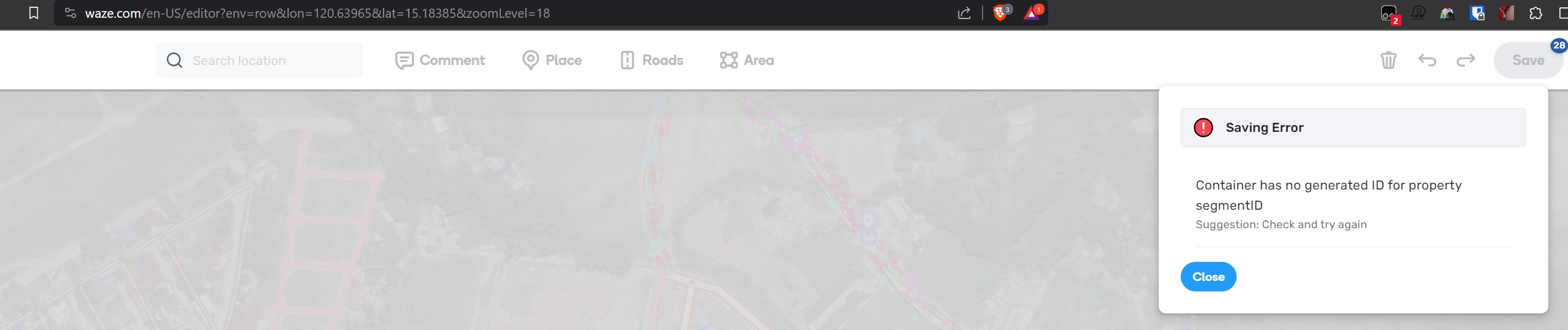
I followed your steps and cannot reproduce this. I tried to follow your video and I still can’t reproduce this error. I can get this error to happen sometimes with new segments, but you are using existing segments. Can you please redo your steps, there seems to be something missing that is important to this issue.
I tested again in a new computer and I was able to reproduce the problem.
I cannot make a video in this compute but here are some screenshots:(unavailable attachment: Step 1.png)
(unavailable attachment: Step 2.png)
(unavailable attachment: Step 3.png)
(unavailable attachment: Step 4.png)
(unavailable attachment: step 5.png)
It is impossible to reproduce when you carry those steps the first five or six times.(unavailable attachment: Final Step.png)
I cleanned the cookies and I was able to save without a problem to save again without issues (I won’t havetime to carry the steps again).
I am still not able to replicate on NA server. But based on what the screenshots are showing, I am wondering if it is related to this bug that was fixed. https://www.waze.com/forum/viewtopic.php?t=394359
I get the same error occasionally when dealing with normal segments (not suggestions) but I’ve not been able to find out yet the steps to reproduce it.
In the past you got the error “Container has no generated ID for property id.” especially when you created too many segments and/or nodes/connections. Undo-ing the connections left you with the newly created segments which you could save. A beareble nuisance.
With this WME version (2.206) I often encounter the situation that I even have to undo all the segment drawing, forcing me to throw away all my work.
Please do the necessary to prevent this error.
Best regards,
Dirk
This issue is still open in the tracker. I was not able to duplicate, so if you can come up with steps to reproduce this every time, I can add that to the details.
We also can’t identify exact steps to recreate the error. May I ask you to make a screenshot from the Save stack, after the error occurs? Like on the screen below. And tell the time, when the error appears. We want to see the list of actions to understand which one might cause the problem.
(unavailable attachment: 6Wyb5ryxhwEE6H3.png)
Could you also please make a screenshot from the Save stack, after the error occurs? We want to recheck changes from the save stack list to identify what can cause the error.
Nataliia is asking for you to take a screenshot when you hover over the Save button. She wants to see what all is trying to be saved when the issue happens.