Template of topic 380525, post 1
Template of topic 380019, post 1
Template of topic 380209, post 5
A Centrally Managed Community Schedule is applied to many map objects. Try to remember to think big and systematically when working with schedules, or in other words, approach this with a systems thinking mentality - you’re not just adjusting a single map object.
Terminology
School Zone
A school zone permanent hazard located in the Waze Map Editor. These are represented on the map as an orange polygon drawn at the boundaries of a physical school zone.
Centrally Managed Community Schedule
A centrally managed schedule that is managed in the Waze Map Editor.
On-Community Schedule
Similar to an inclusion schedule, except this schedule does not contain any exclusions. This is a Centrally Managed Community Schedule which is always active, it has no exclusions applied to it, and importantly, the times included in this schedule are when the School Zone is active or alerting in the Waze client. This schedule typically has no end date.
Off-Community Schedule
Similar to an exclusion schedule, except this schedule does not contain any inclusions. These Centrally Managed Community Schedules are configured with school term holiday dates and any public holidays that fall outside school holidays. When applied they have the effect of turning off the above On-Community Schedule.
Centrally Managed Community Schedule Applied to School Zone
Where a Centrally Managed Community Schedule is assigned to a School Zone in WME.
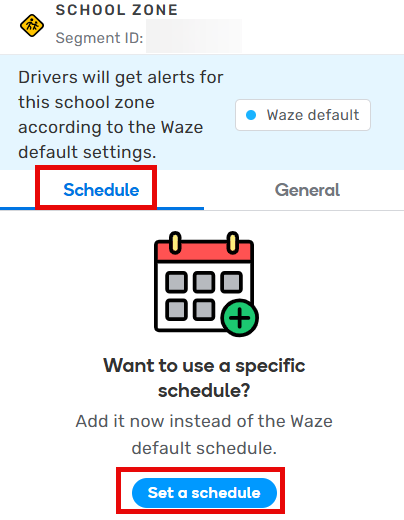
Setting a schedule in WME
School Zone Based Individual Schedule (not allowed)
Where the School Zone does not exclusively use a Centrally Managed Community Schedule Applied to School Zone, and there are dates and/or hours configured directly on the individual School Zone.
General principles for school community schedules
School Zone schedules should be designed so that routine school zone operation times are included in an On-Community Schedule, with a separate Off-Community Schedule to exclude school and public holidays. That means a minimum of two Centrally Managed Community Schedules will be assigned to each School Zone. The advantage of this method is seen when yearly maintenance is conducted to add school and public holidays - only one or two Centrally Managed Community Schedules require updating per jurisdiction instead of every Centrally Managed Community Schedule or individual School Zone.
- The scheduler uses 24 hour time only so be careful when making any changes.
- Where a calendar date is selected it is inclusive of that date.
- Selected dates start at 00:00 (midnight) and end at 23:59 (11:59 PM).
All description fields within a Community Schedule are mandatory and must be kept up to date with any changes. For example, if a school holiday includes a public holiday then explain in the description field which public holidays are included in the range so it is clear.
Scheduling system design
There are tens of thousands of schools in Australia and the individual management of schools is simply not feasible. Therefore, as discussed above, Australia requires the use of Centrally Managed Community Schedules. Applying School Zone Based Individual Schedules is not allowed in Australia.
Centrally Managed Community Schedule Applied to School Zone requires the application of both On and Off-Community Schedules to be assigned to a School Zone.
On-Community Schedule
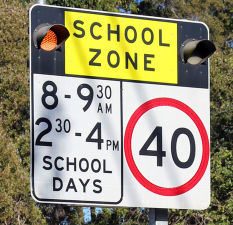
The hours of operation of a School Zone, as seen on the school zone signs, will be stored in an On-Community Schedule. Some jurisdictions have a variety of combinations where school times start and end. As a result, multiple On-Community Schedules may exist to cater for the various start and end time patterns that exist in a jurisdiction.
Off-Community Schedule
In contrast, an Off-Community Schedule will have exclusions for when the On-Community Schedule would otherwise operate. The Off-Community Schedule will cater for school and public holidays for each jurisdiction.
For example, an On-Community Schedule operates Monday to Friday from 0800-0930 and 1430-1600 and is applied to a School Zone. An Off-Community Schedule which includes ANZAC day on the 25th of April is also applied to the same School Zone. In this example, on Thursday 24 April the School Zone will operate between 0800-0930 and 1430-1600 however on Friday 25 April it will not operate at all.
Only school holidays as defined by the state education department are to be considered when designing Centrally Managed Community Schedules. This is expected to cause incorrect Waze app alerts around private and independent schools. Waze Australia accepts that School Zones are a single feature and the volunteer map editing community’s priority is to cater for the majority of use-cases only. Some error is acceptable.
Template of topic 380209, post 14
Public holidays should only be included where they impact the whole state. Local, part-day and bank holidays are not permitted to be included in Off-Community Schedules.
Examples are provided for how Centrally Managed Community Schedules should be designed by each state and applied to School Zones in Australia. It is expected they will vary slightly depending on the jurisdiction.
Example (Subject to Change)
On-Community Schedule
Schedule info
| Name | AS NSW - School Zone East-01-Default 08:00-09:30+14:30-16:00E. Note: the naming scheme used for schedules is discussed later in this guide. |
| Description | A schedule for NSW schools with the times listed in the name. There are no exclusions in this schedule. Note: description fields within a community schedule are mandatory and must be kept up to date with any changes to a schedule. |
| Lock | 5 |
| Country/State | Australia, New South Wales |
When does this schedule apply?
- Start date is when the schedule was created and should not be changed.
- No end date selected.
- Times Mon-Fri: 0800-0900 and 1430-1600
- Days Sat-Sun are left blank. Be careful when using the copy/paste feature, because Sat-Sun are automatically populated.
- Description 0800-0930+1430-1600 No End Date
What dates should be excluded?
- Blank. Nothing is entered here because this is an On-Community Schedule.
Off-Community Schedule
Schedule info
| Name | AS NSW - School & Public Holidays. Note: the naming scheme used for schedules is discussed later in this guide. |
| Description | A schedule for school and public holidays in NSW. This schedule requires yearly maintenance. School holidays in this schedule are defined by the NSW Department of Education, and are inclusive of "school development days", however so named. Private school holidays are not considered in this schedule. Only school holidays for the Eastern Division schools are used, which creates a one-week error for Western Division schools whereby this scheduler will not "exclude" during the end of January each year. School holidays for NSW Eastern Division are listed at https://education.nsw.gov.au/schooling/calendars. This schedule includes public holidays in NSW that impact the whole state. Local, part-day and bank holidays are omitted. Some public holidays are based on the day and not a calendar date. Further, the quantity of public holidays varies yearly to align with rules determining additional public holidays where a significant day occurs on weekends, as per the Public Holidays Act 2010. Public holidays are listed at https://www.nsw.gov.au/about-nsw/public-holidays. Note: description fields within a community schedule are mandatory and must be kept up to date with any changes to a schedule. |
| Lock | 5 |
| Country/State | Australia, New South Wales |
When does this schedule apply?
- Blank. Nothing is entered here because this is an Off-Community Schedule.
What dates should be excluded?
- Add school and public holidays to this list.
- Use date ranges for school holidays. Where a public holiday is included within a school holiday, mention this in the description.
- Only use “repeats yearly” if the holiday occurs every year on the same calendar date. Consider using it for holidays like ANZAC and Christmas day. Do not use this setting on school holidays and public holidays like Easter which might occur on the same day but different dates.
When configuring a School Zone with a schedule for the first time (Centrally Managed Community Schedule Applied to School Zone), select the school zone, click on the Schedule tab, and click Set a schedule.
Combining/setting schedules
When does this schedule apply?
-
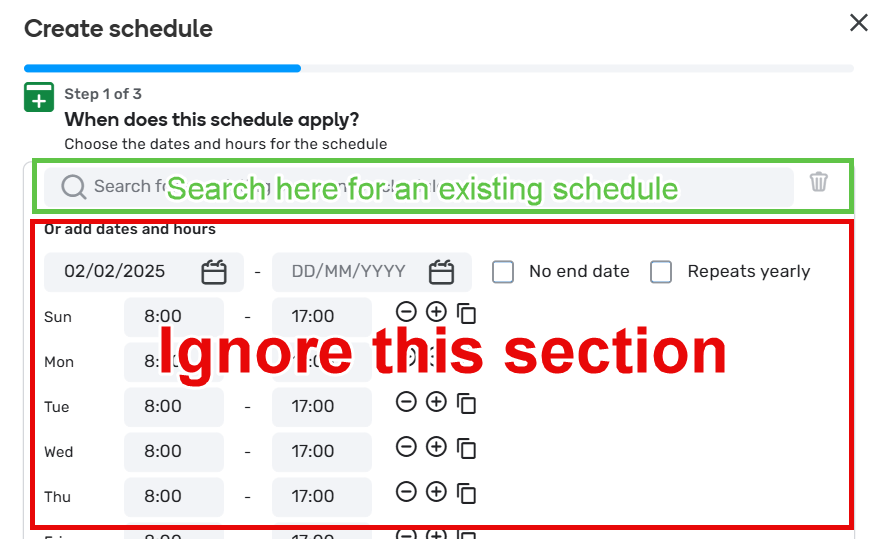
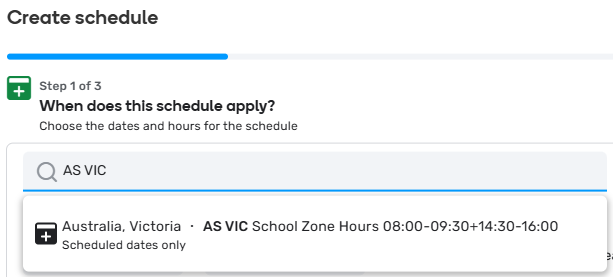
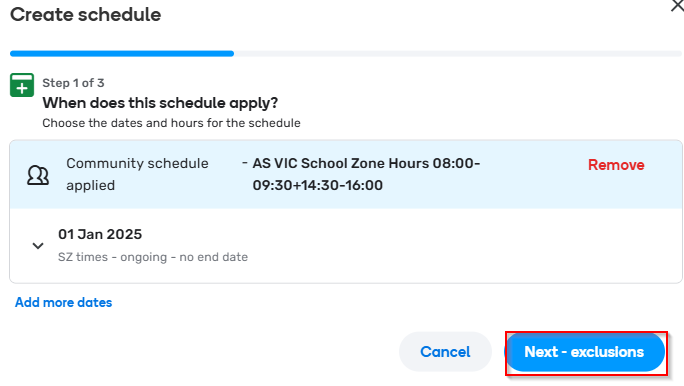
You must add one existing On-Community Schedule, which is a Centrally Managed Community Schedule, using the search box at the top of the “when does this schedule apply” screen. For example type “AS VIC” to list all the On-Community Schedules for VIC.
Do not use the “Or add dates and hours” section of the School Zone. It is not allowed in Australia. -
After selecting the correct On-Community Schedule from the search, click it to add to the inclusion criteria.
-
Then click “Next - exclusions”.
What dates should be excluded?
-
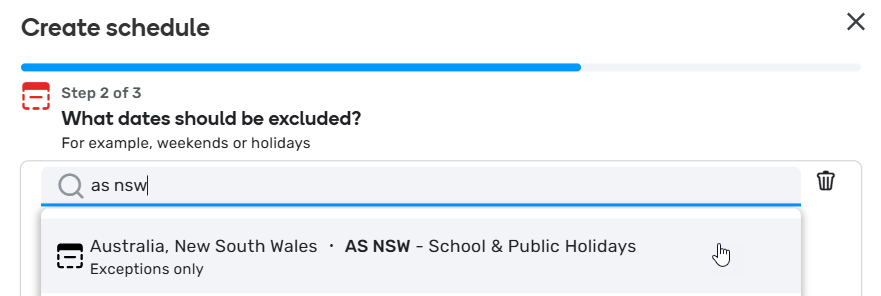
You must add at least one existing Off-Community Schedule, which is a Centrally Managed Community Schedule, using the search box at the top of the “what dates should be excluded” screen. For example, type “AS NSW” to list all the Off-Community Schedules for NSW.
Do not use the “Or add dates and hours” section of the School Zone. It is not allowed in Australia.
-
After selecting the correct Off-Community Schedules from the search, click it to add to the exclusion criteria.
-
Then click “Next - summary”.


Summary/Create
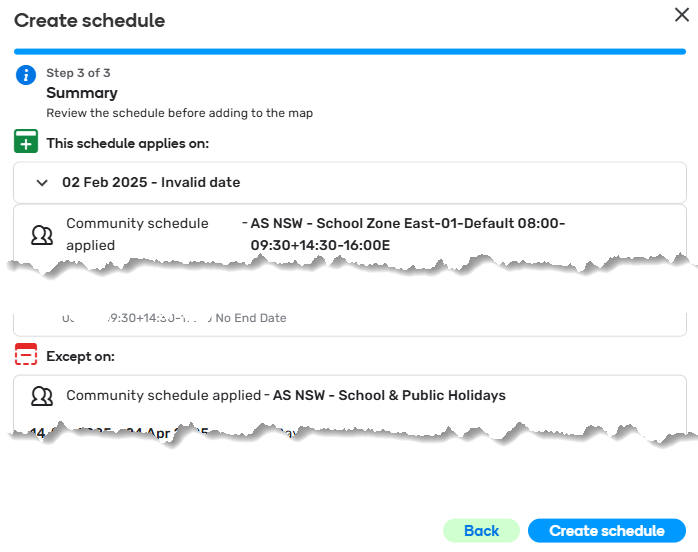
- Check the summary includes only Centrally Managed Community Schedules and that no School Zone Based Individual Schedules are applied, then click “Create schedule”, and click Save to apply the new Centrally Managed Community Schedules to the School Zone.
Creating and updating Centrally Managed Community Schedules
Centrally Managed Community Schedules are accessed in the WME by hovering over the + button in the top left, and clicking Community Schedules.
| Step 1 - Create Community Schedule | Complete the necessary fields:
The default lock for schedules is described in country specific lock levels as per Country Specific Permissions. The lock level can be temporarily lowered to allow level 4 editors to edit where they are a state manager, country manager or local champ of Australia. Select Next - Add Dates to continue |
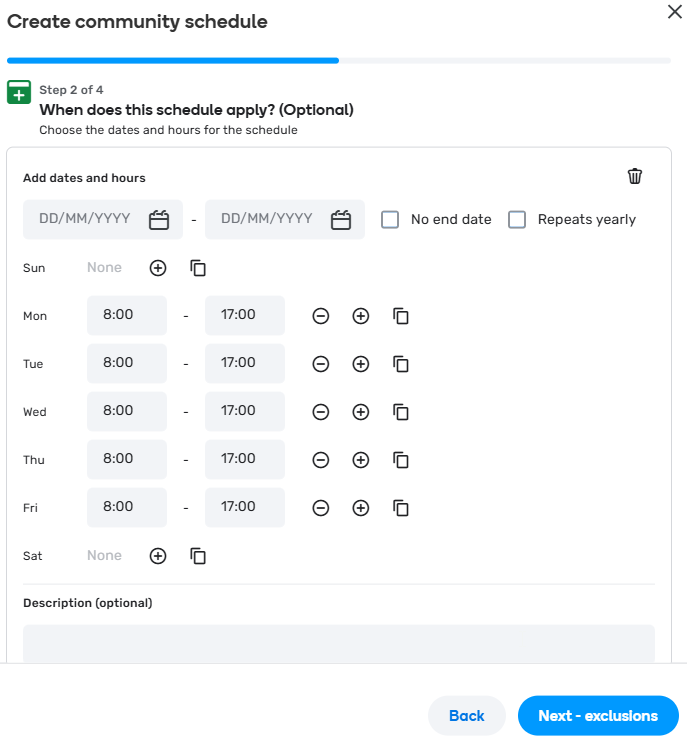
| Step 2 - Configure when the schedule applies | This step allows you to define when the schedule will apply. We refer to it as the "ON" schedule. If you are not creating an ON schedule you select the trash bin icon to remove the Add dates and hours dialogue. You can then proceed to Next - exclusions to set up the OFF schedule. If your schedule is an ON, you can refer to the previous Examples for further guidance School Zone operation hours should be entered here, that is, the various times as displayed on school zone signs. Remember, these apply to all school zones where the On-Community Scheduler is applied. Avoid using date ranges. Instead, set a start date as the date the schedule was created, with the “no end date” box selected. This is to avoid the schedule ceasing to operate should it not be maintained. Add times for each day. Use the + or - buttons to manage multiple timeframes for each day. Use the copy feature to copy the times from one day to all other. Remember to delete Saturday and Sunday times when using the copy feature. Select Next - exclusions to continue |
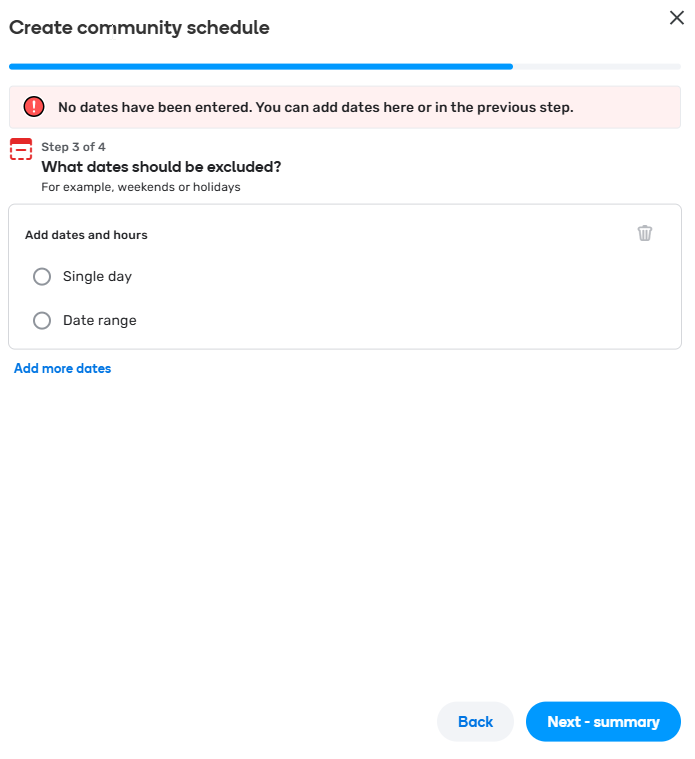
| Step 3 - Configure what dates to exclude | This step allows you to define what dates the schedule will exclude. We refer to it as the "OFF" schedule. If your schedule is an ON, you will select trash bin icon to remove the Add dates and hours otherwise proceed to populate either single days (public holidays or data ranges (school term holidays). You can refer to the previous examples for further guidance Periods in which this Off-Community Schedule does not operate should be entered here. This is typically, school and public holidays. Remember, these apply to all school zones where this Off-Community Schedule is applied. Note that public holidays are frequently, but not exclusively, included in school holidays. Do not use the “Repeats yearly” feature for school holiday periods, though consider it for public holidays that without a doubt always reoccur on the same date every year. E.g. ANZAC is always the 25th of April. Where a single day is selected, utilise the “All day” setting where possible, to minimise complexity. Consider if there are any changes to public holidays (new, removals or moves) during yearly maintenance of the schedule. Add a description: In Australia, this field is required. Briefly describe the period entered and any considerations included. E.g. “2025 Autumn (including Easter PHs)” Select Next - summary to continue |
| Step 4 - Summary | Review the schedule for accuracy and completeness. Select Publish to make the Community Schedule available. |

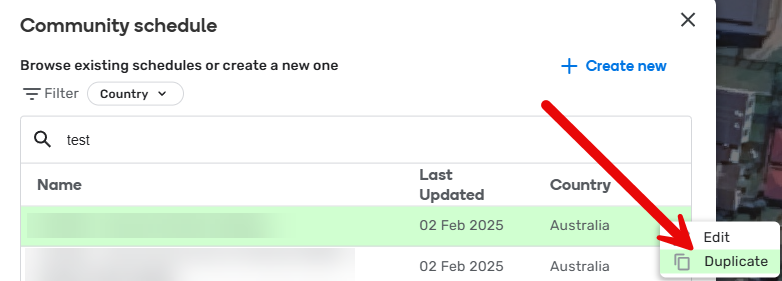
Updating existing Centrally Managed Community Schedules should always be the preference, as ideally, those well established schedules have already been assigned to existing School Zones.
Where state managers, country managers and local champs are forced to create a new Centrally Managed Community Schedule, aim to duplicate another schedule that is very similar to what you’re aiming to create, then tweak it to meet your specific needs. This reduces the work required to create a new schedule and minimises human error. To create a new schedule based on an existing schedule (the preferred method of creating new schedules), use the search to find an existing schedule, click the three dots at the end of the row, and click duplicate.
Naming conventions and mandatory field considerations
When creating and maintaining a Centrally Managed Community Schedule system for School Zones, it must adhere to the following conventions so all Australian map objects are:
- Easy to find in search
- Easy for other editors to understand
- Easy to maintain in the future.
Schedule name
It must be easy for editors to ensure they are selecting the correct schedule by looking at the name. School Zone Centrally Managed Community Schedules must therefore follow the below naming convention:
On-Community Schedules
AS [State abbreviation] - School Zone [Unique ID] [Summary of times]
The convention is further explained below:
- “AS” (mandatory) - the Waze country code for Australia.
- [State abbreviation] (mandatory) - The state should be abbreviated, such as NSW.
- “ - School Zone” (mandatory) - Distinguishes school zone community schedules from other community schedules that may exist in the future. Note the spaces and hyphen included.
- [Unique ID] (mandatory) - Include a unique identifier or descriptive name for the schedule, as determined per jurisdiction.
- [Summary of times] (mandatory) - Include a summary of the operation times in 24 hours time. E.g. 0800-0930+1430-1600.
Below is an example of what an On-Community Schedule name may look like:
AS NSW - School Zone East-01-Default 0800-0930+1430-1600
Off-Community Schedules
AS [State abbreviation] - [Description]\[Year/s]
The convention is further explained below:
- “AS” (mandatory) - the Waze country code for Australia.
- [State abbreviation] (mandatory) - The state should be abbreviated, such as NSW.
- [Description] (mandatory) - Describe the content of the schedule.
- [Year/s] - The year/s the schedule is intended to service (e.g. 2025-2026 school and public holidays). If you are updating the schedule for the upcoming year, update the name too.
Below is an example of what an Off-Community Schedule name may look like:
AS NSW - School & Public Holidays 2025-2026
Description
Describe the use-case for the scheduler, and briefly summarise the settings used.
- Where the schedule relies on an external data source, like a government authority, provide a URL to that source.
- Where caveats apply, such as known circumstances where the schedule will or will not work, explain that in the description.
Below is an example of a comprehensive description for one schedule:
A schedule for school and public holidays in NSW. This schedule requires yearly maintenance. School holidays in this schedule are defined by the NSW Department of Education, and are inclusive of “school development days”, however so named. Private school holidays are not considered in this schedule. Only school holidays for the Eastern Division schools are used, which creates a one-week error for Western Division schools whereby this scheduler will not “exclude” during the end of January each year. School holidays for NSW Eastern Division are listed at https://education.nsw.gov.au/schooling/calendars. This schedule includes public holidays in NSW that impact the whole state. Local, part-day and bank holidays are omitted. Some public holidays are based on the day and not a calendar date. Further, the quantity of public holidays varies yearly to align with rules determining additional public holidays where a significant day occurs on weekends, as per the Public Holidays Act 2010. Public holidays are listed at https://www.nsw.gov.au/about-nsw/public-holidays.
Maintenance of schedules
Yearly maintenance is required to be conducted by state managers, country managers and local champs. The designated month of community schedule maintenance is November every year. This month has been selected to align with other holiday maintenance conducted by country coordinators. Failure to perform yearly maintenance will result in incorrect school zone alerts in the following year.
Maintenance required to all Off-Community Schedules:
- School holidays must be added for the next calendar year, and historic school holidays removed.
- Public holidays that are based on days rather than date: update them to the new dates for the new next year. E.g. Easter does not fall on the same dates every year.
- Public holidays that are based on dates: check if the jurisdiction has added, removed or moved a public holiday.
- Note about public holidays: some jurisdictions have rules that add/remove public holidays depending on rules written into law. Manually check and add/remove as necessary.
While dates for future holidays may be available years in advance, try to only add them for the next calendar year. The purpose of this is to build routine and practice updating these schedules yearly, and to catch any changes that might occur “last minute”.
Maintenance is the responsibility of the state manager, where one exists. Otherwise, maintenance for a state can be conducted by a country manager or local champ.
State Based Rules
Template of topic 380209, post 13
Australian Capital Territory
Which schedule should I pick?
- On-Schedule - Select the AS ACT - School Times 08:00-16:00 schedule.
- Off-Schedule - Select the AS ACT - School & Public Holidays [Year] schedule.
Where are the schools?
To help level 3+ editors map schools in ACT, see the ACT School Zones Mapping Sheet.
How ACT schedules are designed
All school zones in the ACT operate from Monday to Friday from 0800 to 1600. They do not operate on school and public holidays.
School holidays are determined by the holidays listed on the ACT Education website. Public holidays are determined by referring to those listed on Public Holidays in the ACT.
New South Wales
Which schedule should I pick?
- On-Schedule - You should always select the schedule that matches the school zone times on the sign.
- Off-Schedule - There should be 1-2 Off-Schedules applied:
- AS NSW - School & Public Holidays [Year]
- Schools in the western division only, must also have AS NSW - Western Division Extra Holidays [Year] added.
How NSW schedules are designed
Most NSW schools follow the standard schedule for school zones: 0800-0930 & 1430-1600. Approximately 3% of NSW schools have a different schedule, with 21 known variations; these will be set up as separate schedules rather than being entered by hand. School Zone signage at schools with a non-standard schedule generally show the applicable times in red, rather than black.
The On-schedule calendars are:
- AS NSW - School Zone 01-Default 08:00-09:30+14:30-16:00 (used for most schools)
- AS NSW - School Zone 02-Alt 07:00-08:30+12:30-14:00 (etc. - 21 numbered versions covering existing time combinations)
School holidays are as defined by the NSW Department of Education on their website with state-wide public holidays as defined by the NSW Government website. School terms include “development days” where school zones are enforceable by law, but students are not at school.
Schools in the “Western Division” (also known as “Late starting schools”) start the school year one week later than the rest of the state. This will be handled by havingtwo Off-Community Schedules: 1) for statewide school and public holidays, 2) for the Western Division additional days. The exact definition of “Western Division” is unclear, but we have a data set that identifies which schools fall into this group. NSW does not currently have any gazetted local/regional holidays to be supported.
The Off-schedule (exclusion) calendars are:
- AS NSW - School & Public Holidays [Year] (used for all school zones in NSW)
- AS NSW - Western Division Extra Holidays [Year] (added for schools identified as being in Western Division only)
While private schools may have different holiday periods to government schools, these must not be entered into the schedule in Waze, as all school zone speed limits are enforceable during government school terms, even where the school/s in a school speed zone are closed or on holidays, under (NSW-only) Road Rule s318 (3-1).
School Zones (i.e. zones where school zone signs are placed) that are in locations where the standard speed limit is already 40 km/h will still be mapped as a school zone as normal, so that if the standard speed limit is changed in the future, the school zone is already in place and mapped correctly. The same applies for the small number of schools where the standard speed limit is 30 km/h - in these cases the School Zone speed limit is also 30 km/h. NSW has one School Zone where the reduced speed limit doesn’t apply to part of the school zone - this section is mapped as a separate School Zone with no speed limit.
Norfolk Island
Is an external Territory of Australia. It has one School Zone. The zone does not have a centrally managed On Schedule rather for simplicity sake the zone was created with the relevant School Hours of Mon to Friday 8.00am to 3.30pm.
The Off Schedule uses a centrally managed Community Schedule and it was found that AS QLD - School and Public Holidays 2025-6 is the most appropriate.
Queensland
School zones are active on the days school is in session at the location the sign is located. This means they do not apply on public holidays, school holidays or other local holidays (excluding bank holidays). The following should be taken into account:
- State schools and independent schools can have different school terms.
- More than one school can share a school zone and each school may have different days where school is in session.
- If you are unsure if it is a school day, you should adhere to the speed limit displayed on the school zone sign.
There is a standard school zone time of 0700-0900 & 1400-1600 as well as a standard all day time of 0700-1600. Schools outside of south-east Queensland (i.e. regional Queensland) may receive an exemption to the standard school zone times. Where this is granted the exemption applies to all schools within the LGA unless an additional change has been granted for an individual school only. For this reason we have developed nine community schedules that cover most schools (98.5%). If a school zone time falls outside of these schedules it is to be referred to a State Manager.
Queensland operates on four terms of ten weeks each. This differs slightly depending on where Easter and Christmas fall. The first week of school is generally the week that Australia Day falls in. It is not feasible (due to the number and resources involved) to add holidays for independent and Catholic schools. All school zones will need to follow the gazetted dates for state schools.
Schools situated north of 16 degrees south latitude and west of 144 degrees east longitude finish a week earlier in December. A list of schools can be found here. These schools will need to have the additional exclusion schedule added (i.e. there will be two exclusion schedules for these school zones).
Staff professional development days have been realigned to fall within school holidays except for one day in Term 3. School is not “in session” on these days so the school zone would not apply. These have not been added as an exclusion as they do not apply to independent and Catholic schools.
Only statewide and national public holidays have been included in the exclusion schedule. Due to the number and resources required to keep them up to date, local and bank holidays (for example show days) are not included.
On-Community Schedules
| Schedule | Application (correct at January 2025) |
|---|---|
| AS QLD - School Zone Default 0700 - 0900 & 1400-1600 | Standard time |
| AS QLD - School Zone Default All Day 0700 - 1600 | Standard all day time |
| AS QLD - School Zone E1 0730-0900 & 1400-1600 | Carpentaria Shire Council (Extended Holidays) Mount Isa City Council (Extended Holidays) Weipa Town Council (Extended Holidays) |
| AS QLD - School Zone E2 0730-0900 & 1430-1530 | Cairns Regional Council |
| AS QLD - School Zone E3 0730-0900 & 1430-1600 | Banana Shire Council Barcaldine Regional Council (Extended Holidays) Bundaberg Regional Council Gladstone Regional Council Rockhampton Regional Council |
| AS QLD - School Zone E4 0730-0930 & 1400-1600 | Gympie Regional Council |
| AS QLD - School Zone E5 0730-0930 & 1430-1600 | North Burnett Regional Council |
| AS QLD - School Zone E6 0800-0900 & 1430-1530 | Burdekin Shire Council Hinchinbrook Shire Council Mackay Regional Council Townsville City Council Whitsunday Regional Council |
| AS QLD - School Zone E7 0800-0930 & 1430-1600 | South Burnett Regional Council |
Note: In regional areas, all-day school zones may operate at different times to match up with the standardised times for that council (e.g. Gympie Regional Council has an all-day school zone that operates from 7.30am–4pm).
Off-Community Schedules
- AS QLD - School and Public Holidays [Year] (shared with Norfolk Island)
- AS QLD - Extended School Holidays [Year]
Note: The extended holidays schedule may also be used for non-state schools that are known to finish a week earlier.
Initial Rollout
No data is available on school zones in QLD but we are able to use data on school zone signs to find and estimate most school zones for the initial rollout. There may be some duplications and some that are missed. A spreadsheet to find and add school zones to WME is available on Discord or by request.
If a school zone time falls outside of one of the nine community schedules mark it as an issue (with a description) and a State Manager will investigate. Do not map the school zone. The best approach to adding these will be decided after the initial rollout.
- Use the WME link to find the approximate school zone location.
- Add the school zone making sure to use StreetView to check locations and times.
- Make sure to add the second off-schedule if the school has extended holidays. There will be a “No” in the column if the school does and it has not been added. Do not change the N/A unless you have added this schedule to a non-state school.
- Report any issues by completing the cell in the spreadsheet.
- Add the school place if it is missing. Add as many details as possible. Use the school’s office hours when available (these are not necessarily 9-3). Leave times blank if you can’t find any.
- Complete the four columns in the spreadsheet making sure to note any issues with that school zone.
Identifying school zones
An overlay has been created to help find the start and end of school zones (available on Discord or by request). It is designed to be used with the WME Geometries script and will show the location of both schools and school zone signs we have identified. For signs the format is speed limit/zone times. The following manual changes are recommended to the script:
- Edit maxlabels on line 37 so that all data points are able to show
var maxlabels = 2500000 - Edit the colour list on line 43. The default blue can blend too much and be difficult to see. Magneta seems to be okay
var colorlist = ["magenta","deepskyblue","limegreen", "orange", "teal", "grey”];
You will need to reload the overlay every time you refresh. To work around this copy the WME link and paste it in the search field (you may need WME Enhanced Search installed for this to work). When using WME Geometries it is also recommended to turn off the Issues layer and as many others as you can do without. You may also have performance issues if you try and zoom out and/or pan while the file is loaded.
Resource links
School zone speed limits and signs
Standardised school zone times
School holidays and term dates
State schools with extended holidays
Victoria
Victoria benefits from a unified state wide school zone time as defined by the Department of Transport and Planning. Term Dates are sourced from the Victorian Government website. These are dates for government schools with the presumption it will also cover private schools with the awareness they may be out a day here or a day there,
As such there are two calendars:
- AS VIC School Zone Hours 08:00-09:30+14:30-16:00 - the On Community Schedule, and
- AS VIC State/Gov SZ Exclusions for [Year] - the off or exclusion schedule.
South Australia
SA school zones work a little different to other states in Australia - a school zone in South Australia is enforceable 24 hours a day, seven days a week. A school zone is operation during any time a child is within the zone including on the road, footpath and median strip or on a bike. More information about School Zones in South Australia is available here.
Term Dates are sourced from the SA Department for Education. These are dates for government schools with the presumption it will also cover private schools with the awareness they may be out a day here or a day there,
As such there are two calendars:
- AS SA - School Zones - 0800-0915+1445-1600 - the On Community Schedule; and
- AS SA - School & Public Holidays [Year] - the off or exclusion schedule.
To assist L3+ editors map School Zones in SA, please refer to the SA School Zones Mapping Sheet.
This sheet provides quick access to School Zone locations in WME, and tracks the rollout in SA.
Tasmania
Tasmanian school zones all follow the same schedule - 0800-0930 and 1430-1600.
Term dates are sourced from the Tasmanian Department for Education, Children and Young People (DECYP) website. Public holidays as published by WorkSafe Tasmania. Due to the complex geographical application of regional holidays in Tasmania, we do not intend to include exceptions for regional holidays in Waze.
Consequently all Tasmanian schools (whether government, Catholic or independent) will follow the same schedule:
- AS TAS - School Zones - 0800-0930+1430-1600 - the On Community Schedule
- AS TAS - School and Public Holidays [Year] - the Off or Exclusion Schedule for school and public holidays
Western Australia
WA schools will fall into 3 areas - Pilbara, Kimberley and Rest of WA. If a particular town has a different schedule (as shown on the school sign) - then all schools in that town must follow the same time.
Term dates are sourced from the WA Department of Education website. Some private schools may follow a different set of term dates - these will not be mapped differently, the WA state dates will apply. Public holidays are listed on the WA Government website - note that in some years the number of holidays will vary if the main day falls on a weekend.
The following schedules apply across WA
- AS WA - School Zone Rest of WA 07:30-09:00+14:30-16:00
- AS WA - School Zone Kimberley 07:00-08:30+14:00-15:30
- AS WA - School Zone Pilbara 07:30-09:00+14:00-15:30
- AS WA - School & Public Holidays [Year] - the off or exclusions schedule.
WA has also introduced Children Crossing zones. These are placed where school crossing guards are located outsize a school zone. They operate at the same time frame as the school zone nearby, and although the signpost is different, they act like a school zone, so will be mapped as a school zone.
School zone sheet
To help level 3+ editors map schools in WA, see the WA School Zones Mapping Sheet. This sheet provides a list of school zones, which On-Schedule to apply, and a link to WME. Once a school zone is mapped, change the Zone Mapped status to “Complete” to help us track the roll-out. Some entries may contain inaccurate data. Treat them only as a guide. Check what you’re mapping corresponds to Satellite and Street View.
WME Geometries overlay
To help level 3+ editors find schools that need mapping, use the WME Geometries script to load the WA Legal Speed Zones overlay on the map. Please note these contain all speed zone areas - not all are school zones. Please verify with street view and satellite resources.