This script is super basic, but hopefully helpful for those creating places regularly in Waze Map Editor (WME).
The script is designed to do the following:
-
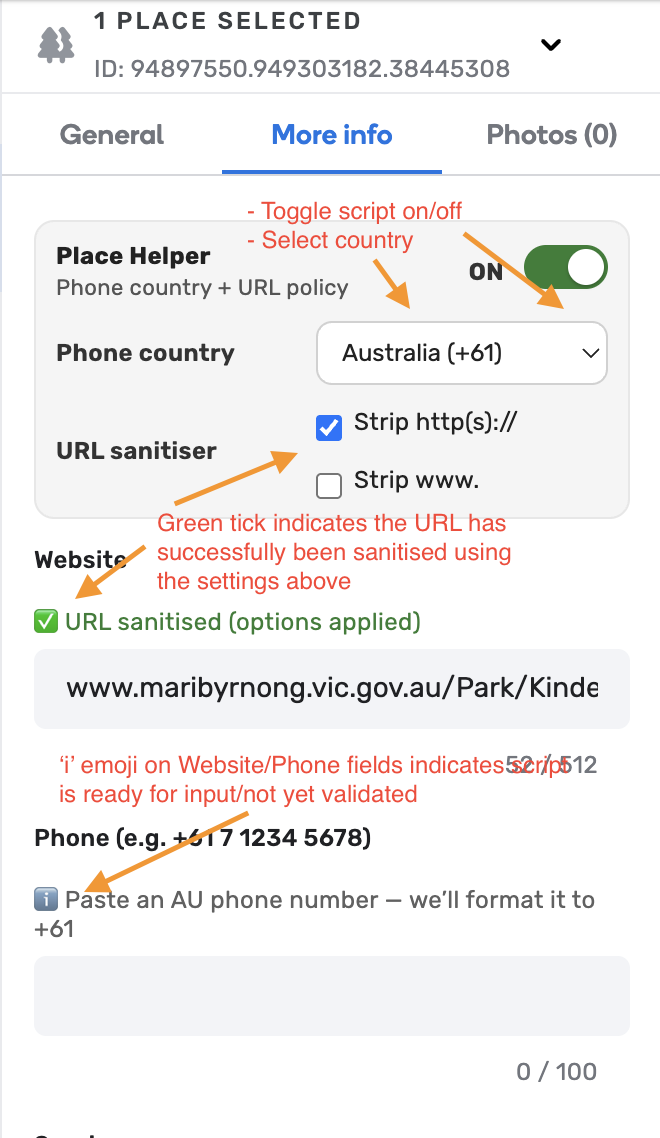
Format all URLs so the protocol is stripped and URL is sanitised (including removal of UTM tags and tracking tails). The user has the option to strip or retain the protocol, along with stripping or retaining the www.
-
Format all phone numbers so they are presented in the required format dependant on the country selected (i.e. +61 1 2345 6789, +18295551234, +52 12 3456 7890, +57xxxxxxxxxx, etc.)
-
Auto-detect the country from the map and switch the phone formatter to match. You can still manually override the country if needed.
-
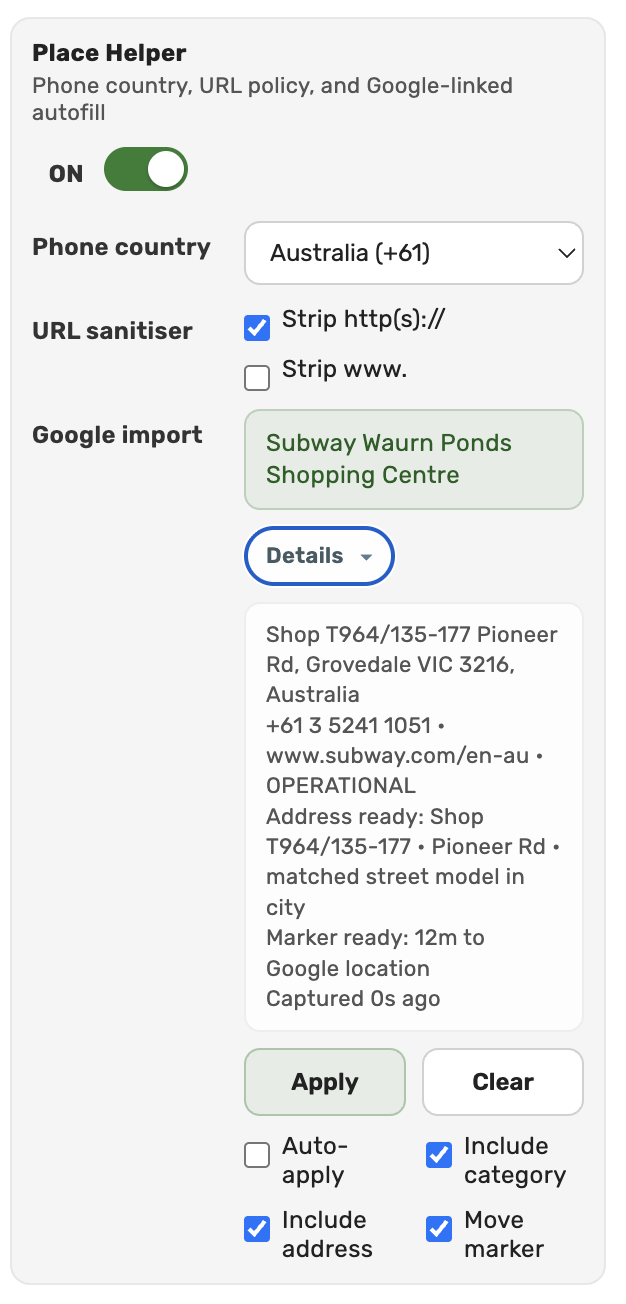
Autofill place details (name, address, phone, hours, website and category) using data from the linked Google place that WME already loads — no extra API calls required. There is also an optional button to move the WME place marker to the Google-provided location.
-
Support places linked to multiple Google listings — when more than one is linked, you can pick which one to apply via radio buttons.
-
Full WME Dark Mode support — the helper panel matches your editor theme.
-
The script’s function can be switched on and off using a toggle switch at the top of the More Info tab when creating a new place (see images below).
-
The script currently supports Australia, the Dominican Republic, Mexico, Ireland, Cyprus, Greece and Colombia (+61 / +1 (809/829/849/800/888/877/866/855/844/833/822/900 area codes/toll free/premium) / +52 / +353 / +357 / +30 / +57).
Download: https://greasyfork.org/scripts/564120
Changelog:
- 2.5.4 - Added automatic country selection. It uses the SDK country filter to auto-select supported countries. Added support for dark mode. Added smarter functionality around places with multiple Google Places and the ability to clear the list if required.
- 2.3.0 - Added support for Colombia. Also added a new Google Place helper feature. It allows you to pull additional data from the External Provider API data that is already being called within Waze. It’ll pull address, opening hours, categories and exact location and apply those to the new place (or existing place) you are adding.
- 1.6.9 - Added support for Greece, Cyprus and Ireland.
- 1.6.1 - Added new functionality to the website field that allows you to turn on/off protocol and www sanitisation. This applies regardless of region selected.
- 1.5.5 - Now includes support for Mexico phone numbers
- 1.5.4 - Included further URL sanitisation by removing UTM tags and tracking tails. Removed spaces from DR phone numbers.
- 1.5.3 - Added support for Australian 1300, 13, 1800, 1900 numbers.
- 1.5.2 - Support for Dominican Republic added.
- 1.4.2 - Original version of script with bug fixes implemented. Works for AU only.
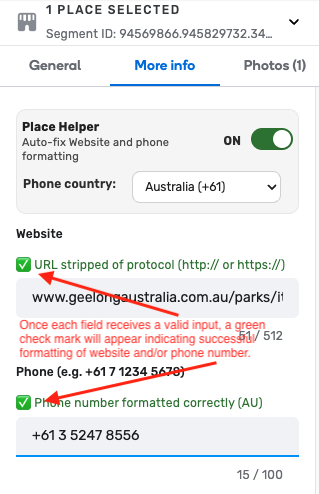
You’ll know the script has formatted your text and phone number because the ‘i’ icon will change to a green tick to indicate success.
Examples:
-
If a user pastes “https://www.geelongaustralia.com.au/parks/item/13thbeach.aspx?utm=google&source=search” and has selected the protocol stripping function, it will format the URL as “www.geelongaustralia.com.au/parks/item/13thbeach.aspx”
-
If a user pastes a phone number as “03 5244 5888”, it will format this number as “+61 3 5244 5888”, likewise for DR, MX, IE, CY, GR and CO — e.g. “829 555 1235” becomes “+18295551235”, “5545331233” becomes “+52 55 4533 1233”, and “3101234567” becomes “+573101234567”, etc.
-
Phone number formatting works for all landline and cell numbers.
-
Number formatting for Australia, Mexico, Ireland, Greece and Cyprus includes spaces, while number formatting for DR and Colombia excludes spaces.
-
-
If a place has a linked Google listing, clicking the Google autofill button will populate the place’s name, address, phone number, opening hours, website and category directly from the data WME has already loaded — no extra API calls or copy/pasting required.
-
If a place has more than one Google listing linked, the helper will show all of them as radio buttons so you can pick which one to apply.
Limitations/notes:
-
Everybody is welcome to use this script, but the phone number formatting function only works for Australia, the Dominican Republic, Mexico, Ireland, Cyprus, Greece and Colombia. It won’t format international phone numbers outside of these countries.
-
The Google autofill feature relies on WME already having loaded the linked Google place data — it will not work if the place has no Google link or if WME hasn’t loaded the data yet.
-
The Clear button hides the captured Google data from the helper panel; it does not revert any fields you’ve already applied. Use WME’s built-in Undo to roll those back. After clicking Clear, the button changes to Restore so you can bring the captured data back without re-linking the Google place.
Images:
 just checking your number format is typically just a full set of digits with no spaces or hyphens?
