Adds a counter at the top of WME to display your current day’s edit count (note: Your edit count will return to 0 whenever Waze’s day ends. Your time will depend on your time zone).
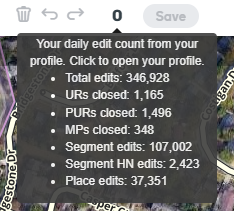
Hover over it to view some more of your stats:
Click the counter to open your profile.
Keeps track of saves that don’t add to your edit count. If you get enough of those consecutively, the background color will change to warn that you might be throttled – too many edits too quickly, and you aren’t getting credit for more edits until the throttling time period ends.
(Why is this called Waze Edit Count Monitor and not WME Edit Count Monitor like all the other scripts out there? Because this was my first script and I didn’t know what I was doing back then )
I’m making another post instead of an edit to indicate of the very nice update to the extension.
Love the change of formatting to next to the save button and the link to your profile!
I have to test this out some more because I was throttled last night and the edit count was reflecting the throttling! This might be an extension that can show us when we get throttled or help provide input with throttling.
Nice script!
Have you seen this one?: WME Timer LS
The last WME update leave it useless, and the author hasn´t updated it for a while, but has the same idea. Would be nice to have both scripts functionalities in one, like the last hour’s edit count.
Thanks for the feedback, everyone. Color-changing to warn of possible throttling has just been implemented in v0.5.
It will change to yellow after 2 saves with no edit count increase, and red after 3 or more saves with no increase. This is to help prevent “false positives”, for example when you’re saving an edit to segments that you already changed the same day (will not increase your edit count).
Can you give me some details about the problems you’re seeing? Toolbox and WECM v0.6 seems to be working OK on Chrome for me.
What browser are you using?
What do you mean by “killed”? Is the toolbox icon missing, but toolbox features are working? Or are none of the features working?
(if you know how to check this and have a couple minutes) Turn off all other scripts/extensions besides toolbox and edit count monitor. Reload the page and look for errors in the developer console. Report them here.
Just released v0.7 of Waze Edit Count Monitor. Hopefully it fixes the Toolbox crash issue. Please install this latest version and let me know if you are still experiencing problems.
 )
)
