Hi All,
I’ve started a month ago to re-write the famous WME Extended Tools plugin since it was broken with the last releases of WME Editor.
There is no major changes in term of functionalities with the previous one but major ergonomic redesign, performances and resources optimizations.
Since it is a re-write from scratch, don’t expect to have a mature and bug free script.
For developpers, the script is also shipped with an API which allow you to create your owns buttons and menus in the toolbar.
As you might know, there is an editor which allow you to modify only parts of addresses without modifying the other parts. This editor allow to edit also parts of streetnames according to the current French conventions (a street ID concatenated with a ‘-’ and a streetName). This is a simple regular expression which do the job and if you have such conventions, I can implement it accordingly.
For any bugs or feauture requests, please fill the form in the following link: http://code.google.com/p/wme-addons/issues/list WME Add-Ons V0.41:
Minor release :
Fix error on save with unnamed segment
Better management of navigator zoom levels (still need to refresh page after zooming) WME-Addons V0.42
Save snap dist parameter in user settings
StreetId regexp improvment for France
Path for new beta-editors in manifest (NA and INTL)
Improved layout for segment list options
03/23/2013 Minor release : WME-Addons V0.43
Fixed #8 : Locked field in segment list repost "unknow’ instead of “false”
Fixed #10 : Only allow modification of items you are allowed to edit
So here’s the big question: Does the segment list work correctly in Chrome? I hated having to switch to Firefox (which won’t let me click E/W streets) to use the segment list to track down Portola segments.
Version 0.3 seemed to work fine, however version 0.40 does not appear the same in WME.
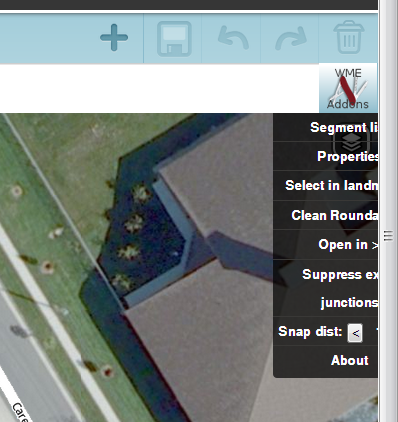
The button is no longer on the same line as the other WME buttons, and the WME Add-Ons menu pops up too far to the right and is not entirely visible. The subs menus therefore do not appear at all.
[color=#008040]PROBLEM SOLVED:
I had not noticed that my browser zoom level had changed to 90%! Thanks for the reminder drummer83! Rather than deleting this post, I’ll leave it here as a reminder to others too.[/color]
Hello,
Thanks for your feedback.
you’re right , there is a problem sometimes with the zoom factor of the navigator.
I know where is the problem, I’ll try to fix it.
Thanks for you time bringing this script back to life.
Only issues i have run into so far are with segment that have no name or noname/nocity. You need to take care of these first or you will run into problems saving the new changes.
As the moderator who started the previous English version of the ET thread, and who encouraged gdu1971 to start this thread, I am reluctant to make this topic sticky. I will leave that to other moderators if they care to do so. I share the opinion with many others, that while the power of this script is very useful, the potential for harm to the maps is also of concern. Therefore it is better that the script be sought out by those who need it, rather than it be quite so prominently displayed as it would be in a sticky topic.
I’m pretty sure it’s because of un-named segments. If I’m careful not to select any of those, the problem generally goes away.
In principal, I think I’m in favour of this. I have seen large towns where all the segments (including the roundabouts) have the city name set but none of the segments have road names. To me, that suggests someone looking for the big-points edit without doing the hard work of naming the streets. But it would be nice if the tool could, when modifying the city name on a large batch of segments, simply ignore all segments with no street name instead of giving an error.
Here’s a workaround to deal with this (faster) until it’s fixed in add-ons:
Enable the ‘StreetNames’ and ‘city’ column in Add-ons. Go to the area you want to edit, and refresh the segment list.
Look for the row which has nothing in it. This is the roads without a name.
Click the ‘select’ button.
Now, use WME itself (NOT the Add-ons edit tool) to assign a city/state/country to the unnamed road segments.
Save.
Now that all the unnamed segments are ‘out of the way’, enable ONLY the ‘city’ column, which will allow you to change the rest of the segments - but this time, using the Add-ons edit tool.
It’s a little ugly, but it’s a lot faster than having to pick around finding and unselecting unnamed roads manually.
Hello,
Normally the script works even for unnamed segments.
Just for test:
create some new segments and let them “red”
select them and script->properties
change city name only
save
=> works (for me)
IMO, It is more probably the payload (number of changes to send to the server) which lead in error.
Some users, during the test phase, reported me same problems and after another try having the correct behavior without any change.
I also have same problems sometimes with JNF and after 2 or 3 retries, it works…
Nevertheless, I will perform again some tests.